

Etch: Quick Flashcards
Maeva Liebling · Education
Independent analytics for this App Store listing. AppTracker is not affiliated with Maeva Liebling.
Chart standing · US
What changed · US
Listing changes AppTracker has observed for this app in this storefront — new versions, price moves, rating shifts, and store copy.
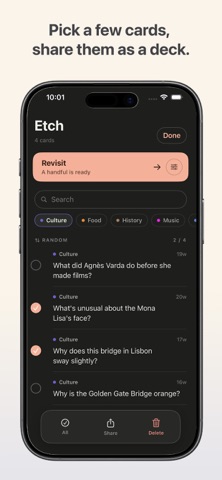
- Bold, italic and a highlight for your cards. Select a word in the card editor and tap B, I or the highlighter - Text size for cards: Compact, Default or Larger, in Settings - Select several cards: delete them together, or share them as a deck file another Etch can add - Add a deck: Your data → Add a deck merges a card file into your collection without touching what you have - Sources get a title: clipped pages keep their page title, pasted links can be named by on-device AI, or type your own - Switching a card from Fact to Q·A moves the text to the answer
Screenshots

About
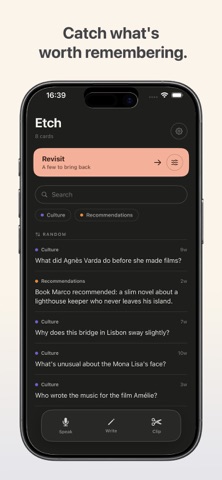
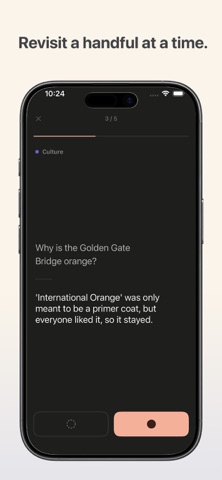
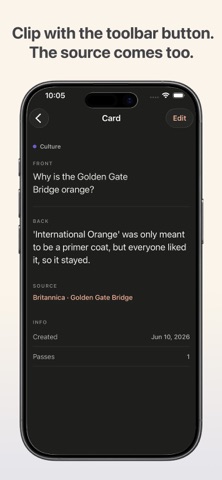
Etch is a place for the things you want to remember. It sits somewhere between a notes app and flashcards: quick to capture, gentle to revisit, without the pressure of a study app. Capture in whatever way is fastest. Type a quick note, dictate it with your voice, or clip a passage while you read. In Safari, select the text and send it with the Share button in the toolbar, and Etch keeps both the passage and a tappable link back to its source. Every card is either a simple fact or a question with an answer. A question gives you a small moment of recall before you reveal the answer, which is what makes revisiting feel like reminiscing rather than testing. Revisit a handful at a time, whenever you feel like it. No streaks, no due dates, no counts piling up. You come back to what you saved because you want to, not because an app is nudging you. Optional on-device AI. On supported devices, Etch can help shape what you capture into a clean card. It is entirely optional, it runs on your device, and it only ever works on the text you enter. Nothing is sent away to do it. Made to travel. The interface is in English and French, and you can create cards in many supported languages, so your notes stay in whatever language you think in. Yours, and private. Your cards sync across your own devices with iCloud, and you can export a full backup any time. Etch collects no data about you.
What's new · 1.1
- Bold, italic and a highlight for your cards. Select a word in the card editor and tap B, I or the highlighter - Text size for cards: Compact, Default or Larger, in Settings - Select several cards: delete them together, or share them as a deck file another Etch can add - Add a deck: Your data → Add a deck merges a card file into your collection without touching what you have - Sources get a title: clipped pages keep their page title, pasted links can be named by on-device AI, or type your own - Switching a card from Fact to Q·A moves the text to the answer
Details