

PVE-Manager
Jan Hendrik Ellermann · Utilities
Independent analytics for this App Store listing. AppTracker is not affiliated with Jan Hendrik Ellermann.
Chart standing · US
What changed · US
Listing changes AppTracker has observed for this app in this storefront — new versions, price moves, rating shifts, and store copy.
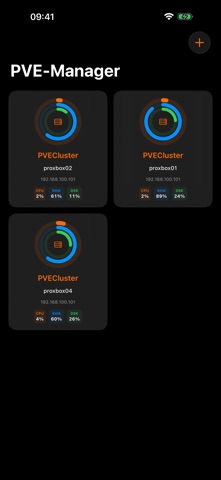
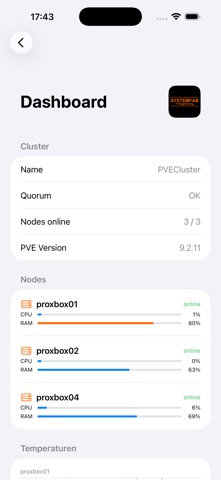
• Dashboard: Each node gets its own donut card with cluster name — clearer overview in multi-cluster setups. • Drag & Drop: Freely rearrange donut cards on the dashboard. • SSH Terminal: Credentials are saved and no longer need to be re-entered. • SSH Terminal: Keyboard no longer overlaps the terminal view. • Pull-to-refresh and automatic update when returning to the app. • Bugfix: Fixed duplicate back button in navigation. • Improved light/dark mode rendering. • Stability and security improvements.
In-app purchases · US
No in-app purchases.
Screenshots




Keywords this app targets
Search terms AppTracker associates with this app — estimates, not search volume. ❝ = in the app's title; a highlighted number is its current position for that term.
Similar apps
Competitors and close alternatives, as estimated by AppTracker.
 SSH Client & Terminal - Cura
Oday Maleh
SSH Client & Terminal - Cura
Oday Maleh
 Portainer Mobile: Docker Admin
UMEGS (SMC-PRIVATE) LIMITED
Portainer Mobile: Docker Admin
UMEGS (SMC-PRIVATE) LIMITED
 ServerCat - SSH Terminal
Early Moon, LLC
ServerCat - SSH Terminal
Early Moon, LLC
 Docker Server Admin
婉媚 邵
Docker Server Admin
婉媚 邵
 ShellBean - AI SSH Client
Beijing Rudian Technology Co., Ltd.
ShellBean - AI SSH Client
Beijing Rudian Technology Co., Ltd.
 SSH Terminal Pro
志鹏 潘
SSH Terminal Pro
志鹏 潘
 OpsCat - Server Monitor & SSH
望 余
OpsCat - Server Monitor & SSH
望 余
 ProxMan
Routecore LLC
ProxMan
Routecore LLC
About
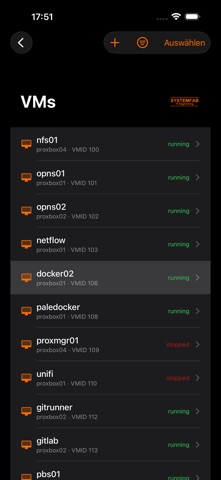
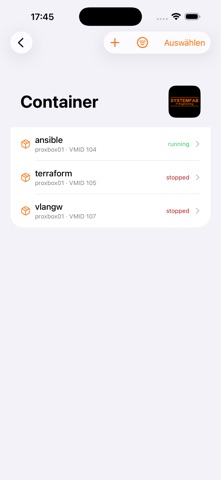
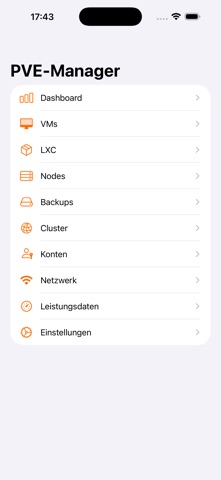
PVE-Manager is the native iOS client for Proxmox Virtual Environment. Manage VMs, containers, and nodes directly from your iPhone or iPad — whether at home on your LAN or remotely via VPN. DASHBOARD All key metrics at a glance: CPU usage, memory, uptime, and PVE version. Always know how your Proxmox cluster is performing. VMs & CONTAINERS Start, stop, pause, and delete VMs and LXC containers directly from the app. Real-time status — always know what's running. NODES Overview of all cluster nodes with CPU, RAM, uptime, and status. Detail view with network and storage information. CONSOLE Direct access to the console of VMs and containers — without going through the web interface. SSH Built-in SSH client for quick terminal access to nodes and containers directly from the app. BACKUPS Create, run, and monitor backup jobs. Snapshot overview for all guests. TASKS & LOGS Full task logs in real time. Spot errors immediately without opening the web interface. MONITORING Graphical CPU, RAM, and network history graphs for nodes and guests. STORAGE Overview of all storages with usage and available space. AI ASSISTANT Built-in AI assistant with support for Claude (Anthropic), ChatGPT (OpenAI), Groq, and local LLMs (OpenAI-compatible). Ask questions about your PVE environment, start or stop VMs — all by voice or text. Critical actions are always protected by a confirmation prompt. PUSH NOTIFICATIONS Get notified about completed tasks and important events in your cluster. HOME SCREEN WIDGET Shows the status of your most important nodes and guests directly on the Home Screen. SECURE & PRIVATE API tokens and credentials are stored encrypted in the iOS Keychain. No data is shared with third parties. Supports self-signed certificates and custom ports. COMPATIBILITY - Proxmox VE 7.x and 8.x - Token authentication (API Token) - Username/password authentication - Self-signed certificates (fingerprint pinning)
What's new · 1.5
• Dashboard: Each node gets its own donut card with cluster name — clearer overview in multi-cluster setups. • Drag & Drop: Freely rearrange donut cards on the dashboard. • SSH Terminal: Credentials are saved and no longer need to be re-entered. • SSH Terminal: Keyboard no longer overlaps the terminal view. • Pull-to-refresh and automatic update when returning to the app. • Bugfix: Fixed duplicate back button in navigation. • Improved light/dark mode rendering. • Stability and security improvements.
Details