ZenNotes: Markdown Notes

Lumary Labs LLC · Productivity

4.9 11 ratings Free

Independent analytics for this App Store listing. AppTracker is not affiliated with Lumary Labs LLC.

Chart standing · US

Not currently charting in this storefront.

What changed · US

Listing changes AppTracker has observed for this app in this storefront — new versions, price moves, rating shifts, and store copy.

Oct 14, 2026
Promotional text “Start a new note right inside the folder you are browsing, and see at a glance when a Cloud vault moved to end-to-end encryption.”
Oct 14, 2026
New version 1.24.0 → 1.25.0

Start a note right where you are. • Browse has a New note row: it starts a note inside the folder you are looking at, with its title ready to type. • A ZenNotes Cloud vault that another device encrypted end to end now says so, and stops syncing the old copy, instead of asking you to update. • An encrypted vault shows its real name as soon as you unlock encryption, and its backups tell you where to save an archive. • Settings search offers only the settings this device has, and on iPad the keyboard shortcuts list only keys that work here. • Renaming or moving a note keeps an assistant's pending edits with it, for review on your computer. Your notes stay ordinary Markdown files, and local and iCloud vaults work without an account.

Oct 13, 2026
Promotional text “Headings stay headings when you indent, and tables keep their column widths when you read them.”
Oct 13, 2026
New version 1.23.0 → 1.24.0
Oct 12, 2026
New version 1.22.0 → 1.23.0
Oct 10, 2026
Promotional text “Publish a note with up to 50 pictures, uploaded straight from your vault. Quick, Note and Task stay one tap away from the circle.”
Oct 10, 2026
New version 1.21.0 → 1.22.0
Oct 9, 2026
Promotional text “Tap the circle and start a quick note, a note or a task in one tap. A new task tells you it landed, with a button to open it.”
Oct 9, 2026
New version 1.19.0 → 1.21.0
Oct 7, 2026
Promotional text “Start a list under a paragraph by typing - and the paragraph stays a paragraph: no surprise headings in the editor, the outline or Preview.”
Oct 7, 2026
New version 1.18.0 → 1.19.0
Oct 6, 2026
Promotional text “Browse shows a folder's files as well as its notes, Edit mode stays where you scroll, Ubuntu Sans is built in, and Kanban columns can follow due dates.”
Oct 6, 2026
New version 1.17.1 → 1.18.0
Oct 3, 2026
Promotional text “Cloud now shows what it is waiting on: paused notes say so, oversized files are named, and backups list every file. Videos play right in your notes.”
Oct 3, 2026
New version 1.15.0 → 1.17.1
Sep 30, 2026
Promotional text “Fold the details, keep the overview. Lists, tasks and callouts collapse as you read or edit, and Atlas gives newly linked notes space of their own.”
Sep 30, 2026
New version 1.14.0 → 1.15.0
Sep 28, 2026
Rating ★ 4.9 → 4.91
Sep 25, 2026
Promotional text “Give a vault a name of its own: several docs folders, one per project, each named for its project. App core 2.56.1. Local and iCloud vaults need no account.”
Sep 25, 2026
New version 1.13.0 → 1.14.0
Sep 25, 2026
Rating ★ 5 → 4.9
Sep 24, 2026
Promotional text “Search a note that does not exist yet and create it right there, with its folder and tags. App core 2.54.1. Local and iCloud vaults still need no account.”
Sep 24, 2026
New version 1.11.0 → 1.12.0
Sep 24, 2026
New version 1.12.0 → 1.13.0
Sep 19, 2026
Promotional text “The app launches on iOS 27 again, and your favorite notes sit on the home screen. App core 2.53.0. Local and iCloud vaults still require no account.”
Sep 19, 2026
New version 1.10.1 → 1.11.0
Sep 17, 2026
Promotional text “Long-press a database in Browse to rename or delete it, the same way folders work. Local and iCloud vaults still need no account.”
Sep 17, 2026
New version 1.9.10 → 1.10.1
Sep 15, 2026
Promotional text “More reliable Cloud uploads, sign-in that survives a restart, clearer publication updates, and backup restores that refresh the note already open.”
Sep 15, 2026
New version 1.9.9 → 1.9.10
Sep 12, 2026
Promotional text “Cloud sync that stays out of your way: fewer refreshes, smoother typing while it runs, and conflict review that always reads the real file.”
Sep 11, 2026
New version 1.9.8 → 1.9.9
Sep 10, 2026
Promotional text “Widgets: start a note, open a recent one, or see today's tasks from the Home Screen and the Lock Screen.”
Sep 10, 2026
New version 1.9.7 → 1.9.8
Sep 9, 2026
Promotional text “Phone editing, tuned by hand: autocorrect and predictive text in the editor, one-tap lists on empty lines, gestures on every note, and a Start screen setting.”
Sep 8, 2026
New version 1.9.6 → 1.9.7
Sep 6, 2026
Promotional text “Cloud conflicts become clear choices: safe edits merge on their own, you decide only the overlapping words, and no surprise conflict copies land in your vault.”
Sep 5, 2026
New version 1.9.5 → 1.9.6
Sep 1, 2026
Promotional text “Attachments land in assets, self-hosted uploads stay intact, and iPad users can once again add remote vaults from Settings, then Vault.”
Aug 31, 2026
New version 1.9.4 → 1.9.5
Aug 29, 2026
Promotional text “Big files reach the Cloud: photos, scans, and PDFs over 5 MB now sync from your iPhone through signed direct uploads, token kept off storage. Plus app-core 2.38.”
Aug 28, 2026
New version 1.9.3 → 1.9.4
Aug 26, 2026
Rating ★ 0 → 5
Aug 26, 2026
New version 1.1 → 1.9.3

Price & rating history · US

Reconstructed from the listing changes AppTracker has observed in this storefront. A field is charted once it has changed more than once, and each line starts at the value it moved from.

Average rating history over the observed period. 0 2 4 Aug 23 Sep 5 Sep 19 Oct 2 Oct 15

Average rating · ★ 4.91 now · 3 changes on record

Ratings breakdown · US

The star breakdown behind this app's rating in this storefront.

5★ 91% 10
4★ 9% 1
3★ 0% 0
2★ 0% 0
1★ 0% 0

Screenshots

About

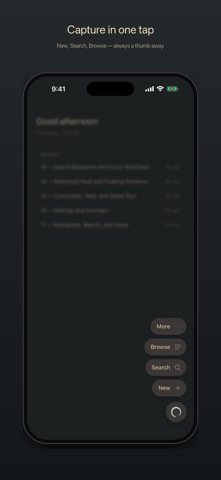
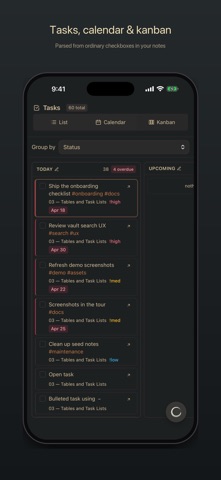
ZenNotes is a local-first markdown notes app for writing, organizing, and connecting ideas without giving up ownership of your files. YOUR NOTES, YOUR FILES Every note is a plain .md file in a vault you control. Start with storage on your iPhone or iPad, use iCloud Drive, or open a folder through the system document picker. Local and iCloud vaults work without an account. ZENNOTES CLOUD Connect an optional ZenNotes Cloud plan to: • Sync a vault across ZenNotes desktop and mobile • Sync notes and attachments • Create manual and automatic daily backups • Restore a full vault or a single note from a backup • Publish notes to the web and manage their public links Cloud never replaces the free local-first workflow. Use it only when you want hosted sync, backup, or publishing. WRITE IN MARKDOWN Use a focused editor with headings, lists, tasks, tables, code, links, wikilinks, tags, callouts, footnotes, and frontmatter. A mobile formatting bar keeps common actions close to the keyboard, and a pinch resizes the text to your eyes. RICH, OFFLINE PREVIEW Render KaTeX math, Mermaid diagrams, JSXGraph, function plots, tables, callouts, and more directly on your device. ORGANIZE YOUR WAY Pin your go-to notes and folders to the top, swipe rows to act on them, create and rename nested folders, browse tags, search the full vault, manage tasks, create periodic notes, and work with table databases stored as CSV. CAPTURE QUICKLY Create a quick note from the app or send text and links to ZenNotes from the iOS share sheet. HOME SCREEN WIDGETS Start a note, open a recent one, or check today's tasks without opening the app. New Note also lives on the Lock Screen, and the widgets wear your theme. PRIVACY BY DEFAULT ZenNotes has no advertising or tracking. Local and iCloud notes stay in the storage you choose. When you enable ZenNotes Cloud, the account identity, connected-device information, and vault content needed for the Cloud features you use are sent to the ZenNotes service. Payment details are handled by Stripe. ZenNotes is open source. Your vault remains useful outside the app because it is made of ordinary files.

What's new · 1.25.0

Start a note right where you are. • Browse has a New note row: it starts a note inside the folder you are looking at, with its title ready to type. • A ZenNotes Cloud vault that another device encrypted end to end now says so, and stops syncing the old copy, instead of asking you to update. • An encrypted vault shows its real name as soon as you unlock encryption, and its backups tell you where to save an archive. • Settings search offers only the settings this device has, and on iPad the keyboard shortcuts list only keys that work here. • Renaming or moving a note keeps an assistant's pending edits with it, for review on your computer. Your notes stay ordinary Markdown files, and local and iCloud vaults work without an account.

Details

ReleasedJul 2026
UpdatedJul 2026
Version1.25.0
Size65.7 MB
RequiresiOS 14.0 or later
Age rating4+
LanguagesEnglish
PriceFree
Categories ProductivityUtilities
Bundle IDmd.zennotes