

Newsnobo: RSS News Reader
Nan Yu · Utilities
Independent analytics for this App Store listing. AppTracker is not affiliated with Nan Yu.
Chart standing · US
What changed · US
Listing changes AppTracker has observed for this app in this storefront — new versions, price moves, rating shifts, and store copy.
Fixed a crash when opening the “All” article list with a large number of articles. Long lists also scroll more smoothly. New: automatically clean up old articles. Keep them for 7, 14, 30 or 90 days, or never delete. Starred articles are always kept.
Ratings breakdown · US
The star breakdown behind this app's rating in this storefront.
In-app purchases · US
What this app sells inside itself, grouped by kind and priced for this storefront.
Screenshots





About
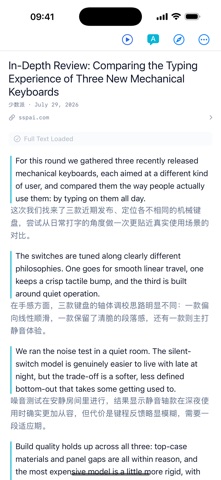
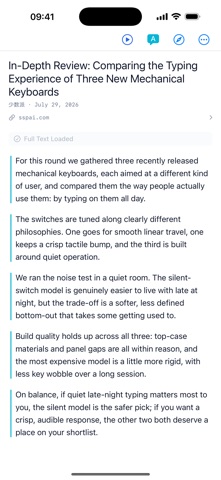
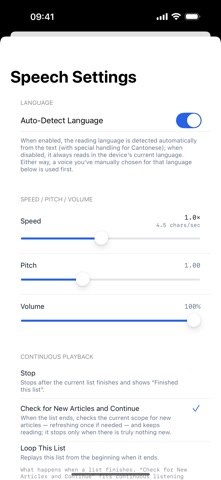
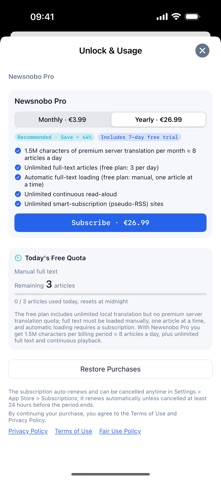
Two things done properly: foreign news reads in your own language the moment you open it, and one tap on play keeps the news coming until you say stop. AUTO-TRANSLATION YOU NEVER HAVE TO THINK ABOUT Open any foreign-language article and the headline and body are already in your language — no waiting, no extra tap. Two ways to translate: a free engine (Apple's on-device translation first, falling back to free online services when needed, unlimited) or Newsnobo Pro's high-quality server translation. Simplified and Traditional Chinese are handled separately, with one-tap conversion between them. READ-ALOUD THAT DOESN'T STOP Tap play and Newsnobo reads from wherever you are: it finishes one article and moves straight to the next, until you stop it or set a sleep timer (15 / 30 / 60 / 90 / 120 minutes). Background and lock-screen playback, headphone and steering-wheel controls, adjustable speed and voice — your commute becomes your own news radio. FULL TEXT AND IMAGES, FETCHED FOR YOU Open the article and Newsnobo pulls the full text and images automatically; images support full-screen zoom and saving. Free tier: 3 manual full-text loads per day. Newsnobo Pro: unlimited, and loaded automatically as you open each article. FINDING FEEDS IS THE EASY PART A built-in directory of 1,020 official news sources worldwide, browsable and searchable by language, country and category, with one-tap subscribe. Or paste any site address and the feed is discovered for you. One-tap OPML import and export. Groups, unread counts, and a per-feed refresh interval, translation setting and read-aloud voice. THE APPLE TV APP IS INCLUDED IN THE SAME PURCHASE Newsnobo also runs on Apple TV, and it stands on its own: add feeds, browse and listen right on the TV. Subscriptions and top-ups work across iPhone, iPad and Apple TV. BUILT FOR READING, NOT FOR SHOWING OFF Six reading themes, including true black and an eye-comfort mode. Full control over font, size and line spacing for both Latin and CJK text. A flat, fast interface that stays light on your battery. USAGE YOU CAN ACTUALLY SEE Your Pro server-translation allowance appears as a usage card in the Me tab: how much this period has used, what's left, plus top-up balance and expiry. When the allowance runs out, translation falls back to the free engine automatically, without interrupting your reading. PRIVACY, KEPT LOCAL No ads, no tracking. Your feeds and read state stay on your device and in iCloud. When an article is translated, the text is sent to the service you picked: Apple's on-device translation never leaves the device, while Newsnobo's hybrid model and the free online services need a connection. Pricing, plainly: the app itself is free. Newsnobo Pro is €3.99/month or €26.99/year (about 44% off) and includes 1.5 million characters of server translation per billing period (roughly 8 articles a day), unlimited full-text extraction and unlimited read-aloud. Need more? Top-ups add 300,000 or 1.5 million characters and stay valid for 24 months. The free tier gives you unlimited free translation, 3 full-text loads per day and 60 minutes of read-aloud per day. Subscriptions are charged to your Apple account after purchase is confirmed, renew automatically 24 hours before the current period ends unless canceled, and can be managed or canceled anytime in your account settings. Terms of Use (EULA): https://www.apple.com/legal/internet-services/itunes/dev/stdeula/ Privacy Policy: https://imayu.com/privacy
What's new · 1.0.6
Fixed a crash when opening the “All” article list with a large number of articles. Long lists also scroll more smoothly. New: automatically clean up old articles. Keep them for 7, 14, 30 or 90 days, or never delete. Starred articles are always kept.
Details