

Waveloop: Layerz
Elijah Lucian · Music
Independent analytics for this App Store listing. AppTracker is not affiliated with Elijah Lucian.
Chart standing · US
What changed · US
Listing changes AppTracker has observed for this app in this storefront — new versions, price moves, rating shifts, and store copy.
A new look, and room to breathe. • The new WaveLoop look: no outlines, new type, and panes that stay put while things land in them. • VOCAL CHAIN in the FX pane: one switch levels your mic or cable, shuts out the room and adds air. The slider tunes it for bass, voice or drums. • The waveform gets all the spare room, and CLEAR sits striped in the bottom-right corner. No undo, and now it looks it. • Turn it sideways: the tape on the left, what you shape on the right. iPad gets the same side-by-side face. • Swipe left from the right edge to open the library. • + tells you where your last loop went; tap the tab to open the library. • WAVE VIDEO plays your loop 1×, 2× or 4×. • TRAINING in the title menu: little goals that tick themselves as you play. • Fixed: the camera button shows what the camera is really doing. • Fixed: with the microphone off, your loops still play, at home and in the background. • → WALL is gone (the wall closed). SHARE… and → WAVE VIDEO still send your loop anywhere. • DUO is off the FX fader for now.
In-app purchases · US
No in-app purchases.
Screenshots
About
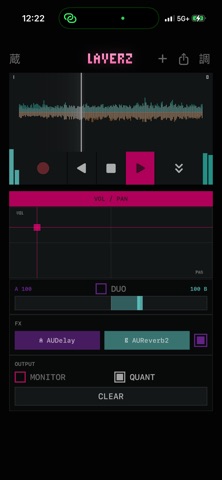
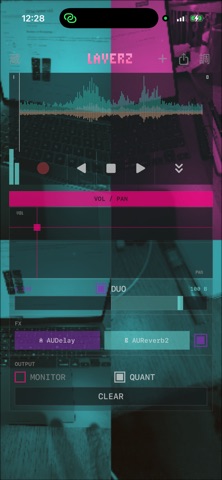
Layerz is a realtime layering looper. Record a loop, and it starts playing instantly. Stack take after take over it, drop punch-ins on the fly, and hear exactly what you record — what you monitor IS what lands on the tape. Under the hood it runs monitoring, overdub, and playback on a single Core Audio render callback — no engine graph churn, no second tap thread — so laying down audio while you monitor never glitches. REALTIME LAYERING The first take sets the loop length and loops immediately. Keep layering onto it, or hold DROP to punch-record a buffer drop. Destructive-first, no undo by design. RUN THE TAPE BACKWARDS A tape-deck transport: play reverse, stop, play forward. Overdub while it runs backwards and that layer plays backwards when you flip forward again. WHOLE PASS Snap recording to the loop seam so a take is always a complete lap, instead of one that starts and ends mid-loop. HOST YOUR AUDIO UNITS Run your installed AUv3 effects and instruments — samplers, synths — right in the input chain, with their own plugin UIs. Play a hosted instrument from the built-in keyboard or from a MIDI controller, straight into the loop. Blend two effect racks on one fader that runs from full-wet A through dry to full-wet B. SEE THE ROOM — VIDEO PASSTHROUGH Put the live camera behind the controls and dial in how far the face fades over it. Then let the picture loop with the sound: • BURN-IN — video records while the loop records, and every lap composites onto the last. Four blends: imprint, lighten, darken, difference. • MOSAIC — each lap claims its own cell and the grid grows as you play, 4 panes to 9 to 16, spiralling outward from the middle. Playback follows the audio play head, so picture and sound share one clock. Nothing is saved or sent — the video lives in memory and dies with CLEAR. BUILT FOR THE HANDS An XY pad for gain and pan, a stereo-balance waveform you can scrub, stereo in/out metering, and a welded, single-surface control face. ALWAYS SAVED Your project is saved on the fly and restored when you reopen the app — transport, modes and all. NEW starts a fresh one; a library holds them all. SHARE ACROSS APPS Export a loop to Choppa, turn it into a wave video, or see loops from the other WaveLoop apps in the shared library rail. iPhone and iPad. Headphones recommended: monitoring to the speaker will feed back.
What's new · 1.0.1
A new look, and room to breathe. • The new WaveLoop look: no outlines, new type, and panes that stay put while things land in them. • VOCAL CHAIN in the FX pane: one switch levels your mic or cable, shuts out the room and adds air. The slider tunes it for bass, voice or drums. • The waveform gets all the spare room, and CLEAR sits striped in the bottom-right corner. No undo, and now it looks it. • Turn it sideways: the tape on the left, what you shape on the right. iPad gets the same side-by-side face. • Swipe left from the right edge to open the library. • + tells you where your last loop went; tap the tab to open the library. • WAVE VIDEO plays your loop 1×, 2× or 4×. • TRAINING in the title menu: little goals that tick themselves as you play. • Fixed: the camera button shows what the camera is really doing. • Fixed: with the microphone off, your loops still play, at home and in the background. • → WALL is gone (the wall closed). SHARE… and → WAVE VIDEO still send your loop anywhere. • DUO is off the FX fader for now.
Details