

Smart Archive
Stefan Hollekamp · Finance
Independent analytics for this App Store listing. AppTracker is not affiliated with Stefan Hollekamp.
Chart standing · US
What changed · US
Listing changes AppTracker has observed for this app in this storefront — new versions, price moves, rating shifts, and store copy.
SmartArchive 3.0 – cleaner, faster, and right at home on macOS New archive window - Sidebar with document types, years and "To Review" - Sortable table with date, merchant, type, amount and folder – with totals per currency - Inspector to fix details, rename and refile - Search now also finds invoice numbers, projects and customers - Quick Look with the space bar, multiple selection and context menu Redesigned settings - Organized like System Settings: General, Recognition, Filing, Rules, Notifications and Shortcuts Cleaner menu - Turn automatic processing on or off right at the top - Recently filed receipts with their amount – one click opens them in the archive - The menu now uses the standard macOS appearance Improvements - Lots of receipts at once (say, a whole folder) are now processed quickly and reliably - Cash receipts: SmartArchive now reads the total instead of the cash handed over
In-app purchases · US
No in-app purchases.
Screenshots






About
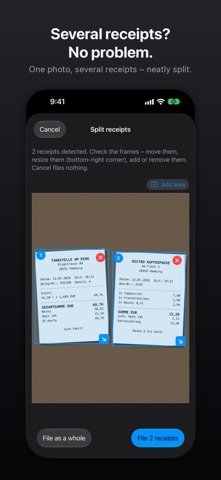
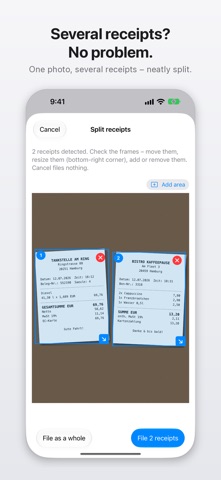
A receipt in your jacket. An invoice buried in Downloads. A parking stub on the dashboard. Each one matters at tax time, and each one is easy to lose. SmartArchive lives quietly in your menu bar and does the filing for you. Drop in a receipt or invoice and it reads the text, works out what the document is, pulls out the details that matter, gives it a clear name, and moves it into the right folder. No typing. No renaming. No shoebox. DROP IT AND FORGET IT - Drag files or whole folders onto the drop zone, or let SmartArchive watch your screenshots folder - Capture a region or a window of your screen, or send a file from any app with the Share Extension or "Scan with SmartArchive" in the Services menu - Pages that came in sideways are straightened automatically YOUR ARCHIVE AT A GLANCE - A clean archive window in the style of Mail and Finder: a sidebar with document types, years and everything still to review - A sortable table with date, merchant, type, amount and folder, plus totals per currency for your selection - Search across file names, merchants, invoice numbers, projects and customers - Fix any detail in the inspector, preview with Quick Look (Space) and refile with one click ONE SCAN, SEVERAL DOCUMENTS - Several receipts on one photo? SmartArchive finds each one and shows you the frames before filing them separately - An invoice and its delivery note in the same scan, or a PDF of several invoices? Each document is filed on its own, in the right folder READS THE DETAILS THAT MATTER - On-device text recognition (Apple Vision) reads both images and PDFs - Identifies the document type: fuel, parking and hospitality receipts, invoices, delivery notes, contracts, warranties, business cards, and more - Extracts merchant, date, total, VAT rate, invoice number, serial number and location - Double-checks totals: net plus VAT has to add up to the gross amount - Reads barcodes and QR codes - Spots duplicates with perceptual hashing, so the same receipt never lands twice NAMES AND FILES IT FOR YOU - Builds a tidy, consistent filename from what it found, like 2026-07-11_Aral_Fuel Receipt_78.42EUR.pdf - Routes each document into the right folder using rules you define - Writes Finder tags so everything stays easy to find later - Foreign receipt? It converts the total to your home currency using European Central Bank reference rates TAX SEASON, ALREADY SORTED - Built for freelancers and small businesses who do their own paperwork - Export a whole month or year as a single ZIP for your tax advisor, with the receipt copies, an Excel-compatible index (CSV) and a README - Fill your own Excel (.xlsx) cost-report template with your receipts automatically PRIVATE BY DESIGN - Text recognition and document sorting run fully on your Mac - Optional AI assistance uses Apple's on-device Foundation Models. No cloud AI service is ever contacted, and the AI only fills gaps, never overriding what the app already read with confidence - No account, no login, no analytics, no tracking, no ads, no third-party SDKs - The only thing that ever leaves your Mac is a currency code and a date, sent to a public exchange-rate service (frankfurter.app) when you use currency conversion. Your documents, images, extracted text, amounts and filenames never do - The App Store version is fully sandboxed, with access only to the folders you choose ALSO ON IPHONE AND IPAD Scan receipts on the go with the camera, let SmartArchive file them on your device, and hand them over to your Mac when you are back at your desk. One purchase covers Mac, iPhone and iPad. REQUIREMENTS macOS 15.6 or later. SmartArchive works fully with its rules engine on every supported Mac. On-device AI features additionally require macOS 26 or later on an Apple Intelligence-eligible Mac. Available in English, German, Spanish, French, Italian and Dutch. Set your rules once, then let SmartArchive keep your receipts and invoices organized: privately, automatically and right on your Mac.
What's new · 3.0
SmartArchive 3.0 – cleaner, faster, and right at home on macOS New archive window - Sidebar with document types, years and "To Review" - Sortable table with date, merchant, type, amount and folder – with totals per currency - Inspector to fix details, rename and refile - Search now also finds invoice numbers, projects and customers - Quick Look with the space bar, multiple selection and context menu Redesigned settings - Organized like System Settings: General, Recognition, Filing, Rules, Notifications and Shortcuts Cleaner menu - Turn automatic processing on or off right at the top - Recently filed receipts with their amount – one click opens them in the archive - The menu now uses the standard macOS appearance Improvements - Lots of receipts at once (say, a whole folder) are now processed quickly and reliably - Cash receipts: SmartArchive now reads the total instead of the cash handed over
Details