

Agent Lab: Learn AI Agents
燚 张 · Developer Tools
Independent analytics for this App Store listing. AppTracker is not affiliated with 燚 张.
Chart standing · US
What changed · US
Listing changes AppTracker has observed for this app in this storefront — new versions, price moves, rating shifts, and store copy.
Version 1.2 turns Agent Lab from something you watch into something you test. • New Evaluate tab: build a set of test cases for each demo, run them as a batch, and score them automatically — exact match, keywords, regex, numeric tolerance, plus tool-calling accuracy. Success rate, tokens, latency and cost in a single view, with the full trace of any failing case one tap away. Each demo ships with 5 sample cases. • A/B experiments: run one test set against two configurations (model + prompt version) and compare them case by case. • Prompt versions: save, switch, rename and delete system prompts, and reset to the default at any time. • Tunable RAG retrieval: chunk size, overlap and top-K are now adjustable, with a live preview of the resulting chunk count.
Ratings breakdown · US
The star breakdown behind this app's rating in this storefront.
In-app purchases · US
What this app sells inside itself, grouped by kind and priced for this storefront.
Screenshots


Similar apps
Competitors and close alternatives, as estimated by AppTracker.
 AI Agent Builder -Create Agent
Yuhsiu Lai
AI Agent Builder -Create Agent
Yuhsiu Lai
 Chat AI: Ask Agent Anything
DEEP FLOW SOFTWARE SERVICES
Chat AI: Ask Agent Anything
DEEP FLOW SOFTWARE SERVICES
 CodeAgents Mobile
Ievgen Pyvovarov
CodeAgents Mobile
Ievgen Pyvovarov
 LatentChat - Assistant LLM
Emanuele Delirio
LatentChat - Assistant LLM
Emanuele Delirio
 AgentsRoom: Dev Remote Control
CHAUVIN Jean-Baptiste Thibault
AgentsRoom: Dev Remote Control
CHAUVIN Jean-Baptiste Thibault
 ChatLLM: AI Assistant & Chat
Abacus.AI, Inc.
ChatLLM: AI Assistant & Chat
Abacus.AI, Inc.
 ClawControl: AI Agent Hub
Oaken Cloud Technologies, LLC
ClawControl: AI Agent Hub
Oaken Cloud Technologies, LLC
 AIGenix - AI Agent Creator
Yuhsiu Lai
AIGenix - AI Agent Creator
Yuhsiu Lai
About
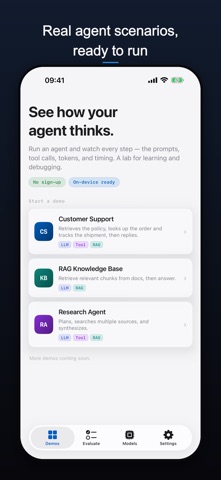
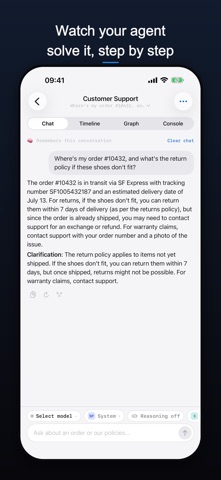
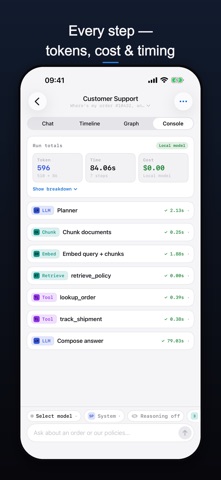
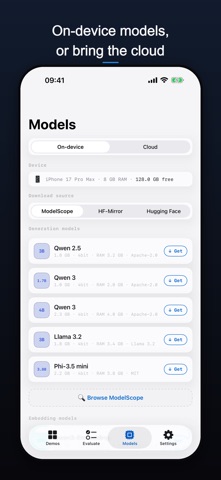
Agent Lab is a learning and experimentation playground for AI agents, built for AI learners, agent developers, and product managers. It doesn't just run agents — it makes every step of an agent's execution visible, so you can finally understand how agents actually work. Unlike an ordinary AI chat app, Agent Lab is about learning, experimenting, debugging, and visualization. On every run you can see the prompts, tool calls, retrieval, tokens, and latency — nothing is hidden. Get started fast · On-device local models: download a small Qwen model on first use (Wi-Fi recommended), then run it fully offline — no API key and no second machine required. Cost is always 0, and tokens and latency are shown for real. · Download on demand: grab other open-source models your device can actually run, with capability gating based on your chip and memory. · Cloud models: works with Chat Completions-compatible APIs (DeepSeek, Moonshot, OpenRouter, and more) and Anthropic Claude — just enter your key, base URL, and model. Three built-in demos · Customer Support Agent — demonstrates tool calling and workflow with a built-in mock order system, no real backend needed. · RAG Knowledge Base — comes with curated reference docs (LangGraph, MCP, LLM APIs, Python) and lets you upload your own PDF / Markdown / TXT, then inspect the retrieved chunks, similarity scores, and final answer. · Research Agent — shows how an agent plans on its own: Planner → Search → Read → Summarize → Answer. Unified visual debugging Every demo offers three views: · Timeline — the full step-by-step sequence of LLM and tool calls · Graph — the workflow graph, highlighting the active node as it runs · Console — expand any step to see System / User / Assistant prompts, the complete LLM request and response JSON, tool requests and responses, tokens, estimated cost, latency, and errors Security and privacy · API keys are stored encrypted on-device via the system Keychain — local only, never uploaded to any server. · Uploaded knowledge-base files and the vector indexes built from them stay on your device and can be deleted anytime. · On-device inference runs fully offline; your data never leaves the device. No sign-up, no login — open it and go. Make every step an agent takes visible.
What's new · 1.2
Version 1.2 turns Agent Lab from something you watch into something you test. • New Evaluate tab: build a set of test cases for each demo, run them as a batch, and score them automatically — exact match, keywords, regex, numeric tolerance, plus tool-calling accuracy. Success rate, tokens, latency and cost in a single view, with the full trace of any failing case one tap away. Each demo ships with 5 sample cases. • A/B experiments: run one test set against two configurations (model + prompt version) and compare them case by case. • Prompt versions: save, switch, rename and delete system prompts, and reset to the default at any time. • Tunable RAG retrieval: chunk size, overlap and top-K are now adjustable, with a live preview of the resulting chunk count.
Details