

SplitStack: Team Stopwatch
Hajime Kato · Sports
Independent analytics for this App Store listing. AppTracker is not affiliated with Hajime Kato.
Chart standing · US
What changed · US
Listing changes AppTracker has observed for this app in this storefront — new versions, price moves, rating shifts, and store copy.
This update improves timing reliability and usability. - More stable timing across device-clock changes and background recovery - Added confirmation-protected Reset All - Disabled timing controls while editing the roster to prevent mistakes - Improved the largest-text layout and simplified the team header Existing history and CSV formats remain compatible.
In-app purchases · US
No in-app purchases.
Screenshots


Keywords this app targets
Search terms AppTracker associates with this app — estimates, not search volume. ❝ = in the app's title; a highlighted number is its current position for that term.
Similar apps
Competitors and close alternatives, as estimated by AppTracker.






About
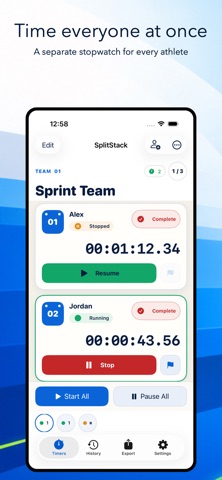
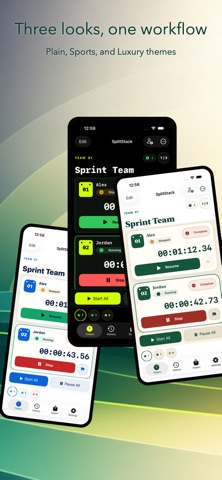
SplitStack is a multi-person stopwatch built for coaches, club managers, trainers, and teams that need to time several people from one iPhone. Use it for track and field, swimming, cycling, motorsport, school clubs, group training, client sessions, and any activity where every person needs an independent clock. TIME SEVERAL PEOPLE AT ONCE Create a separate stopwatch for each member. Start, pause, resume, record a lap, or finish each timer independently. You can also start or pause everyone in the current team together. SWIPE BETWEEN TEAMS Keep different squads, events, classes, or client groups in separate team workspaces. Swipe horizontally to move to the people you need without rebuilding your list. KEEP A CLEAN HISTORY Finished sessions are saved on device with their team, member, start time, end time, elapsed time, and laps. Results stay connected to the person who recorded them. EXPORT TO CSV Export saved history as two spreadsheet-friendly CSV files: a session summary and a row-by-row lap detail file. Share both through AirDrop, Mail, Files, or another iOS share destination, then open them in Excel or your preferred spreadsheet app. CHOOSE YOUR LOOK Switch between Plain, Sports, and Luxury themes. Every theme keeps the same familiar controls. Main features: - Multiple independent stopwatches - Multiple teams with horizontal paging - Add, rename, reorder, and delete members - Individual and team-wide start/pause controls - Lap and session history - CSV export through the iOS share sheet - Three appearance themes - Japanese and English interface - No account required Core timing data is stored on your device. You choose where it goes when you export or share a CSV. SplitStack keeps every person's time in view.
What's new · 1.0.1
This update improves timing reliability and usability. - More stable timing across device-clock changes and background recovery - Added confirmation-protected Reset All - Disabled timing controls while editing the roster to prevent mistakes - Improved the largest-text layout and simplified the team header Existing history and CSV formats remain compatible.
Details