

Max Read - Read Faster
SENSONET BILISIM TEKNOLOJILERI ELEKTRONIK YAZILIM SANAYI VE TICARET LTD STI · Productivity
Independent analytics for this App Store listing. AppTracker is not affiliated with SENSONET BILISIM TEKNOLOJILERI ELEKTRONIK YAZILIM SANAYI VE TICARET LTD STI.
Chart standing · US
What changed · US
Listing changes AppTracker has observed for this app in this storefront — new versions, price moves, rating shifts, and store copy.
Better reading for Japanese and Chinese. • NEW — Text Splitting (Settings › Timing › Text Splitting). Choose "Spaces Only" to divide text only at spaces and line breaks, so each segment is shown whole. • Smarter splitting: Japanese and Chinese text is now divided at word boundaries, and words in Latin letters such as "DISCOVER" are never broken in two. • The reader now pauses at Japanese and Chinese sentence and clause endings (。!?、). • Long words shrink evenly and stay centred on the anchor letter. • Web pages in Shift_JIS, EUC-JP and other encodings now import correctly. • Fixes for special characters in EPUBs, onboarding in dark mode, and more. Thank you to the readers who sent feedback. Keep it coming!
In-app purchases · US
What this app sells inside itself, grouped by kind and priced for this storefront.
Screenshots


About
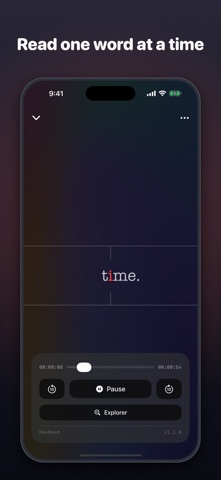
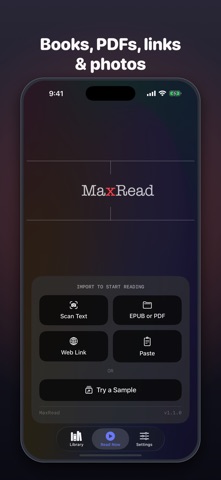
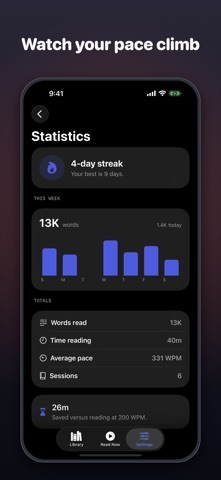
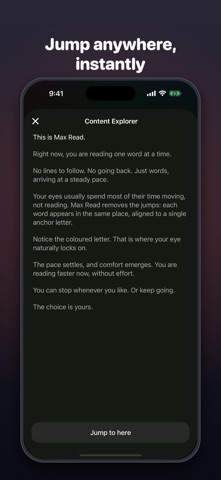
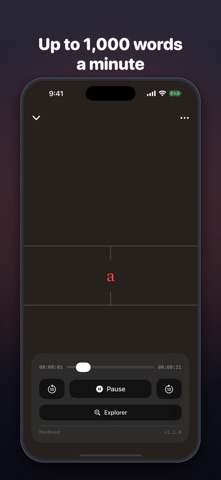
Max Read shows you one word at a time, right where your eyes are already looking. No lines to follow, no jumping back — just words arriving at the pace you choose. WHY IT WORKS When you read normally, your eyes spend most of their time moving between words instead of taking them in. Max Read removes those jumps: every word appears in the same spot, aligned to a highlighted anchor letter. Your eyes rest, your focus sharpens, and your pace climbs. READ ANYTHING • Import EPUB and PDF files • Open web articles from a link • Paste any text from your clipboard • Scan printed pages with your camera — OCR turns photos into readable text YOUR PACE, YOUR RULES • Set your speed from 100 to 1,000 words per minute • Add a natural pause at the end of each sentence • Feel the rhythm with subtle haptic feedback MAKE IT YOURS • Four backgrounds, including a calm animated gradient • Serif, sans-serif and typewriter fonts in three sizes • Eight anchor colors and adjustable guide lines PICK UP WHERE YOU LEFT OFF • Your Library keeps every document with reading progress and time left • The Content Explorer shows the full text so you can jump anywhere Max Read speaks your language: English, Danish, German, Spanish, Arabic, Turkish, Swedish, Chinese, Japanese, Greek, French, Dutch, Italian and Russian. Questions or ideas? Write to info@sebaexhibits.com — feedback goes straight to the developer. Terms of Use (EULA): https://www.apple.com/legal/internet-services/itunes/dev/stdeula/
What's new · 1.2
Better reading for Japanese and Chinese. • NEW — Text Splitting (Settings › Timing › Text Splitting). Choose "Spaces Only" to divide text only at spaces and line breaks, so each segment is shown whole. • Smarter splitting: Japanese and Chinese text is now divided at word boundaries, and words in Latin letters such as "DISCOVER" are never broken in two. • The reader now pauses at Japanese and Chinese sentence and clause endings (。!?、). • Long words shrink evenly and stay centred on the anchor letter. • Web pages in Shift_JIS, EUC-JP and other encodings now import correctly. • Fixes for special characters in EPUBs, onboarding in dark mode, and more. Thank you to the readers who sent feedback. Keep it coming!
Details