

ContactTap
Donald Castle · Utilities
Independent analytics for this App Store listing. AppTracker is not affiliated with Donald Castle.
Chart standing · US
What changed · US
Listing changes AppTracker has observed for this app in this storefront — new versions, price moves, rating shifts, and store copy.
• Results now fill the whole sheet instead of stopping partway down. • Call, Text and Copy stay on one line on smaller iPhone screens. • The Settings button now opens ContactTap's row in Safari settings directly. • Restored the keyboard focus outline for hardware keyboard and VoiceOver users. • Updated for iOS 27.
In-app purchases · US
No in-app purchases.
Screenshots

Keywords this app targets
Search terms AppTracker associates with this app — estimates, not search volume. ❝ = in the app's title; a highlighted number is its current position for that term.
Similar apps
Competitors and close alternatives, as estimated by AppTracker.
 Tapify: Digital Business Card
Tapify
Tapify: Digital Business Card
Tapify
 TapCall - Second Phone Number
Zapps Mobi Ltd
TapCall - Second Phone Number
Zapps Mobi Ltd
 Double Tap Call
Eugene Cartwright
Double Tap Call
Eugene Cartwright
 TapTap - Simple Counter
SN Web
1 shared topic
TapTap - Simple Counter
SN Web
1 shared topic
 Trackless Links: URL & PiP
Alexander Loth
1 shared topic
Trackless Links: URL & PiP
Alexander Loth
1 shared topic
 Tapline: Digital Business Card
Utility Forces LLC
Tapline: Digital Business Card
Utility Forces LLC
 Contacts Duplicates Cleaner
EyeOS Store Inc.
1 shared topic
Contacts Duplicates Cleaner
EyeOS Store Inc.
1 shared topic
 Tally: Tap Counter
Netflowers Inc.
1 shared topic
Tally: Tap Counter
Netflowers Inc.
1 shared topic
About
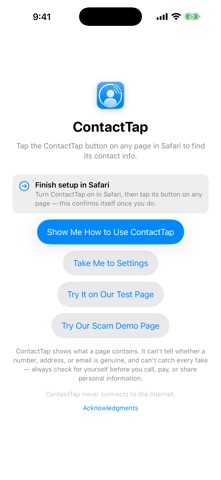
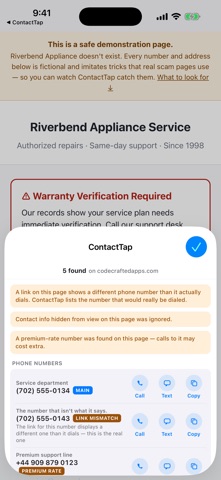
ContactTap finds the contact information on the web page you're viewing and turns it into one-tap actions. Open any page in Safari, tap the ContactTap button, and the phone numbers, email addresses, and street addresses on that page are collected into one clean panel: • Call or text a number instantly • Email with a tap • Open any address in Maps • Copy anything as clean, well-formatted text — no web clutter ContactTap works out which number is the main line, labels numbers and addresses with the names the page gives them, and keeps long pages tidy by showing the most important results first. On devices with Apple Intelligence it goes further, grouping what it found into the businesses and departments the details belong to — entirely on your device. BUILT TO RESIST SCAMS • Always lists the number a link really dials — and flags that row when a link displays a different number than it calls • Ignores contact info hidden from view, a favorite scam trick • Flags premium-rate numbers when it can identify them ContactTap relays what the page you're viewing contains — it cannot verify that a number, email, or address is legitimate, current, or belongs to who the page claims. Its warnings make misleading pages easier to spot; always check for yourself before you call, pay, or share personal information. PRIVATE BY DESIGN • Works only when you tap it — never scans in the background • Reads the page only; never changes it • No analytics, no tracking, no network calls — your browsing stays yours • Nothing it finds is stored, uploaded, or shared One purchase covers iPhone, iPad, and Mac.
What's new · 1.0.1
• Results now fill the whole sheet instead of stopping partway down. • Call, Text and Copy stay on one line on smaller iPhone screens. • The Settings button now opens ContactTap's row in Safari settings directly. • Restored the keyboard focus outline for hardware keyboard and VoiceOver users. • Updated for iOS 27.
Details