

Network Scan: Wi-Fi & SSH
Earl Jones · Utilities
Independent analytics for this App Store listing. AppTracker is not affiliated with Earl Jones.
Chart standing · US
What changed · US
Listing changes AppTracker has observed for this app in this storefront — new versions, price moves, rating shifts, and store copy.
Scans are now dramatically more consistent: the same network returns the same devices, scan after scan. Devices that stop answering (phones asleep, gear powered off) stay in your list marked offline instead of vanishing. Better identification, fully on device: Network Scan now recognizes the hardware vendor of many smart-home and IoT devices from the bundled IEEE registry — no internet lookup, nothing leaves your iPhone. Bonjour naming is also far more reliable, so more devices show their real names. Also in this release: - The scan progress line lights up while a scan is running. - Tools and Terminal match the app's console background. - Faster, gentler network probing that plays nicer with busy Wi-Fi.
Price & rating history · US
Reconstructed from the listing changes AppTracker has observed in this storefront. A field is charted once it has changed more than once, and each line starts at the value it moved from.
Average rating · ★ 0.00 now · 2 changes on record
Screenshots





About
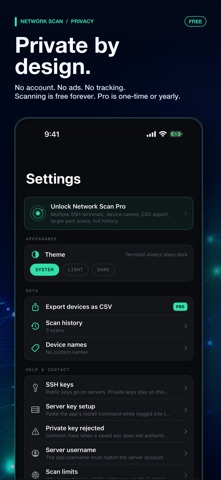
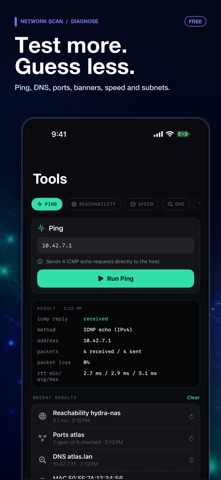
Who's on my Wi‑Fi? What's that unknown device? Can I reach my server? Network Scan answers all of it. It finds every device on your network, and opens a real SSH terminal to any of them. Discover, diagnose, and connect, all in a clean, native app with nothing to sign up for. SCAN YOUR NETWORK • See every device on your local network with its IP address and open ports. • Group and filter devices (SSH hosts, media and smart‑home gear, newly seen devices) so the list stays readable. • Continuous monitoring keeps watch and shows when devices come online or drop off. • Identifies the maker of many smart-home devices from the built-in IEEE hardware registry — entirely on device. DIAGNOSE AND EXPLORE • Ping and TCP reachability checks, DNS lookups, port scans, and service banners. • A subnet calculator and interface details for quick network math. • Tap any device to see what it likely is, based on its services and open ports. A REAL SSH TERMINAL • Connect to your servers with a full interactive terminal. Run htop, editors, Claude Code, Codex, and other full‑screen programs. • Works with any SSH server: Raspberry Pi, NAS, routers, and home‑lab machines. • Keep multiple live sessions open at once, to the same server or different ones, and switch between them instantly. • Save hosts and store passwords or generated keys securely in the iOS Keychain, unlocked with Face ID or Touch ID. PRIVATE BY DESIGN • No account, no analytics, no ads, no tracking. • Scans, saved connections, and credentials stay on your device. Network Scan is built for home labs, smart homes, and small offices, anywhere you want to understand your network and reach the machines you run. FREE • Network scanning, the grouped device list, ping and TCP reachability, DNS lookups, and recent scan history. PRO (optional) • The SSH terminal with multiple live sessions. • Custom device names, larger port scans, CSV export, and full scan history. • Try Pro free for 7 days with the yearly plan. • Prefer to pay once? Pro Lifetime is a single one‑time purchase. Pro is available as a monthly or yearly auto‑renewing subscription, or as a one‑time lifetime purchase. Payment is charged to your Apple Account. Subscriptions renew automatically unless canceled at least 24 hours before the end of the current period. Manage or cancel anytime in your App Store account settings. A free trial converts to a paid subscription unless canceled before the trial ends. Privacy Policy: https://www.superextramega.com/networkscan/privacy/ Terms of Use (EULA): https://www.apple.com/legal/internet-services/itunes/dev/stdeula/
What's new · 1.1.4
Scans are now dramatically more consistent: the same network returns the same devices, scan after scan. Devices that stop answering (phones asleep, gear powered off) stay in your list marked offline instead of vanishing. Better identification, fully on device: Network Scan now recognizes the hardware vendor of many smart-home and IoT devices from the bundled IEEE registry — no internet lookup, nothing leaves your iPhone. Bonjour naming is also far more reliable, so more devices show their real names. Also in this release: - The scan progress line lights up while a scan is running. - Tools and Terminal match the app's console background. - Faster, gentler network probing that plays nicer with busy Wi-Fi.
Details