
Chart standing · US
What changed · US
Listing changes AppTracker has observed for this app in this storefront — new versions, price moves, rating shifts, and store copy.
SteadyLift 1.4.2 adds clearer rest alerts without interrupting music already playing in another app: • Choose Classic alarm + vibration, Classic alarm, Vibration only, or Off. SteadyLift remembers the last choice, and the mode can also be changed from the active rest screen. • On iOS 26 or later, modes with an alarm show a native Live Activity countdown on the Lock Screen and supported Dynamic Island devices. At zero, the system alert continues until you stop it from the system UI or SteadyLift. • While SteadyLift is in the foreground, the selected alarm or vibration repeats until stopped. Alert audio mixes with Apple Music, Spotify, and other audio instead of interrupting playback. • On iOS versions earlier than 26, background delivery uses a one-time system notification, so continuous alarms or vibration are not guaranteed. Vibration only does not use AlarmKit and therefore has no native top-of-screen countdown. • The completed set is safely recorded when the countdown reaches zero. Stopping the alert dismisses only its sound and vibration; it does not remove the workout record. This release also retains on-device InBody layout recognition, optional comparison of 2–3 photos of the same complete report from varied angles and lighting, animated trends after at least two dated entries, optional accounts, and Apple-signed lifetime entitlement verification. Routines, workouts, InBody images, recognized text, and body values remain on device and are not synced to the account. Always compare imported values with the original report before saving. Body data is not medical advice.
Screenshots



About
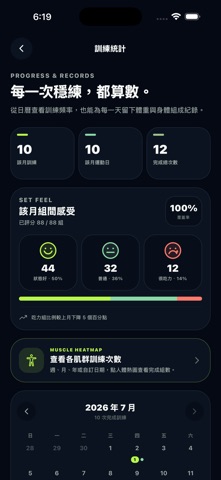
Walk into the gym with every set already organized. SteadyLift turns the exercises you use most into reusable workout routines. The free version includes one routine, while a one-time lifetime purchase unlocks unlimited routines. Plan every set faster • Choose from 72 built-in machine, free-weight, and bodyweight exercises • Each exercise includes names in Traditional Chinese and English, form steps, common mistakes, safety notes, and primary and secondary muscle guides • Set reps and weight with side-by-side wheels, then switch the primary unit between KG and LB • Mark each set as warm-up, working, or drop; drop sets include reps per round, starting weight, and weight reduction per round • Swipe an exercise left to reveal Delete, or press and hold to drag it into a new position Keep training and rest connected • Completing a set starts the rest timer; add time or finish rest early when needed • During rest, use one of three faces to rate the previous set as Good, Okay, or Hard • Drop-set weight decreases after each completed round until you choose to stop Review training and body records • A standard front-and-back body heatmap shows muscle training for week, month, year, or custom dates; tap a muscle to view workout and completed-set counts • A workout calendar shows daily completions and training frequency • Training analytics show actual volume, intensity trends, average load, and personal records • Select a date to manually record optional weight, skeletal muscle mass, body fat percentage, BMI, visceral fat, and notes, or import a supported InBody report with on-device iPhone text recognition • Layout-aware importing uses report sections, labels, and relative positions. For harder-to-read reports, cross-check 2–3 photos of the same full report from different angles and lighting; uncertain values remain editable and may be left blank or marked CHECK • Once an indicator has at least two dated records, view its animated body-composition trend and change from the previous reading • Switch between muscle-gain and fat-loss goals for rule-based protein, calorie, and timeline ranges using body records and recent training frequency Designed for the gym floor Large type, clear contrast, and focused controls reduce repeated phone interaction. If you have an eligible offer code for Lifetime Access, open Apple's secure redemption sheet inside the app. Apple handles the code and payment flow. Optional account, on-device workouts Routines, workouts, timers, and InBody records work without signing in. Apple or Google sign-in is used only for account identity, support, and lifetime account access. SteadyLift has no ads, analytics, or tracking. Routines, workout progress, ratings, history, InBody images, recognized text, and confirmed body values are not synced to the account. If you are signed in and StoreKit finds an eligible App Store lifetime entitlement, the Apple-signed non-consumable transaction is sent for server verification. Necessary transaction identifiers, product, status, environment, purchase time, and verification time are linked to the account for restoration, refund or revocation handling, and duplicate-link prevention. This does not include a full card number or Apple ID password. Account deletion does not erase Apple’s original transaction. Deleting the app removes local data; Apple controls device backup and transfer behavior. SteadyLift is a general fitness, timing, and self-tracking tool. Form guides and manually entered measurements are for personal reference only. The app does not provide medical diagnoses, treatment, rehabilitation guidance, personalized exercise prescriptions, or professional coaching. Stop exercising and seek qualified help if you experience pain, dizziness, chest tightness, or other discomfort.
What's new · 1.4.2
SteadyLift 1.4.2 adds clearer rest alerts without interrupting music already playing in another app: • Choose Classic alarm + vibration, Classic alarm, Vibration only, or Off. SteadyLift remembers the last choice, and the mode can also be changed from the active rest screen. • On iOS 26 or later, modes with an alarm show a native Live Activity countdown on the Lock Screen and supported Dynamic Island devices. At zero, the system alert continues until you stop it from the system UI or SteadyLift. • While SteadyLift is in the foreground, the selected alarm or vibration repeats until stopped. Alert audio mixes with Apple Music, Spotify, and other audio instead of interrupting playback. • On iOS versions earlier than 26, background delivery uses a one-time system notification, so continuous alarms or vibration are not guaranteed. Vibration only does not use AlarmKit and therefore has no native top-of-screen countdown. • The completed set is safely recorded when the countdown reaches zero. Stopping the alert dismisses only its sound and vibration; it does not remove the workout record. This release also retains on-device InBody layout recognition, optional comparison of 2–3 photos of the same complete report from varied angles and lighting, animated trends after at least two dated entries, optional accounts, and Apple-signed lifetime entitlement verification. Routines, workouts, InBody images, recognized text, and body values remain on device and are not synced to the account. Always compare imported values with the original report before saving. Body data is not medical advice.
Details