

Tersa: Budget & Money Planner
Leonardo Mathiazzi Lagnado · Finance
Independent analytics for this App Store listing. AppTracker is not affiliated with Leonardo Mathiazzi Lagnado.
Chart standing · US
What changed · US
Listing changes AppTracker has observed for this app in this storefront — new versions, price moves, rating shifts, and store copy.
Tersa is ready for what’s next. The latest version brings full support for iOS 27 and iPadOS 27, including an experience optimized for iPhone Duo and its new foldable display. Whether you’re managing your money on iPhone or enjoying more space on iPad, Tersa is designed to feel right at home across your Apple devices. We’ve also included performance improvements and refinements throughout the app to keep everything running smoothly.
In-app purchases · US
What this app sells inside itself, grouped by kind and priced for this storefront.
Screenshots






About
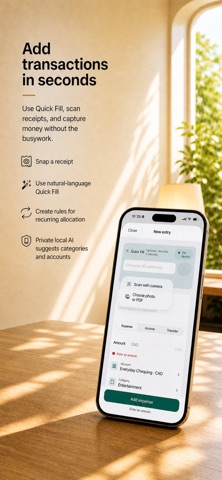
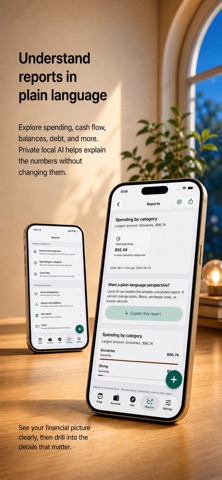
Know what you can safely spend today, what could put an account at risk next, and when your cash is expected to recover. Tersa is a private budget and cash flow planner built for decisions before you spend, not just charts after the fact. It turns the accounts, bills, budgets, goals, and debts you choose to track into one forward-looking plan. No bank login. No cloud AI. No ads. No tracking. SEE AHEAD WITH CASH AHEAD • See your Spending Room for today, backed by your plan. • Project cash 14, 30, 60, or 90 days ahead. • Spot the lowest projected balance, upcoming shortfalls, next expected income, and recovery date. • See which account may run short, when action is needed, and what caused the risk. • Explore practical funding options without Tersa moving money or making decisions for you. BUDGET WITH REAL CASH • Build flexible budgets from weekly to yearly. • Separate essentials from flexible spending. • See what current cash can support, what depends on expected income, and where timing creates a gap. • Protect important categories, choose rollover rules, and rebalance without rewriting transaction history. • Compare completed periods and review every proposed change before saving. CAPTURE MONEY WITHOUT CONNECTING YOUR BANK • Add expenses, income, and transfers with fast entry or natural-language Quick Fill. • Scan receipts on your device and keep them as encrypted attachments. • Use splits, tags, notes, templates, recurring schedules, widgets, and Siri shortcuts. • Import OFX, QFX, or mapped CSV statements. • Review possible duplicates, rule conflicts, and learned suggestions before anything is applied. PLAN YOUR WHOLE FINANCIAL PICTURE • Organize recurring bills and income in a financial calendar. • Build goals and sinking funds with target dates, contribution plans, and what-if comparisons. • Model loans, credit lines, and mortgages with amortization schedules and extra-payment scenarios. • Track accounts, assets, liabilities, manual valuations, net worth, and multiple currencies. • Explore reports for cash flow, spending, budgets, debt, balances, schedules, and transactions. • Export reports as PDF or filtered CSV. TRUST EVERY NUMBER Tersa keeps a balanced, traceable financial record. Corrections and reversals preserve history instead of silently changing the past. Reconcile against statements, review pending entries, and see the assumptions behind forecasts and exchange rates. Private local AI can help interpret entries, receipts, searches, reports, and planning options. It receives only the information needed for the task, cannot browse your full workspace, and cannot commit financial changes. You stay in control. PRIVATE BY DESIGN • Your database, receipts, and attachments are encrypted on your iPhone. • Protect Tersa with Face ID, Touch ID, or your device passcode. • Create password-protected encrypted backups you can validate and restore. • Individual subscribers can enable encrypted iCloud sync across approved personal devices. • Household subscribers can share one encrypted workspace through approved devices and explicit invitations. • Tersa never asks for your bank credentials and never sells or tracks your financial activity. YOUR WORKSPACE REMAINS YOURS Export transactions as CSV, export your workspace as JSON, create encrypted portable backups, and restore locally. If your trial or subscription ends, Tersa remains available in read-only mode for viewing, search, reports, export, backup, restore, and deletion. ACCESSIBLE BY DESIGN Tersa supports VoiceOver, Dynamic Type, Increased Contrast, Reduce Motion, Reduce Transparency, large interaction targets, and optional Atkinson Hyperlegible typography. Try every local feature free for 30 days. Choose Individual for optional encrypted personal sync or Household for a shared encrypted financial plan. EULA: https://www.apple.com/legal/internet-services/itunes/dev/stdeula/ Tersa terms: https://leolagnado.github.io/leo-lagnado-developer/legal/tersa/
What's new · 1.21
Tersa is ready for what’s next. The latest version brings full support for iOS 27 and iPadOS 27, including an experience optimized for iPhone Duo and its new foldable display. Whether you’re managing your money on iPhone or enjoying more space on iPad, Tersa is designed to feel right at home across your Apple devices. We’ve also included performance improvements and refinements throughout the app to keep everything running smoothly.
Details