

Swiftix
Chongqing Hyperits Network Technology Co., Ltd. · Education
Independent analytics for this App Store listing. AppTracker is not affiliated with Chongqing Hyperits Network Technology Co., Ltd.
Chart standing · US
What changed · US
Listing changes AppTracker has observed for this app in this storefront — new versions, price moves, rating shifts, and store copy.
• The terminal feels more like Linux: write and run shell scripts, use the usual options of ls, grep, sed, sort, wc and more, and try new commands such as awk, tar, less, date, and id, plus ip addr, ss, and curl -I for networking. • Virtual machines keep the device's time, and you can power off or restart from the terminal with shutdown and reboot. • Virtual machines created by earlier versions can update their system files under Summary > Disk and Snapshots. A snapshot is taken first. • Fixed Ctrl-C at the prompt and the terminal size being lost after reopening a terminal.
Screenshots


About
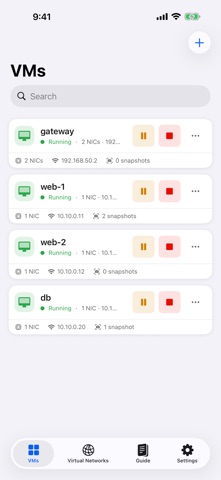
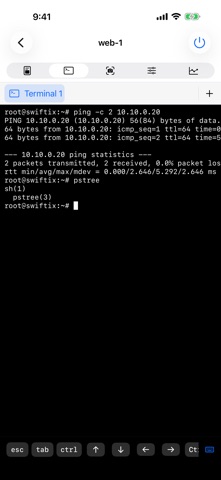
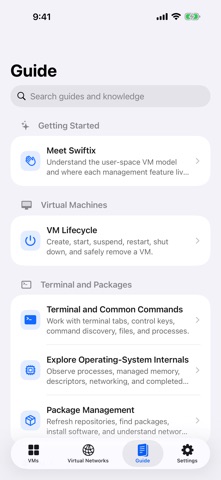
Carry an interactive operating system lab in your pocket. Swiftix is a user-space virtual computing environment for Apple platforms. Use a shell, manage multiple virtual machines, build virtual networks, and explore how operating systems work through observable process, file system, and network state—all on iPhone, iPad, and Mac. TERMINAL AND COMMAND LINE • Run multiple terminal tabs with isolated shell sessions • Manage files, processes, and jobs with familiar commands • Inspect system behavior with ps, top, pstree, lsof, memstat, and strace • Use the built-in Swiftix Go toolchain and pkg package manager VIRTUAL MACHINE MANAGEMENT • Create, rename, search, start, shut down, restart, suspend, and resume VMs • Give every VM its own file system, process table, terminals, and network stack • Keep inventories, disks, and configurations saved locally VIRTUAL NETWORKING • Build isolated, routed, NAT-shared, and point-to-point networks • Configure IPv4 addresses, gateways, router mode, latency, and packet loss • Visualize connections in an interactive topology • Inspect interface counters, routes, ARP and TCP state, and switch forwarding tables SNAPSHOTS AND DATA TRANSFER • Create named snapshots, browse snapshot trees, and roll back changes • Clone independent VMs from snapshots • Import or export an entire virtual cluster for backup and transfer BUILT FOR LEARNING • Browse and search the built-in offline user guide • Switch between English and Simplified Chinese • Enjoy adaptive layouts designed for iPhone, iPad, and Mac • Customize app appearance, terminal themes, fonts, and text size Every feature is free, including virtual networking, routing, snapshots, and network monitoring, with up to 2 virtual machines. A one-time Swiftix Pro purchase lets you build labs with up to 64 virtual machines. No subscription. Please note: Swiftix is a user-space environment that runs inside the app process. It is not a hardware virtualizer, does not boot a native operating-system kernel, and does not provide access to the host device's shell.
What's new · 1.3
• The terminal feels more like Linux: write and run shell scripts, use the usual options of ls, grep, sed, sort, wc and more, and try new commands such as awk, tar, less, date, and id, plus ip addr, ss, and curl -I for networking. • Virtual machines keep the device's time, and you can power off or restart from the terminal with shutdown and reboot. • Virtual machines created by earlier versions can update their system files under Summary > Disk and Snapshots. A snapshot is taken first. • Fixed Ctrl-C at the prompt and the terminal size being lost after reopening a terminal.
Details