

Speedometer Ultra
Ultrafine, Lda · Navigation
Independent analytics for this App Store listing. AppTracker is not affiliated with Ultrafine, Lda.
Chart standing · US
What changed · US
Listing changes AppTracker has observed for this app in this storefront — new versions, price moves, rating shifts, and store copy.
Speedometer Ultra is ready for iPhone Duo, on both screens. Unfold it and Trips can show your list beside the trip you're viewing, while the dashboard, map and HUD are laid out for the larger screen.
Ratings breakdown · US
The star breakdown behind this app's rating in this storefront.
In-app purchases · US
What this app sells inside itself, grouped by kind and priced for this storefront.
Screenshots



Similar apps
Competitors and close alternatives, as estimated by AppTracker.
 Speedometer: Speed Tracker&GPS
PB Studios OU
Speedometer: Speed Tracker&GPS
PB Studios OU
 Speedometer»
Tim O's Studios, LLC
Speedometer»
Tim O's Studios, LLC
 GPS Speedometer: MPH Tracker
Daniel Esteban Gonzalez
GPS Speedometer: MPH Tracker
Daniel Esteban Gonzalez
 GPS Speedometer MPH Tracker
BITHAUS.TECH, UNIPESSOAL LDA
GPS Speedometer MPH Tracker
BITHAUS.TECH, UNIPESSOAL LDA
 Speedometer 55 Pro. GPS kit.
Stanislav Dvoychenko
Speedometer 55 Pro. GPS kit.
Stanislav Dvoychenko
 Digital Speed GPS Speedometer
BITHAUS.TECH, UNIPESSOAL LDA
Digital Speed GPS Speedometer
BITHAUS.TECH, UNIPESSOAL LDA
 Speed Tracker: GPS Speedometer
Oxagile LLC
Speed Tracker: GPS Speedometer
Oxagile LLC
 Speed Tracker Pro GPS
Tobias Lorenz Haubold
Speed Tracker Pro GPS
Tobias Lorenz Haubold
About
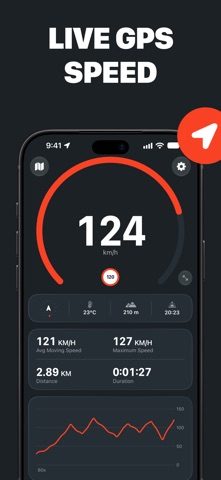
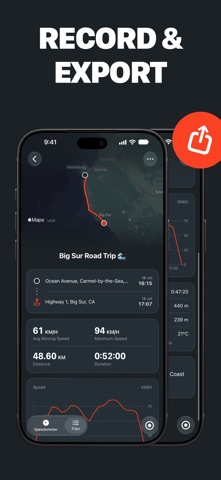
Measure, record and track your speed wherever you’re moving with Speedometer Ultra, the all-in-one GPS speedometer, HUD and trip logger for iPhone. From a morning ride to a highway drive, a hike to a harbor crossing, Speedometer Ultra makes it easy to see your speed, stay aware of the limit and keep a detailed record of every journey. Precision Speed, Wherever You Go: Read your speed straight from your iPhone’s GPS, without installing or calibrating a wheel sensor. Choose from nine modes – walking, running, cycling, driving, motorcycle, truck, train, boat and plane – each with a gauge scaled to the speeds you expect. Display speed in mph, km/h or knots. When the signal isn’t good enough to trust, Speedometer Ultra shows – rather than a guess. Stay Under the Limit: Set a speed limit and see it clearly on the gauge. Cross it and the app warns you with a chime and a tap, helping you stay informed without taking your attention off the road. Turn the sound off if you prefer a visual warning, and keep recently used limits one tap away as the road changes. Record the Whole Journey: Start recording to save your route, distance, average moving speed, maximum speed, moving time, elevation, average temperature and a graph of your speed throughout the trip. Any time without reliable location data is shown as a signal gap, so you can judge how completely the journey was measured. Rename trips, add notes and export the underlying route data as CSV. Trips stay on your device and sync privately through your own iCloud account. Keep the Journey in View: Follow your position on a live map while keeping your speed front and center. Switch between north-up and heading-up, pan freely, or use the compass, altitude, temperature and time until sunset for more context. While recording, time, distance and average speed remain on the Lock Screen and in the Dynamic Island, with a Stop button that works without reopening the app. Use HUD at Night: Switch to a large, high-contrast heads-up display for a speed reading you can take in at a glance. Mirror it when you want the reflection in the windshield to read the right way around, or leave it as it is and keep your iPhone on the dash. The screen stays awake while the app is open. Download now and use the GPS speedometer, nine movement modes, live map, compass, speed limits and trip recording for free. Choose PRO to unlock HUD mode, live and recorded speed graphs, and CSV trip exports. GPS accuracy and availability depend on your device, surroundings and signal conditions. Speedometer Ultra is not a substitute for a vehicle’s certified instruments or safe driving practices. Do not interact with the app while driving. Terms of Use: https://speedometerultra.com/terms Privacy Policy: https://speedometerultra.com/privacy
What's new · 1.3.0
Speedometer Ultra is ready for iPhone Duo, on both screens. Unfold it and Trips can show your list beside the trip you're viewing, while the dashboard, map and HUD are laid out for the larger screen.
Details