

RulerApp: True-Size Ruler
Takumi Sekiguchi · Utilities
Independent analytics for this App Store listing. AppTracker is not affiliated with Takumi Sekiguchi.
Chart standing · US
What changed · US
Listing changes AppTracker has observed for this app in this storefront — new versions, price moves, rating shifts, and store copy.
- Built-in screen sizes for each iPhone and iPad model, so the ruler is true to size even before you match the size with a card. Unknown models are guided to "Match Size" first. - Match the size with a card in portrait or landscape, and fine-adjust with the shrink/enlarge buttons. - "Long (slide along)" mode: slide your device along longer objects and the ruler continues to show the total length. - Fine-tune markers in 0.1mm steps and snap them to tick marks. - Each measurement now shows an accuracy estimate. - New tools: AR measure with the camera, photo measure, protractor, printable ruler, ring size finder, online sizes at true scale, plumb line, altimeter and decibel meter. - The unit converter now also converts day-of-year (Julian) dates. - Open the ruler from Home and Lock Screen widgets, Control Center, the Action button, Siri or Shortcuts. - Free: ruler, Match Size, the "Long (slide along)" mode, protractor, spirit level, plumb line, decibel meter, altimeter and more. Full Access (one-time purchase): ring size finder, AR measure, photo measure, unlimited saved measurements with export, and no ads. - No banner ad on the ruler screen while you measure. - History shows how many free saves you've used (of 3), with a shortcut to Full Access. - Ads ask for your tracking permission first. You can decline and keep using the app. - Improved translations in Settings, error messages and exported images. - New short how-to guides for first-time users (3 pages on first launch and a tip in each tool), and clearer words on screen, such as "Single" / "Long (slide along)" and "Match Size".
In-app purchases · US
What this app sells inside itself, grouped by kind and priced for this storefront.
Screenshots



About
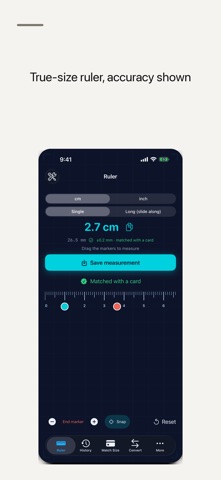
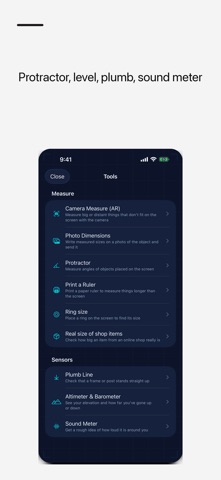
RulerApp turns your iPhone or iPad screen into a true-size ruler. Lay an object on the screen and read its length in cm or inches. Match the size once with a standard card ("Match Size") for more accurate marks. Beyond the screen, it is a pocket toolbox: a "Long (slide along)" mode for items longer than the screen, AR measuring with the camera, a ring size finder, a protractor, a spirit level, a plumb line and a decibel meter. TRUE-SIZE RULER - On-screen ruler at true scale (cm/inch, marked in 1mm or 1/16-inch steps) - Built-in screen sizes for each iPhone and iPad model, so the marks are right even before you match the size with a card; unknown models are guided to "Match Size" first - "Match Size": hold a standard credit card (85.6mm) to the outline and match the size quickly, in either orientation - Drag start/end markers to calculate the distance between two points - Fine-tune markers in 0.1mm steps with a precision slider, and snap them to tick marks for small parts like screws and beads - Each result shows an accuracy estimate (for example ±0.3mm when "Matched with a card") - Works in portrait and landscape (landscape measures farther) LONGER THAN THE SCREEN - "Long (slide along)" mode: mark the end of the screen, slide your device along the object, and the ruler continues from the previous length to give the total - Print a paper ruler with AirPrint and use it without your device AR MEASURE WITH THE CAMERA - Measure walls, desks and objects too big or too far away for the screen - Area of rectangles, volume of boxes, diameter and area of circles - Angles between two lines, height from the floor, and the total length of a multi-segment path - Export what you measured as a floor plan image or PDF with dimensions MORE TOOLS - Ring size finder: place a ring you own on the screen, match the inner circle, and see its US, UK, EU and Japanese sizes with the inner diameter in mm - Photo measure: write the sizes you measured on a photo and share it as one image, for example for a marketplace listing - Protractor: read the angle of an object or drawing placed on the screen - Spirit level: check whether a surface is flat or plumb - Plumb line: a line that always points straight down, with the angle off vertical - Decibel meter: current and maximum sound level (dB estimate) using the microphone - Altimeter: air pressure, relative height change, elevation and coordinates - See online sizes at true scale: share text like "8.6 × 5.4 cm" from Safari to show a rectangle of that size on screen, or type the size yourself - Unit converter for cm / inch / mm, plus day-of-year (Julian date) conversion QUICK TO OPEN Open the ruler in one step from Home Screen and Lock Screen widgets, a Control Center button, the Action button, Siri or Shortcuts. YOUR MEASUREMENTS - Save favorite measurements and recall them instantly - A counter shows how many measurements you saved today, this week and in total. Deleting a saved measurement lowers the count. - Blueprint dark theme: subtle grid lines on a deep blue background Measurements are processed on your device. The microphone is used only to show the sound level; audio is not recorded or saved. After your first measurement, the app may ask once for a rating (within Apple's limits). FREE AND FULL ACCESS Free (with banner ads): the true-size ruler, Match Size, the "Long (slide along)" mode, fine-tuning, protractor, spirit level, plumb line, decibel meter, altimeter, printable ruler, online sizes, unit converter, widgets and Siri, and up to 3 saved measurements. Full Access (one-time purchase, no subscription): ring size finder, AR measure, photo measure, unlimited saved measurements with export, and no ads. Customers who previously bought the paid app keep using it without ads. Privacy Policy: https://smallappworks.com/rulerapp/privacy/ Support: https://smallappworks.com/rulerapp/support/
What's new · 1.0.4
- Built-in screen sizes for each iPhone and iPad model, so the ruler is true to size even before you match the size with a card. Unknown models are guided to "Match Size" first. - Match the size with a card in portrait or landscape, and fine-adjust with the shrink/enlarge buttons. - "Long (slide along)" mode: slide your device along longer objects and the ruler continues to show the total length. - Fine-tune markers in 0.1mm steps and snap them to tick marks. - Each measurement now shows an accuracy estimate. - New tools: AR measure with the camera, photo measure, protractor, printable ruler, ring size finder, online sizes at true scale, plumb line, altimeter and decibel meter. - The unit converter now also converts day-of-year (Julian) dates. - Open the ruler from Home and Lock Screen widgets, Control Center, the Action button, Siri or Shortcuts. - Free: ruler, Match Size, the "Long (slide along)" mode, protractor, spirit level, plumb line, decibel meter, altimeter and more. Full Access (one-time purchase): ring size finder, AR measure, photo measure, unlimited saved measurements with export, and no ads. - No banner ad on the ruler screen while you measure. - History shows how many free saves you've used (of 3), with a shortcut to Full Access. - Ads ask for your tracking permission first. You can decline and keep using the app. - Improved translations in Settings, error messages and exported images. - New short how-to guides for first-time users (3 pages on first launch and a tip in each tool), and clearer words on screen, such as "Single" / "Long (slide along)" and "Match Size".
Details