

The Shelf - Reading Tracker
Antonio Gordillo Toledo · Books
Independent analytics for this App Store listing. AppTracker is not affiliated with Antonio Gordillo Toledo.
Chart standing · US
What changed · US
Listing changes AppTracker has observed for this app in this storefront — new versions, price moves, rating shifts, and store copy.
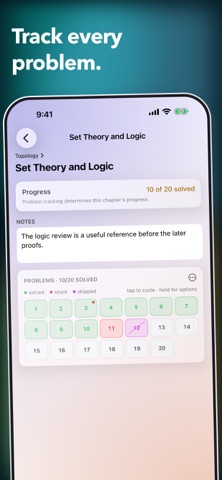
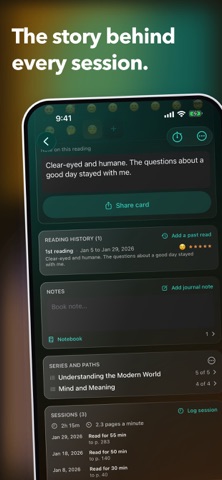
The Shelf 1.13 improves the search experience, tells you more about your reading habits, and lets you have more fun with Dewey and celebrations. • Search online by title, author, or both. Explore author pages and see more author matches when you need them. • Make chapters, problems, and annotations easier to discover through minimal, dismissible Book suggestions. • Bring Dewey into Book and Focus views, then choose his hat, accessory, prop, and colors. Pick Confetti, Sparkles, or Stars for the moments you want to celebrate. • Create notes and quotes in one clearer Annotation editor, with pages, scanned text, and photos when they help. • Find Book notes and annotations from Library search, with highlighted matches and previews centered on the matching text. • Record where each reading session started and ended. Pace, pages read, records, charts, and estimated time to finish now work after one session. • Keep reading after opening the finish sheet, add an annotation during Focus, and use safer time and page entry. • Reuse recent Borrow from, Lend to, and Shelf location values without giving up free-form entry. • Enjoy smoother Library search, sturdier iPad navigation, more complete duplicate cleanup, and full-color widget covers with Clear app icons. • Begin with a truly empty shelf on a fresh install or after Reset, ready for your own books and optional private iCloud library.
Price & rating history · US
Reconstructed from the listing changes AppTracker has observed in this storefront. A field is charted once it has changed more than once, and each line starts at the value it moved from.
Price · 4.99 USD now · 2 changes on record
Ratings breakdown · US
The star breakdown behind this app's rating in this storefront.
In-app purchases · US
No in-app purchases.
Screenshots







Keywords this app targets
Search terms AppTracker associates with this app — estimates, not search volume. ❝ = in the app's title; a highlighted number is its current position for that term.
Similar apps
Competitors and close alternatives, as estimated by AppTracker.
 Book Tracker: Bookshelf & TBR
Simone Montalto
Book Tracker: Bookshelf & TBR
Simone Montalto
 PocketShelf: TBR Book Tracker
Klemens Strasser
PocketShelf: TBR Book Tracker
Klemens Strasser
 ShelfBuddy
JAN-HENNING BUNS
ShelfBuddy
JAN-HENNING BUNS
 Book Tracker: Lexi
Richard Wheatley
Book Tracker: Lexi
Richard Wheatley
 BookPine: Book Tracker & Stats
Devpri SRL
BookPine: Book Tracker & Stats
Devpri SRL
 Shelfy: Book Tracker & TBR
Oleksandr Oleksandrovych Murakhovskyi
Shelfy: Book Tracker & TBR
Oleksandr Oleksandrovych Murakhovskyi
 HomeBooks: Book Tracker
HomeBooks Technologies Inc.
HomeBooks: Book Tracker
HomeBooks Technologies Inc.
 BookSafe
Fabian Grill
BookSafe
Fabian Grill
About
The Shelf is a private reading tracker for stories you love, books you study, and everything in between. Search or scan a book, choose the edition that matches yours, then track only what feels useful. BUILD YOUR LIBRARY • Search by title, author, or ISBN, explore author pages, or scan one book or a whole stack. • Keep each edition or physical copy as its own book with its own details, progress, sessions, and history. • Mark books as Owned, add to Wishlist, or Track borrowed books. • Organize books with reading status, your own Lists, shelf locations, and Subjects. • Import Goodreads or StoryGraph CSV files and export a complete backup whenever you want. TRACK READING WITHOUT FRICTION • Update pages, percentage, audiobook position, chapters, or study problems. • Start a focused Reading, Listening, or Study session from any book. • Record starting and ending pages, then see pace, pages read, records, session patterns, and estimated time to finish after your first session. • Keep every re-read separate, with its own dates, rating, mood, and notes. REMEMBER WHAT YOU READ • Save Book notes, dated notes, favorite quotes, page references, scanned text, and photographs. • Search across your Library and jump directly to a Book note or annotation, with the matching text brought into view. • Make chapters, study problems, and annotations easier to discover through gentle, dismissible suggestions on each Book. BORROW AND LEND WITH CLARITY • Keep editable borrowing and lending histories for each book. • Record people, dates, due dates, shelf locations, and optional notes. • Reuse recent people and locations while keeping every field free-form. SEE YOUR READING LIFE • Explore daily, weekly, monthly, yearly, and recent activity. • See goals, streaks, totals, records, and finished books on a reading calendar. • Compare progress by Subject and view your library as a prerequisite map. • Revisit books, notes, and quotes from this day in earlier years. MAKE IT FEEL LIKE YOURS • Choose your own background and accent colors, or start with an included Look. • Pair a Solid or Gradient background with System, Glass, Soft Depth, Lined Paper, Dot Grid, or Dog-eared Page cards. • Invite Dewey into Book and Focus views, then choose his hat, accessory, prop, and colors. • Celebrate the moments you choose with Confetti, Sparkles, or Stars. MADE FOR IPHONE AND IPAD • Use widgets, Spotlight, Siri, Live Activities, Split View, and Stage Manager. • Sync with iCloud when you choose and keep a complete JSON backup. PRIVATE BY DESIGN • No accounts, ads, tracking, analytics, or subscriptions. • Optional book lookup sends only a title, author, or ISBN after you ask the app to search or fetch. • Camera images and recognized text stay on your device or in your own optional private iCloud library. • Use the optional system privacy lock and outside-app redaction when you want them. • Turn Online Lookup off for a fully offline library. Pay once, own it forever.
What's new · 1.13
The Shelf 1.13 improves the search experience, tells you more about your reading habits, and lets you have more fun with Dewey and celebrations. • Search online by title, author, or both. Explore author pages and see more author matches when you need them. • Make chapters, problems, and annotations easier to discover through minimal, dismissible Book suggestions. • Bring Dewey into Book and Focus views, then choose his hat, accessory, prop, and colors. Pick Confetti, Sparkles, or Stars for the moments you want to celebrate. • Create notes and quotes in one clearer Annotation editor, with pages, scanned text, and photos when they help. • Find Book notes and annotations from Library search, with highlighted matches and previews centered on the matching text. • Record where each reading session started and ended. Pace, pages read, records, charts, and estimated time to finish now work after one session. • Keep reading after opening the finish sheet, add an annotation during Focus, and use safer time and page entry. • Reuse recent Borrow from, Lend to, and Shelf location values without giving up free-form entry. • Enjoy smoother Library search, sturdier iPad navigation, more complete duplicate cleanup, and full-color widget covers with Clear app icons. • Begin with a truly empty shelf on a fresh install or after Reset, ready for your own books and optional private iCloud library.
Details