

Tomato — Focus Timer
Hang Sun · Productivity
Independent analytics for this App Store listing. AppTracker is not affiliated with Hang Sun.
Chart standing · US
What changed · US
Listing changes AppTracker has observed for this app in this storefront — new versions, price moves, rating shifts, and store copy.
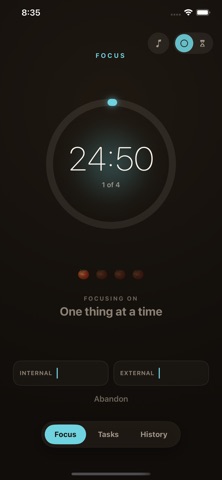
Timer screen: the gear button sits top-left. On the right, the bell now just turns focus music on or off, next to the clock-style switch. Settings page: it shows the 15/25/45/50 min focus-length choice, then Ring sound, Focus music and Break music. The screenshot was taken during a running pomodoro, so the length choice is greyed out with "Applies once this pomodoro ends." The "Your music" section doesn't appear there because Spotify isn't installed on the simulator.
Screenshots


About
Tomato is a focus timer built on the Pomodoro Technique — the simple habit of working in 25-minute sprints with short breaks in between. No setup, no clutter, no learning curve. Just start, focus, and let the tomatoes add up. WORK IN SPRINTS Tap Begin and settle into 25 minutes of focus. Watch the time on a calm, dark screen — choose a glowing progress ring or a draining hourglass, whichever keeps you in flow. After four sprints you earn a longer break; the app tracks the rhythm so you don't have to. LOG DISTRACTIONS WITHOUT BREAKING FLOW When something pulls at your attention, don't chase it — just tap to log it as internal (a thought of your own) or external (someone or something else) and keep going. Over time you'll see exactly what keeps interrupting your focus. TAKE BREAKS THAT ACTUALLY REST YOU Between sprints, a guided break screen suggests a quick way to recharge — look away from the screen, stretch, drink water, breathe — and counts you down to the next round. TRACK TASKS AND REVIEW YOUR DAY Add tasks and estimate them in tomatoes, then compare your estimate to what it actually took. The History tab shows today's completed sprints, your interruptions, and a rolling 7-day chart of your focus. STAYS OUT OF YOUR WAY • A Live Activity keeps the countdown on your Lock Screen and Dynamic Island. • A Home Screen widget shows today's tomato count at a glance. • The ring sounds even in Silent Mode, so you never miss it. FAITHFUL TO THE METHOD Tomato follows the technique honestly: a sprint is all-or-nothing — there's no pause, and the long break is something you earn, not skip to. It sounds strict, but that's the whole point, and it's what makes the habit stick. An in-app "How Tomato works" guide explains the why behind every rule. PRIVATE BY DESIGN No account. No ads. No tracking. Your tasks and history live on your device and sync only through your own private iCloud — we never see your data. Focus, one tomato at a time.
What's new · 1.1
Timer screen: the gear button sits top-left. On the right, the bell now just turns focus music on or off, next to the clock-style switch. Settings page: it shows the 15/25/45/50 min focus-length choice, then Ring sound, Focus music and Break music. The screenshot was taken during a running pomodoro, so the length choice is greyed out with "Applies once this pomodoro ends." The "Your music" section doesn't appear there because Spotify isn't installed on the simulator.
Details