

Intelligence — AI Answers
Ikkurthi Sreemannarayana · Productivity
Independent analytics for this App Store listing. AppTracker is not affiliated with Ikkurthi Sreemannarayana.
Chart standing · US
What changed · US
Listing changes AppTracker has observed for this app in this storefront — new versions, price moves, rating shifts, and store copy.
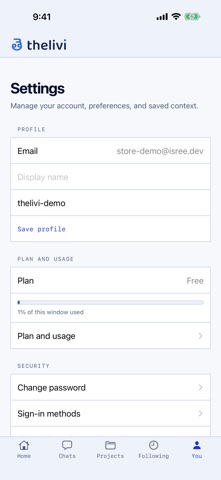
Confirm your email address from Settings. Sign in with Apple and Google is more secure, and you get a clear message if a sign-in secures your account. Settings, Connections now shows Google Drive alongside Calendar, Tasks and Contacts, and the help screen explains Drive and the new heads-up before meetings.
In-app purchases · US
No in-app purchases.
Screenshots




Keywords this app targets
Search terms AppTracker associates with this app — estimates, not search volume. ❝ = in the app's title; a highlighted number is its current position for that term.
Similar apps
Competitors and close alternatives, as estimated by AppTracker.
 Recco: AI Meeting Note Taker
Next Pixel Limited
Recco: AI Meeting Note Taker
Next Pixel Limited
 Grok AI
X Corp.
Grok AI
X Corp.
 Chatbot AI Assistant - Genie
APPNATION YAZILIM HIZMETLERI TICARET ANONIM SIRKETI
Chatbot AI Assistant - Genie
APPNATION YAZILIM HIZMETLERI TICARET ANONIM SIRKETI
 MATE AI - Private AI
Swisswise GmbH
MATE AI - Private AI
Swisswise GmbH
 LuxHalo
Jose Cuellar
LuxHalo
Jose Cuellar
 Chat Smith: AI Chatbot & Agent
Chat Smith OpCo
Chat Smith: AI Chatbot & Agent
Chat Smith OpCo
 Genora AI – Chat Bot Assistant
MOBIWAYS LTD
Genora AI – Chat Bot Assistant
MOBIWAYS LTD
 Versio Inc
VERSIO TECNOLOGIA LTDA
Versio Inc
VERSIO TECNOLOGIA LTDA
About
Thelivi (తెలివి - Telugu for "intelligence") is an AI assistant that doesn't make things up - every answer is backed by sources you can open. • Ask anything in plain English. It searches the live web, reads the documents you upload (PDF, Word, text, images), and reasons over both. • See where every claim comes from. Answers carry citations that open the exact page and passage - no black-box guessing. • Stay in charge of the conversation. Stop a response, ask for another answer, or revise your question, and tell us what could be better on any reply. • Bring your own knowledge. Upload files or paste links and ask questions across all of them. • Group work into projects. Chats in a project share their sources and knowledge. • It remembers you. Thelivi keeps lasting facts you mention and tailors answers - review them, delete them, or switch memory off any time in Settings → Memory. • Follow what matters. Schedule a morning news digest, a weekly summary, a site health check - and get notified with the result. • Help when you need it. Contact support from inside the app. Try it instantly as a guest - no signup required. Create a free account to keep your conversations and sources across devices.
What's new · 1.0.16
Confirm your email address from Settings. Sign in with Apple and Google is more secure, and you get a clear message if a sign-in secures your account. Settings, Connections now shows Google Drive alongside Calendar, Tasks and Contacts, and the help screen explains Drive and the new heads-up before meetings.
Details