

Our - Family Album
Digital Photo Frame Slideshow Maker - Picture & Video Creator App LLC · Photo & Video
Independent analytics for this App Store listing. AppTracker is not affiliated with Digital Photo Frame Slideshow Maker - Picture & Video Creator App LLC.
Chart standing · US
What changed · US
Listing changes AppTracker has observed for this app in this storefront — new versions, price moves, rating shifts, and store copy.
- Make it easier for grandparents and relatives to keep up: share a private album link, and they can tap it to see photos and videos on any device without installing an app or creating an account. Create a link for each recipient, optionally expire it after 30 days, and revoke it any time. - Invite relatives to receive photos by email directly from the sharing flow. Each photo email includes a link to browse the full album, so they can catch up from their inbox without you sending the same photos again. - Fix a typo or add a forgotten detail: you can now edit the words of your own posts and comments. Tap ⋯ on your post and choose Edit Caption, or touch and hold your comment and choose Edit. A quiet "edited" next to the time of a post, or the name on a comment, lets everyone know it changed. - Make photo collages from the Memories tab: choose 2–6 photos from an album, try Grid, Spotlight or Strips, and share a high-resolution image with your family. - Album photos and videos now stay in date order, newest first, with an option to show oldest first. Removed sort options that did not yet work correctly. - Find **Share without an app** in the family invitation screen or album menu. Choose an album, then create a browser link or invite someone by email from the same place. - Set album permissions once, and they stay in sync across your family's devices. Choose who can post, comment and react, save and share photos, or change the album audience; photo-viewer capture protection follows the album settings too. - Choose which updates arrive by push or email, with preferences saved to your account so you do not need to set them up again on another device. Email alerts are opt-in, and failed changes keep your previous settings. - Sharing restrictions also follow photos opened from notifications and used in collages or sticker exports. Thank you for reading! Please email me at info@ourfamilyalbum.com any suggestions to make the App better for you. - Manuel
In-app purchases · US
No in-app purchases.
Screenshots


About
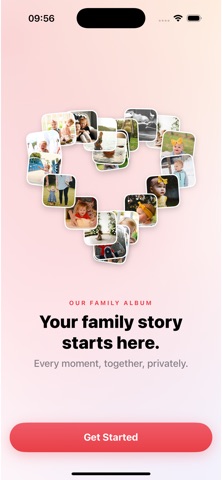
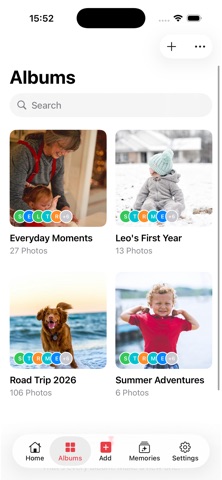
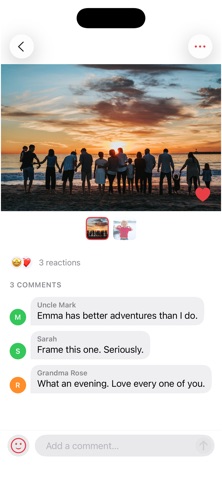
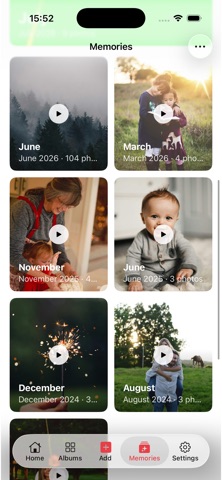
Our Family Album is the simplest way to keep your whole family in the loop on the little moments — the first steps, the messy dinners, the sleepy smiles. Share a photo once, and everyone you invite sees it instantly. One album. The whole family. That's it. SHARE ONCE, SEEN BY EVERYONE Upload a photo or video a single time and it appears for every family member you've invited. No group chats to manage, no forwarding the same picture five times. A FEED OF REAL MEMORIES Your family's photos and videos land in one beautiful home feed, organized by date. Jump back to any moment, filter by album, and relive the day it happened. EASY ENOUGH FOR GRANDMA We built Our Family Album so the least techy person in your family can use it on day one. Inviting relatives takes seconds — share a link, send a code, or let them scan a QR code. REACT AND STAY CONNECTED Like the photos you love and leave comments on the moments that matter. Get notified the instant family reacts, comments, or adds something new. PRIVATE BY DESIGN Your album is only visible to the people you invite — never public, never sold, never surfaced to strangers. Your family's memories stay your family's. BUILT FOR THE LITTLE ONES Add your child's name and birthday to personalize the album and watch their story grow, from the due date onward. Start your family's album today. Invite the grandparents. Never miss a moment again. Privacy Policy: https://ourfamilyalbum.com/privacy Terms of Use: https://ourfamilyalbum.com/terms
What's new · 1.5.0
- Make it easier for grandparents and relatives to keep up: share a private album link, and they can tap it to see photos and videos on any device without installing an app or creating an account. Create a link for each recipient, optionally expire it after 30 days, and revoke it any time. - Invite relatives to receive photos by email directly from the sharing flow. Each photo email includes a link to browse the full album, so they can catch up from their inbox without you sending the same photos again. - Fix a typo or add a forgotten detail: you can now edit the words of your own posts and comments. Tap ⋯ on your post and choose Edit Caption, or touch and hold your comment and choose Edit. A quiet "edited" next to the time of a post, or the name on a comment, lets everyone know it changed. - Make photo collages from the Memories tab: choose 2–6 photos from an album, try Grid, Spotlight or Strips, and share a high-resolution image with your family. - Album photos and videos now stay in date order, newest first, with an option to show oldest first. Removed sort options that did not yet work correctly. - Find **Share without an app** in the family invitation screen or album menu. Choose an album, then create a browser link or invite someone by email from the same place. - Set album permissions once, and they stay in sync across your family's devices. Choose who can post, comment and react, save and share photos, or change the album audience; photo-viewer capture protection follows the album settings too. - Choose which updates arrive by push or email, with preferences saved to your account so you do not need to set them up again on another device. Email alerts are opt-in, and failed changes keep your previous settings. - Sharing restrictions also follow photos opened from notifications and used in collages or sticker exports. Thank you for reading! Please email me at info@ourfamilyalbum.com any suggestions to make the App better for you. - Manuel
Details