

Compress PDF - PDF Compressor
Muhammad Awais Younas · Productivity
Independent analytics for this App Store listing. AppTracker is not affiliated with Muhammad Awais Younas.
Chart standing · US
What changed · US
Listing changes AppTracker has observed for this app in this storefront — new versions, price moves, rating shifts, and store copy.
Minor bug fixes and performance improvements.
In-app purchases · US
What this app sells inside itself, grouped by kind and priced for this storefront.
Screenshots




About
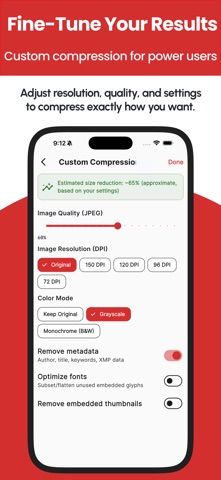
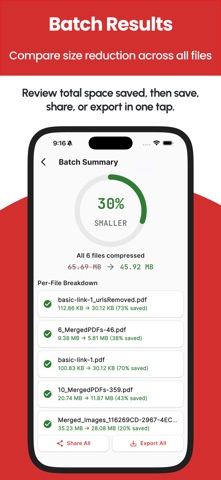
Compress PDF — Shrink File Size, 100% On Your Device Is a PDF too large to email, upload, or submit? Compress PDF reduces file size in seconds, right on your iPhone or iPad — without ever sending your document to a server. COMMON PROBLEMS THIS SOLVES - An application portal rejects your file for exceeding its size limit - A form, registration, or submission system caps uploads at a few MB - Your email provider blocks large attachments - A scanned document or photo-heavy PDF is taking up way too much storage - You just want a faster, lighter file to share If any of that sounds familiar, Compress PDF fixes it in a few taps. 100% OFFLINE — NOTHING IS EVER UPLOADED Unlike most PDF compressor apps, which quietly send your files to a server to process them, Compress PDF works entirely on-device. Your contracts, IDs, scans, and personal documents never leave your phone. No account, no sign-up, no cloud dependency — just fast, private compression, even with no internet connection. 5 COMPRESSION LEVELS — PICK ONE, OR TAKE FULL CONTROL - High Quality — light compression, virtually no visible quality loss - Medium — balanced size reduction - Standard (Recommended) — a smart default so you don't have to think about it - Low Quality — maximum size reduction when you need the smallest file possible - Custom — full manual control over JPEG quality, image resolution/DPI, color mode (grayscale or black & white), metadata removal, thumbnail removal, and font optimization — with a live estimated size preview as you adjust Most competing apps give you a single "compress" button and hope for the best. Compress PDF gives you a real dial when you need one, so you can hit an exact size target for a strict upload portal instead of guessing. BATCH COMPRESS MULTIPLE PDFs AT ONCE Select several files and compress them together in a single batch job. A dedicated progress screen shows the true status of every file — waiting, compressing, done, failed, or skipped — instead of one vague spinner. When it's finished, Share All or Export All bundles every result into a single zip so you're not tapping through separate share sheets one file at a time. HANDLES PASSWORD-PROTECTED PDFs Locked PDF? The app detects it and asks for the password instead of silently failing partway through. A COMPLETE PDF WORKFLOW, NOT JUST A COMPRESSOR - Built-in viewer to preview any PDF before or after compressing — vertical or book-style scrolling, pinch-to-zoom, rotate, jump-to-page, print, and share - Export or Save to any location you choose — not locked into app-only storage - History tracks every compression with before/after size and % saved, searchable by name, with quick re-share, re-export, or delete BUILT FOR EVERYONE Available in 20 languages with full right-to-left support for Arabic and Urdu. Light, dark, and system themes, each fully designed. Set your default compression level once so returning visits don't require re-picking settings. WHO IT'S FOR - Students and professionals submitting documents with a strict size cap - Anyone emailing large scans, reports, or contracts - People freeing up storage without sacrificing document quality - Power users who want manual control over DPI, quality, and color — not just a black-box "compress" button Compress PDF is free to use, with ads. Pro is an auto-renewable subscription (in-app purchase) that removes all ads and lifts the batch-size limit for unlimited files per batch — support ongoing development and get early access to new features. Download Compress PDF and shrink your files in seconds — privately, offline, and exactly the way you want. Terms of use: https://codifyappsprivacy.blogspot.com/p/terms-of-use.html
What's new · 1.2
Minor bug fixes and performance improvements.
Details