

Next Time: Notes & Reminders
Phil Starkovich · Productivity
Independent analytics for this App Store listing. AppTracker is not affiliated with Phil Starkovich.
Chart standing · US
What changed · US
Listing changes AppTracker has observed for this app in this storefront — new versions, price moves, rating shifts, and store copy.
This update fixes an issue where the keyboard could fail to appear or lose focus while writing a Note. Typing and switching between fields now work reliably when adding or editing Entries and Notes. A Done control above the Note keyboard makes it easy to dismiss when you finish typing.
In-app purchases · US
No in-app purchases.
Screenshots



About
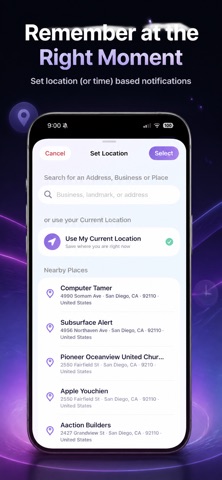
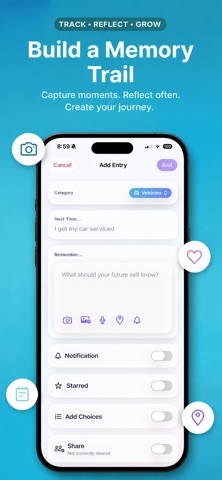
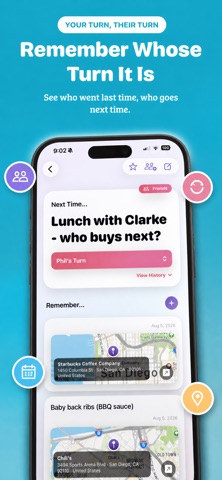
Next Time is a personal memory companion for the useful details ordinary task apps forget. Create an Entry for a recurring person, place, activity, or event, then add Notes for everything your future self should know. USE IT FOR REAL LIFE • Remember what to order at a favorite restaurant• Keep packing advice for your next camping trip or vacation• Save questions for a doctor visit or service appointment• Recall gift ideas, preferences, places, and lessons learned CAPTURE THE WHOLE STORY Add text, photos, videos, voice memos, and saved locations. Keep dated Notes in the order that works for you, turning each Entry into a useful history you can revisit. GET A NUDGE WHEN IT MATTERS Add multiple date-and-time or arrival-based Notifications to an Entry or individual Note. See upcoming Notifications on Home or browse them in the built-in calendar. MAKE RECURRING CHOICES EASIER Add a customizable choice control—such as who pays next or whose turn it is—and keep a timestamped history of every change. FIND ANYTHING FAST Organize Entries with customizable categories and tags. Search titles, Note text, places, choices, and Notification details. Star important Entries for quick access, and archive what you no longer need. PRIVATE, PERSONAL, AND BUILT FOR IPHONE No app account is required. Next Time works locally and uses private iCloud sync when available. Share individual Entries only with people you choose, and optionally protect the app with Face ID, Touch ID, or your device passcode. Stop forgetting the small details that make next time better.
What's new · 1.0.1
This update fixes an issue where the keyboard could fail to appear or lose focus while writing a Note. Typing and switching between fields now work reliably when adding or editing Entries and Notes. A Done control above the Note keyboard makes it easy to dismiss when you finish typing.
Details