

SpeedRead: RSVP Trainer
Takumi Sekiguchi · Education
Independent analytics for this App Store listing. AppTracker is not affiliated with Takumi Sekiguchi.
Chart standing · US
What changed · US
Listing changes AppTracker has observed for this app in this storefront — new versions, price moves, rating shifts, and store copy.
Reading now works in 18 languages, including the in-app text. After the ad consent check, the app now asks for tracking permission. Free version limits: up to 3 saved texts and 14 sessions in History; Analytics charts and CSV export need Full Access.
In-app purchases · US
What this app sells inside itself, grouped by kind and priced for this storefront.
Screenshots



About
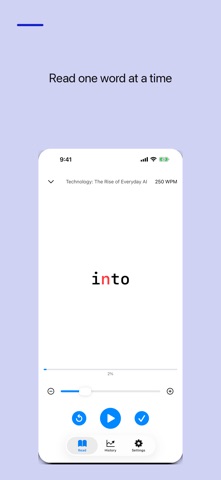
SpeedRead trains you to read faster using the RSVP (Rapid Serial Visual Presentation) technique. Words appear one at a time in a fixed spot, so your eyes stop darting across the page. Build your speed gradually with customizable settings. Features: - Word-by-word RSVP display - Speed range: 50-1000 WPM - Focus mode: show 1, 2 or 3 words at a time for space-separated text such as English (the speed counts one display as one, so showing 2 or 3 words gives more words per minute than the set speed) - Japanese and Chinese text is shown in fixed 4-character chunks, and its speed is set in characters per minute (100-1800 CPM) - Optional pauses at punctuation for easier comprehension - White, dark and sepia themes with adjustable font size - Reading statistics, session history and progress tracking - Daily reading streak to keep you practising - Add your own texts or paste articles and book excerpts - Reading level and estimated reading time for the built-in sample texts, an on-screen progress percentage while reading, and unfinished sessions marked in History FREE VERSION AND FULL ACCESS The free version displays banner ads. A one-time Full Access purchase unlocks every feature and removes ads. Customers who previously bought the paid app also continue without ads. The free version includes up to 3 saved texts and up to 14 sessions in History. Analytics charts and CSV export require Full Access. Privacy Policy: https://smallappworks.com/speedread/privacy/ Support: https://smallappworks.com/speedread/support/
What's new · 1.0.5
Reading now works in 18 languages, including the in-app text. After the ad consent check, the app now asks for tracking permission. Free version limits: up to 3 saved texts and 14 sessions in History; Analytics charts and CSV export need Full Access.
Details