

Chart standing · US
Screenshots




About
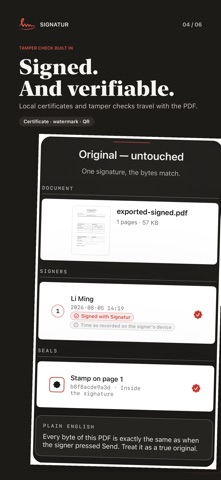
Sign every document the moment it arrives. Signatur puts signing, form filling, verification and PDF editing in one app. Quotes, approvals, onboarding papers, agreements — any document that needs your signature gets signed and sent back in minutes. No printer, no scanner. LEARN IT IN THREE MINUTES A Guide & Practice file ships inside the app: page 2 is a practice contract. Sign it, fill it, verify it — then sign the real thing. SIGN LIKE ON PAPER • Handwritten signature, stamp and date — drop them exactly where they belong • Face ID confirms before the ink lands, so every signature is yours • Seam stamp for multi-page documents, one mark across every page pair • Form fields detected automatically — name, date, company filled in one pass EVERY DOCUMENT CAN BE VERIFIED • Signed files carry an invisible watermark — if anything changes, one check reveals it • Verdicts in plain language: an original is an original, a modified file says so • Signatures made with other tools are listed, never judged — no false accusations • Verification is free forever for anyone you send files to, no account needed MORE THAN PREVIEW • Merge PDFs, password-protect files • Redact sensitive content for real — removed, not covered • Page tools: delete, rotate, reorder • Scan paper with the camera, stitch chat screenshots into a PDF BUY ONCE, USE EVERYWHERE One purchase unlocks iPhone, iPad and Mac. Sign on your phone, keep editing on your Mac. YOUR FILES STAY ON YOUR DEVICE Signing, filling, watermarking and verification all happen locally. No account, no upload — there is no server holding your documents, by design. SIGNATUR PRO Your first 3 documents are free. After that: • Yearly — 7 days free, a reminder 2 days before any charge, billed only if you stay • Lifetime — pay once, keep it forever, no subscription • Monthly — flexible, cancel anytime Reading, verifying and forwarding stay free forever. Terms of Use (EULA): https://www.apple.com/legal/internet-services/itunes/dev/stdeula/
What's new · 1.83
• Signatures stay upright and proportional on rotated PDF pages, including co-signing and stamps you rotate by hand. • A countersigned copy that comes back is filed as the next version of the same document, not a new row. • If signing cannot finish, your pending edits remain available. Switching documents waits while signed bytes are unsaved, and saving or sharing failures are reported clearly. • Pro access now resists overlapping App Store entitlement checks, and every purchase or restore action ends with a visible result. • Very large signature images are decoded at a safe size to prevent memory spikes.
Details