

Event Days Timer
Wujie Yibang (fuzhou) Software Technology Co., Ltd · Productivity
Independent analytics for this App Store listing. AppTracker is not affiliated with Wujie Yibang (fuzhou) Software Technology Co., Ltd.
Chart standing · US
What changed · US
Listing changes AppTracker has observed for this app in this storefront — new versions, price moves, rating shifts, and store copy.
NEW • Import from Reminders and Calendar: open Import in the Themes tab, pick existing reminders or events, and turn them into moments in one tap, sorted into groups. Repeat settings (including Never) are kept as they were, and items that already had an alert get notifications; alarms stay off until you turn them on for a moment. Read-only; your original data is never changed • New Seconds and Milliseconds units: years, months, days, hours, minutes, seconds and milliseconds can each be turned on or off • New Scheduled Alarms list: see every alarm the app has set and when it will ring under Themes > Alarms, and tap one to open its moment CHANGES • New moments show down to hours by default. In the final stretch, hours, minutes and seconds appear automatically • Existing moments now also show down to hours by default; turn minutes, seconds or milliseconds back on under Display Units in the editor • Precise mode (tapping the title) is replaced by the Seconds and Milliseconds units, set per moment • In the Timer Library, an open group's header now stays pinned at the top as you scroll, so you can collapse it anytime. Only one group opens at a time for a tidier list IMPROVEMENTS & FIXES • Much lower battery use: only cards on screen refresh, and collapsed groups no longer do • Smoother expanding and scrolling in the Timer Library • Fixed lag, and the editor failing to open, when milliseconds were on • Fixed All Moments freezing on some iOS versions • Fixed several alarms going off at once in some cases. Open the app once after updating and the extra alarms are cleared automatically
Price & rating history · US
Reconstructed from the listing changes AppTracker has observed in this storefront. A field is charted once it has changed more than once, and each line starts at the value it moved from.
Price · Free now · 3 changes on record
In-app purchases · US
No in-app purchases.
Screenshots


About
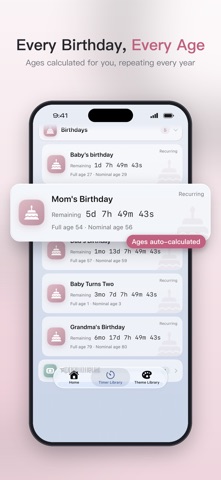
Event Days Timer keeps every important date in one place: birthdays, anniversaries, credit card bills, holidays, exams, concerts. Add it once and the app counts how long to go, or how long it's been, and reminds you right on time. HOME AT A GLANCE • Featured: pin up to 3 moments to the top of Home • Coming Up: everything due in the next 7 days, sorted by time JUST TYPE, AUTO-SORTED • Type "Mom's Birthday", "Rent" or "Christmas" and the group and repeat rule are set for you • Holiday dates fill in automatically, including lunar holidays like Chinese New Year and Mid-Autumn • Anything not recognized goes to Life, and you can change it anytime IMPORT FROM REMINDERS & CALENDAR • Pick dates you already keep in Reminders or Calendar and import them in one tap, sorted into groups • Read-only: your original data is never changed, and access is only requested when you tap Import BIRTHDAYS • Ages calculated automatically, including traditional Chinese nominal age • Gregorian and lunar birthdays repeat every year ANNIVERSARIES • Dating, wedding, baby's birthday, new home: years, months and days counted for you • Count up to see how long it's been, or count down to the next one BILLS, NEVER LATE • Credit cards, mortgage, car loan: monthly countdowns that repeat on their own • Daily, weekly, monthly, yearly, or every few days or weeks REMINDERS THAT REACH YOU • Notifications days or minutes ahead • Real system-level alarms on iOS 26 that ring even on the Lock Screen • Tap a notification to open that moment 7 GROUPS, ORGANIZED • Life, Work, Anniversaries, Payment Days, Holidays, Birthdays, Appointments • Search and Archive; one-time moments archive themselves when they're done 8 THEMES, 7 IN SOFT MUTED TONES • Fresh Cards, Lotus Pink, Dusty Rose, Caramel Latte, Evening Breeze, Celadon, Misty Blue, Starry Night • Set an icon and color for each moment • Home Screen and Lock Screen widgets have their own themes too YOUR UNITS, YOUR WAY • Turn years, months, days, hours, minutes, seconds and milliseconds on or off; hours by default • In the final stretch it switches to hours, minutes and seconds automatically BATTERY, SYNC & PRIVACY • Only cards you can see are refreshed; collapsed groups use no power • Optional iCloud sync to restore on a new phone • No account needed; your data stays on your device and in your own iCloud Event Days Timer: never forget the days that matter.
What's new · 2.0.1
NEW • Import from Reminders and Calendar: open Import in the Themes tab, pick existing reminders or events, and turn them into moments in one tap, sorted into groups. Repeat settings (including Never) are kept as they were, and items that already had an alert get notifications; alarms stay off until you turn them on for a moment. Read-only; your original data is never changed • New Seconds and Milliseconds units: years, months, days, hours, minutes, seconds and milliseconds can each be turned on or off • New Scheduled Alarms list: see every alarm the app has set and when it will ring under Themes > Alarms, and tap one to open its moment CHANGES • New moments show down to hours by default. In the final stretch, hours, minutes and seconds appear automatically • Existing moments now also show down to hours by default; turn minutes, seconds or milliseconds back on under Display Units in the editor • Precise mode (tapping the title) is replaced by the Seconds and Milliseconds units, set per moment • In the Timer Library, an open group's header now stays pinned at the top as you scroll, so you can collapse it anytime. Only one group opens at a time for a tidier list IMPROVEMENTS & FIXES • Much lower battery use: only cards on screen refresh, and collapsed groups no longer do • Smoother expanding and scrolling in the Timer Library • Fixed lag, and the editor failing to open, when milliseconds were on • Fixed All Moments freezing on some iOS versions • Fixed several alarms going off at once in some cases. Open the app once after updating and the extra alarms are cleared automatically
Details