

Cliptum
Vasilij Sviridov · Photo & Video
Independent analytics for this App Store listing. AppTracker is not affiliated with Vasilij Sviridov.
Chart standing · US
What changed · US
Listing changes AppTracker has observed for this app in this storefront — new versions, price moves, rating shifts, and store copy.
Here’s **what’s new** in this Cliptum version: ### Monetization - **Free with ads** as the default plan - **Watch ad → unlock Save** (rewarded ads) - Pro = **no ads + Pro templates + 1080p** - Weekly / Monthly still available ### New / upgraded templates - **Plain+** — long video → ~**20s** of random **5s** cuts - **Plain++** — long video → ~**40s** of random **5s** cuts - **Highlights** — long video → ~20s highlight-style cuts - Stronger looks: color washes, frames, neon, circle focus, letterbox - Better motion: pan zoom, punch, drift ### Fixes / polish - Preview no longer crashes with fancy looks (looks apply on export) - Plain+ / Highlights / Plain++ preview fixed (was black) via file-based preview - Smaller template picker UI ### Still free forever - **Plain** template at **720p** (Standard)
Screenshots



About
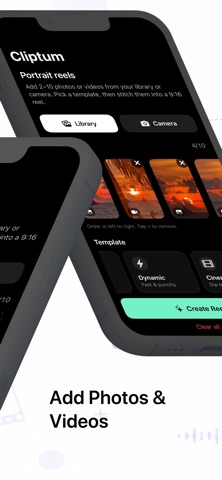
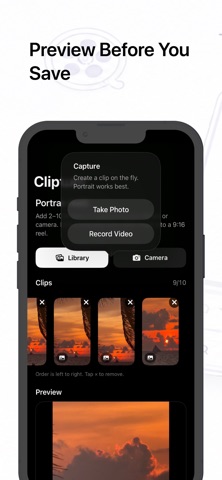
Create polished portrait reels from your favourite photos and videos with Cliptum. Choose 2–10 clips from your photo library or capture something new with the camera. Arrange your moments, select a template, preview the result, and save your finished 9:16 reel directly to Photos. Features: • Combine photos and videos • Create portrait 9:16 reels • Choose from multiple visual templates • Use Plain mode for clean cuts without effects • Preview your reel before exporting • Export in 1080 × 1920 resolution • Capture new photos and videos in the app • Media processing stays on your device Cliptum keeps reel creation simple — without a complicated editing timeline. Terms of Use (EULA): https://qaimos.co.uk/cliptum/terms.html Privacy Policy: https://qaimos.co.uk/cliptum/privacy.html Cliptum Free: • Using third‑party advertising / AdMob data types. Cliptum Pro Subscriptions: • Cliptum Pro Weekly – 1 week, auto-renewable • Cliptum Pro Monthly – 1 month, auto-renewable Payment is charged to your Apple ID account at confirmation of purchase. Subscriptions automatically renew unless cancelled at least 24 hours before the end of the current period. Manage or cancel anytime in your Apple ID account settings.
What's new · 1.4
Here’s **what’s new** in this Cliptum version: ### Monetization - **Free with ads** as the default plan - **Watch ad → unlock Save** (rewarded ads) - Pro = **no ads + Pro templates + 1080p** - Weekly / Monthly still available ### New / upgraded templates - **Plain+** — long video → ~**20s** of random **5s** cuts - **Plain++** — long video → ~**40s** of random **5s** cuts - **Highlights** — long video → ~20s highlight-style cuts - Stronger looks: color washes, frames, neon, circle focus, letterbox - Better motion: pan zoom, punch, drift ### Fixes / polish - Preview no longer crashes with fancy looks (looks apply on export) - Plain+ / Highlights / Plain++ preview fixed (was black) via file-based preview - Smaller template picker UI ### Still free forever - **Plain** template at **720p** (Standard)
Details