

Quick Sub Mobile
Tomoyuki Okawa · Photo & Video
Independent analytics for this App Store listing. AppTracker is not affiliated with Tomoyuki Okawa.
Chart standing · US
What changed · US
Listing changes AppTracker has observed for this app in this storefront — new versions, price moves, rating shifts, and store copy.
1. The app icon is fixed. 2. The app will now check and see if there is a new software update and will notify the user of such if there is. 3. Change: With 'Unlimited number of projects' in-app purchase, the user will be able to save an unlimited number of projects. Without it, the maximum number of projects that they can save is limited to 3. In order to make an in-app purchase, please tap the Store toolbar button at the top left in the Startup screen.
Screenshots





About
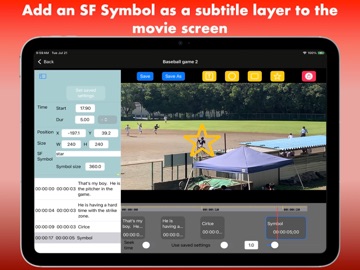
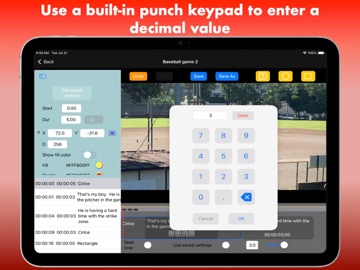
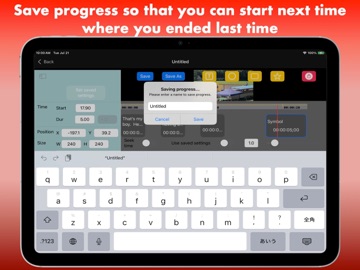
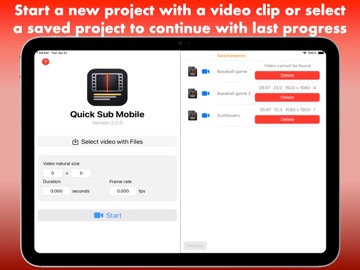
Professional Video Overlays Made Simple Bring your video content to life with Quick Sub Mobile, the powerful, native iOS application designed for precision overlay editing. Built from the ground up in SwiftUI, Quick Sub Mobile provides a fluid, high-performance environment to enhance your videos directly on your iPhone or iPad. Versatile Creative Tools Go beyond simple subtitling. Quick Sub Mobile supports four distinct, customizable layer types: ・ Text: Add professional captions with ease. ・ Geometric Shapes: Use Circles and Rectangles for emphasis or highlights. ・ SF Symbols: Access thousands of high-quality icons from Apple’s native library to add professional polish to any video. (In order to use SF Symbols with this application, please refer to the SF Symbol.app for symbol names.) Professional Editing Features ・ Precision Timeline: Unlike its predecessors, Quick Sub Mobile features a fully resizable timeline, giving you frame-accurate control over when your overlays appear and disappear. ・ Robust Undo/Redo: Experiment with confidence. Our reliable undo/redo system ensures that a simple tap is all it takes to correct mistakes. ・ Project Management: Save your progress and pick up exactly where you left off. The intuitive startup screen lists all your projects, allowing you to quickly switch between ongoing edits or import a fresh video clip to start a new project. Built for Performance Developed as the mobile evolution of the acclaimed Quick Sub 2 desktop software, Quick Sub Mobile is optimized for the iOS ecosystem. Experience a seamless transition from desktop-class functionality to a portable, touch-optimized workflow. Download Quick Sub Mobile today and start turning your video concepts into reality.
What's new · 2.0.5
1. The app icon is fixed. 2. The app will now check and see if there is a new software update and will notify the user of such if there is. 3. Change: With 'Unlimited number of projects' in-app purchase, the user will be able to save an unlimited number of projects. Without it, the maximum number of projects that they can save is limited to 3. In order to make an in-app purchase, please tap the Store toolbar button at the top left in the Startup screen.
Details