

Widget Master: Photo Widgets
Sangwoo Byeon · Utilities
Independent analytics for this App Store listing. AppTracker is not affiliated with Sangwoo Byeon.
Chart standing · US
What changed · US
Listing changes AppTracker has observed for this app in this storefront — new versions, price moves, rating shifts, and store copy.
■ Refresh your widgets with new default designs and gradient backgrounds ■ Add up to two photos for free and unlock a third with Pro ■ Choose any custom background color with Widget Master Pro ■ Enjoy centered text and haptic feedback for key actions ■ Discover more apps from Boogios Studio in Settings
In-app purchases · US
What this app sells inside itself, grouped by kind and priced for this storefront.
Screenshots


Similar apps
Competitors and close alternatives, as estimated by AppTracker.
 Photo Widget: Theme Wallpapers
Photo Widget Inc.
Photo Widget: Theme Wallpapers
Photo Widget Inc.
 Widgetsmith
Cross Forward Consulting, LLC
Widgetsmith
Cross Forward Consulting, LLC
 MD Widgets: Live Wallpaper
MD Studio
MD Widgets: Live Wallpaper
MD Studio
 LockWidget - LockScreen Themes
SoCloud Technology Co., Limited
LockWidget - LockScreen Themes
SoCloud Technology Co., Limited
 NewThing Widgets Pro
AppsLab Co.
NewThing Widgets Pro
AppsLab Co.
 Widgetify: Widgets & Themes
ONE HEARTED NETWORK TECHNOLOGY CO.,LIMITED
Widgetify: Widgets & Themes
ONE HEARTED NETWORK TECHNOLOGY CO.,LIMITED
 Color Widgets
Digital Charms, Inc.
Color Widgets
Digital Charms, Inc.
 WidgetClub:Widget, Theme, Icon
Liume, Inc
WidgetClub:Widget, Theme, Icon
Liume, Inc
About
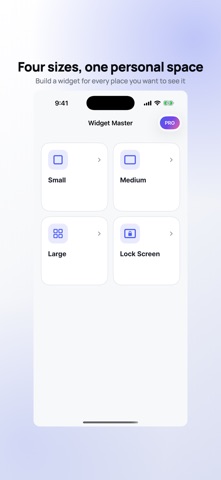
Create the photo, text and countdown widget you want to see every day. Widget Master is a custom widget maker for your Home Screen and Lock Screen. Add automatic photo cutouts, D-Day counters, text, cute fonts and colour palettes, then place each element in the preview. ■ Small, Medium, Large and Lock Screen Design each widget size separately, with a layout that fits the space you actually use. ■ Photo widgets with automatic cutouts Pick a photo and turn it into a sticker on your device. Drag, resize and rotate up to two photos in each widget. ■ D-Day and countdown widgets Track birthdays, anniversaries, trips, exams and other important dates with D-30, D-Day or D+10. ■ Free designs, Pro creativity Free users can save up to two Small designs and one design for each other size. Pro unlocks unlimited designs and premium fonts. ■ Fonts and colour palettes Start with four free fonts, then unlock expressive Korean-friendly fonts and more ways to make your widget yours. ■ Add it to your Home Screen After editing, add Widget Master from the iOS widget gallery and select the design you saved. ■ Privacy first No email or password is needed. Your nickname and a random installation identifier are sent to our server to create your profile, and your nickname appears in a Slack signup notification to the developer. Widget text, photos, dates, designs and settings stay on your device. Photo cutouts use Apple's on-device Vision framework. Widget Master Pro is an optional auto-renewable subscription. Manage or cancel it in your Apple Account settings. Terms of Use: https://boogios.notion.site/Widget-Master-Terms-of-Use-39a686ba3354813e80c8f9de560bf21c
What's new · 1.0.5
■ Refresh your widgets with new default designs and gradient backgrounds ■ Add up to two photos for free and unlock a third with Pro ■ Choose any custom background color with Widget Master Pro ■ Enjoy centered text and haptic feedback for key actions ■ Discover more apps from Boogios Studio in Settings
Details