

Tire Size Calculator +
heekyung moon · Utilities
Independent analytics for this App Store listing. AppTracker is not affiliated with heekyung moon.
Chart standing · US
What changed · US
Listing changes AppTracker has observed for this app in this storefront — new versions, price moves, rating shifts, and store copy.
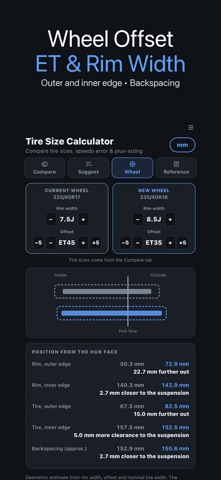
• New Wheel tab: rim width and offset (ET) for the current and new wheel, with the change at the outer and inner edge, backspacing and a to-scale cross-section • Suggested sizes open in the comparison with one tap, and the base size starts from your current tire • Speedometer table in inch mode now uses round mph steps (20 to 80) • Privacy policy and privacy choices in the menu • Line icons, haptic feedback and aligned numbers
In-app purchases · US
No in-app purchases.
Screenshots


About
Tire size calculator for anyone changing tires or wheels: compare two tire sizes, see the speedometer error, find plus sizes and check how a new wheel offset moves the rim in or out. ▶ Compare two tire sizes Pick the current and the new size, for example 225/45R17 against 235/40R18, and read the difference in overall diameter, sidewall height, circumference, ride height and revolutions per km or mile. Both tires are drawn to scale on top of each other, so the size change is easy to see. • Metric sizes and flotation sizes such as 31x10.50R15 • Switch between mm and inches at any time ▶ Speedometer and odometer error A bigger or smaller tire changes how far the car travels per wheel turn. The table shows what you really drive when the speedometer reads 30, 50, 60, 80, 100 or 120 km/h (20 to 80 mph in inch mode), plus the odometer error in percent. ▶ Plus sizes and alternative sizes Enter a base size and get the metric sizes (widths 135–355, rims 13–24) within ±3% of its overall diameter, grouped by rim so a plus-one or plus-two is easy to plan. Tap a size to open it straight in the comparison. ▶ Wheel offset and rim width New in this version. Enter rim width (4 to 13 J) and offset (ET −50 to +70 mm) for the current and the new wheel. The app shows how many millimetres the outer edge moves out, how much closer the inner edge gets to the suspension, the change at the tire edges and the backspacing, with a to-scale cross-section of both wheels. ▶ Read the sidewall Reference tables for P, LT, XL and RF, speed ratings from L to (Y) in km/h and mph, and load index 60 to 130 in kg and lb. ▶ My Garage Save the sizes of your cars and load one back with a single tap. All calculations run on your device and need no account. Good to know: results are geometric estimates from the size markings. Real tire width changes with the rim, and backspacing assumes a 12.7 mm flange. The app does not say whether a wheel will fit your car. Always confirm fitment and clearance with your vehicle manual or a tire professional.
What's new · 1.2.4
• New Wheel tab: rim width and offset (ET) for the current and new wheel, with the change at the outer and inner edge, backspacing and a to-scale cross-section • Suggested sizes open in the comparison with one tap, and the base size starts from your current tire • Speedometer table in inch mode now uses round mph steps (20 to 80) • Privacy policy and privacy choices in the menu • Line icons, haptic feedback and aligned numbers
Details