

LowPoly by Amora
Leonardo Amora · Productivity
Independent analytics for this App Store listing. AppTracker is not affiliated with Leonardo Amora.
Chart standing · US
What changed · US
Listing changes AppTracker has observed for this app in this storefront — new versions, price moves, rating shifts, and store copy.
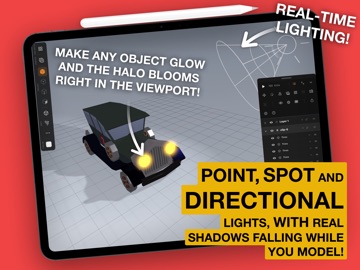
LowPoly 1.8.3 Who you gonna call? BUG BUSTERS! Part 2 The ghost hunt goes on. This time we went after every tap and every pencil stroke, so LowPoly does exactly what your hand means. NEW - Ambient light on every light. One amount and one color square lift the dark side of your scene with a soft, even fill, no shadows, no fuss. It starts at zero, so nothing changes until you want it to. - Face loops. In face mode, double tap a face and the whole ring around the model is selected, like the rim of a vase. Double tap again to switch direction. - Your camera stays where you left it. Every project reopens with the same angle, distance and framing, in perspective or orthographic. - See what Magnetic grabs. While you drag, the target lights up in yellow: the vertex, the edge or the face your piece is snapping to. - Bridge anything. Join a round face to a square one: the sides are stitched by length, with quads where they match and triangles where they don't, just like Blender's Bridge Edge Loops. - The selection cage picks vertices, edges and faces on any visible piece, selected or not, and it respects what's in front: a cage over a window leaves the wall behind it alone. FEELS RIGHT IN YOUR HAND - One simple rule for selecting, in every mode: tap or cage to replace, rest a finger (or hold Shift) to add. - The resting finger works anywhere on the screen, over panels and in the corners, and it keeps holding even when iPadOS palm rejection gets in the way. - The gizmo steps out of the way: a tap on it selects what's behind, and finishing a move never selects a face by accident. - New shapes arrive ready to tweak, in object mode with their settings right in More options. - The Create button shows what's armed. - The layers panel resizes freely, even with a long list. - Light color is a single square that opens the full spectrum. - Knife, Lattice and sketch handles keep the same size on screen at any zoom. GHOSTS BUSTED - The Knife cuts through anything: hidden seams, folded faces and strokes that start right on an edge. - Clay renders show real shadows on the pieces, and spot lights stay inside their cone. - Rotating a tilted piece no longer jumps to the other side near a quarter turn. - Zooming in close in orthographic view no longer cuts into your model. Maximum effort!
In-app purchases · US
No in-app purchases.
Screenshots



About
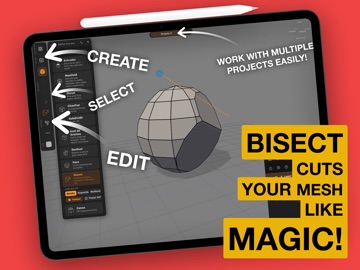
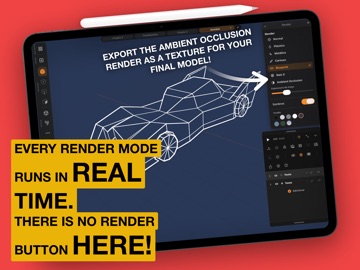
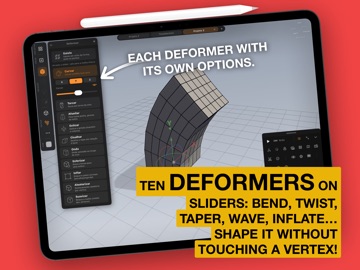
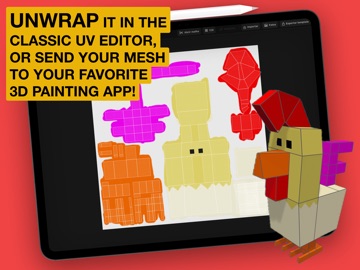
The 3D studio that fits in your bag. And works on a Mac too! :D :D LowPoly brings real 3D modeling to iPad and Mac, with the fluidity you already love from drawing. Your finger navigates, the Apple Pencil builds. It is the Procreate feel applied to lowpoly 3D: direct, tactile and fast. Draw it, build it Sketch a line and watch it become geometry. Spin a profile on the Lathe for vases, bottles, wheels and chess pieces, or add pitch and turns for springs and spiral staircases. Draw a closed outline and pull it into thickness for logos, signs and gears. Draw a floor plan and raise real walls, with thickness, mitered corners and magnetic nodes. Freehand with the Pencil, then drag the nodes until it is exactly right. Every shape stays editable, so you can reopen the drawing that made it. Already have the artwork? Import SVG, PDF, AI, EPS, DXF and PLT from Files or the clipboard, and it becomes a model. Sculpt it for real Start from a primitive and go: extrude, inset, bevel, subdivide, edge loop, slide, a knife that cuts as you draw, shell for thickness, boolean to merge and carve, bridge, live symmetry and smoothing groups. Bend, twist, taper and inflate the whole shape, or grab a lattice cage and push it around. A complete modeling kit with nothing buried in menus. Animate it A real keyframe timeline, right under the model. Animate position, rotation, scale, visibility and even the deformers, so a shape can bend, twist and inflate over time. Set easing per keyframe, choose your frame rate and duration, drag and snap keyframes to frames, and scrub with the model moving live. Play it back full speed on device, then export the animation to GLB or FBX for your engine, as a video, or as a PNG sequence with alpha to composite anywhere. Bring your model to life Paint per face or open the UV and take the texture to your favorite painting app. Flip on Cartoon mode for instant outlines, flat shading and a studio shadow, or bake ambient occlusion for depth. Print it Slice right here, send it over the network to Bambu Lab, OctoPrint, Klipper or PrusaLink, and watch the job from the app: progress, time left and temperatures, live. Export anywhere GLB with animation for engines and AR, OBJ, FBX and 3DS for other software, STL in millimeters for 3D printing, and a 9:16 video, turntable or your animation, ready to post. No forced cloud. No subscription. Your model, your control. Download it and turn your next idea into a model right now. Maximum effort!
What's new · 1.9
LowPoly 1.8.3 Who you gonna call? BUG BUSTERS! Part 2 The ghost hunt goes on. This time we went after every tap and every pencil stroke, so LowPoly does exactly what your hand means. NEW - Ambient light on every light. One amount and one color square lift the dark side of your scene with a soft, even fill, no shadows, no fuss. It starts at zero, so nothing changes until you want it to. - Face loops. In face mode, double tap a face and the whole ring around the model is selected, like the rim of a vase. Double tap again to switch direction. - Your camera stays where you left it. Every project reopens with the same angle, distance and framing, in perspective or orthographic. - See what Magnetic grabs. While you drag, the target lights up in yellow: the vertex, the edge or the face your piece is snapping to. - Bridge anything. Join a round face to a square one: the sides are stitched by length, with quads where they match and triangles where they don't, just like Blender's Bridge Edge Loops. - The selection cage picks vertices, edges and faces on any visible piece, selected or not, and it respects what's in front: a cage over a window leaves the wall behind it alone. FEELS RIGHT IN YOUR HAND - One simple rule for selecting, in every mode: tap or cage to replace, rest a finger (or hold Shift) to add. - The resting finger works anywhere on the screen, over panels and in the corners, and it keeps holding even when iPadOS palm rejection gets in the way. - The gizmo steps out of the way: a tap on it selects what's behind, and finishing a move never selects a face by accident. - New shapes arrive ready to tweak, in object mode with their settings right in More options. - The Create button shows what's armed. - The layers panel resizes freely, even with a long list. - Light color is a single square that opens the full spectrum. - Knife, Lattice and sketch handles keep the same size on screen at any zoom. GHOSTS BUSTED - The Knife cuts through anything: hidden seams, folded faces and strokes that start right on an edge. - Clay renders show real shadows on the pieces, and spot lights stay inside their cone. - Rotating a tilted piece no longer jumps to the other side near a quarter turn. - Zooming in close in orthographic view no longer cuts into your model. Maximum effort!
Details