

Movie Canvas: Poster Wallpaper
Daniel Hinkson · Photo & Video
Independent analytics for this App Store listing. AppTracker is not affiliated with Daniel Hinkson.
Chart standing · US
What changed · US
Listing changes AppTracker has observed for this app in this storefront — new versions, price moves, rating shifts, and store copy.
Surprise Me gets into the season. In October about one in three wallpapers comes with blood or cobwebs, then snow and lights in December, confetti at New Year and hearts before Valentine's Day. Turn off Seasonal touches in Settings if you'd rather not. Want only your best? Set a lowest rating for Surprise Me in Settings, like 8 and up. Your watchlist still comes through. Surprise Me now keeps an album for each screen: iPhone wallpapers go to Movie Canvas Surprise (iPhone) and iPad ones to Movie Canvas Surprise (iPad), so they never mix. Point your Photo Shuffle Lock Screen at the new one. The old album empties itself the next time a run replaces its set. A Top 10 now ranks only what it can: films that are out and have a rating, yours or TMDb's. Upcoming and unrated films go in only where you place them, and a Surprise Top 10 draws from your ratings alone.
Ratings breakdown · US
The star breakdown behind this app's rating in this storefront.
In-app purchases · US
No in-app purchases.
Screenshots





About
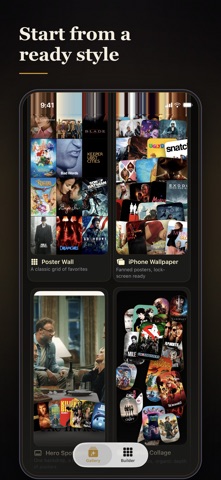
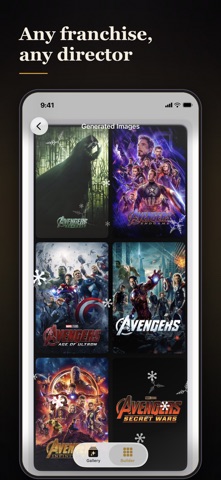
TURN YOUR FAVORITE MOVIES AND SHOWS INTO WALLPAPER ART. Movie Canvas builds poster wallpapers from the films and TV you actually love, with no design skills needed. Choose a layout, pick your device, and it composes a crisp, gallery-ready image at your screen's exact resolution. Save it to Photos and set it as your lock screen, home screen, iPad wallpaper, or desktop background. FREE, WITH EVERYTHING INCLUDED No in-app purchases, no subscription and no adverts. Every layout, every size and every wallpaper you make is yours, unwatermarked. SURPRISE ME Tap once and get a handful of finished wallpapers with nothing to choose: a different layout, finish and cast every time, as often as you like. Want more? Ask for 10, 20 or 30 at a time and save the whole set to one album in a single tap, ready for a Photo Shuffle Lock Screen that changes every hour. Turn on Save every run to Photos in Settings and each run saves itself to a Movie Canvas Surprise album for its screen, replacing the last set. iOS asks you to confirm; say no and both sets stay. Only wallpapers Movie Canvas saved there are ever removed. EIGHT LAYOUTS • Poster Wall: the classic grid, edge to edge • Fanned Mosaic: overlapping, tilted posters across the whole screen • Hero and Band: one cinematic backdrop with an arc of posters • Scatter Collage: layered posters at varied sizes and depth • One Sheet: a single film, full bleed, with its title and year • Filmstrip: your posters in the frames of 35mm film • Top 10: a podium of the ten you choose, #1 featured • Spine Shelf: posters standing as cases on a shelf YOUR TOP 10, IN YOUR ORDER A rating cannot pick ten favorites when you have rated hundreds of films the same. So the Top 10 editor opens on the order the canvas draws, lets you drag it into the order you want, and browses the rest of your selection to swap films in. It tells you when a tie decided the cut. A FRESH ONE EVERY MORNING Turn on a morning nudge and Movie Canvas opens straight into Surprise Me, with a handful of new wallpapers built from your own library. Pick the time. Turn it off whenever you like. Or use the Shortcuts action and let your wallpaper change by itself. WORDS OF YOUR OWN Top 10 and One Sheet will take a heading you write. Call it anything you want and see it in the preview as you type. BUILD FROM A FRANCHISE OR A DIRECTOR No account and no library needed. Search a franchise and get every film in it, or pick a director or an actor and build a wall from their filmography. SEASONAL DESIGNS Blood running down the screen in October, snow and strings of lights in December, hearts in February. Every ornament is drawn to your screen's size, so it is sharp on a watch face and on a poster print. FITS EVERY SCREEN EXACTLY True device resolution for iPhone, iPad in either orientation, and desktop monitors, plus Apple Watch faces, square and story sizes for sharing, and 300 dpi prints up to 18 by 24 inches. Movie Canvas also runs on a Mac with Apple silicon and builds for your actual screen, ultrawide included. BUILT FROM YOUR TASTE Pull posters from your ratings and watchlist, filtered by genre or studio, sorted by rating, release date, or when you rated them. Connect your movie account, or use it alongside How to Movie and How to TV. A built-in sample library lets you design a wallpaper the moment you open the app. A NEW WALLPAPER EVERY MORNING Movie Canvas adds a Make a Wallpaper action to Shortcuts. Pair it with Set Wallpaper in a personal automation and the app never has to be opened. DESIGN, SAVE, REPEAT Save any setup as a reusable job and re-run it whenever your list grows. Everything you make is kept, so you can come back to it. EVERYTHING, FOR NOTHING Batch generation, unlimited runs, the whole Surprise Me set and Combined Runs to chain multiple jobs are all included. There is nothing to buy. Design a wallpaper as unique as your taste in movies. Movie Canvas uses the TMDb API but is not endorsed or certified by TMDb.
What's new · 1.7
Surprise Me gets into the season. In October about one in three wallpapers comes with blood or cobwebs, then snow and lights in December, confetti at New Year and hearts before Valentine's Day. Turn off Seasonal touches in Settings if you'd rather not. Want only your best? Set a lowest rating for Surprise Me in Settings, like 8 and up. Your watchlist still comes through. Surprise Me now keeps an album for each screen: iPhone wallpapers go to Movie Canvas Surprise (iPhone) and iPad ones to Movie Canvas Surprise (iPad), so they never mix. Point your Photo Shuffle Lock Screen at the new one. The old album empties itself the next time a run replaces its set. A Top 10 now ranks only what it can: films that are out and have a rating, yours or TMDb's. Upcoming and unrated films go in only where you place them, and a Surprise Top 10 draws from your ratings alone.
Details