

mySpotMeter
David Quiles · Photo & Video
Independent analytics for this App Store listing. AppTracker is not affiliated with David Quiles.
Chart standing · US
What changed · US
Listing changes AppTracker has observed for this app in this storefront — new versions, price moves, rating shifts, and store copy.
Updated for iOS 27. Minor improvements.
Price & rating history · US
Reconstructed from the listing changes AppTracker has observed in this storefront. A field is charted once it has changed more than once, and each line starts at the value it moved from.
Average rating · ★ 4.14 now · 5 changes on record
Ratings breakdown · US
The star breakdown behind this app's rating in this storefront.
In-app purchases · US
No in-app purchases.
Screenshots


Keywords this app targets
Search terms AppTracker associates with this app — estimates, not search volume. ❝ = in the app's title; a highlighted number is its current position for that term.
Similar apps
Competitors and close alternatives, as estimated by AppTracker.
 Spot Meter Pro
Tebo Labs Inc.
2 shared topics
Spot Meter Pro
Tebo Labs Inc.
2 shared topics
 Light Meter by WBPhoto
William Blaschko
2 shared topics
Light Meter by WBPhoto
William Blaschko
2 shared topics
 Aperture - Light Meter
Nicolae Gherasim
2 shared topics
Aperture - Light Meter
Nicolae Gherasim
2 shared topics
 Cine Meter II
Adam Wilt
2 shared topics
Cine Meter II
Adam Wilt
2 shared topics
 PocketMeter Pro
Studio C-41 Productions, LLC
PocketMeter Pro
Studio C-41 Productions, LLC
 Light Meter - Lux & EV Gauge
Vladislav Zhirnov
2 shared topics
Light Meter - Lux & EV Gauge
Vladislav Zhirnov
2 shared topics
 LuxLab
泽涛 林
2 shared topics
LuxLab
泽涛 林
2 shared topics
 Photometer
lostview GmbH
1 shared topic
Photometer
lostview GmbH
1 shared topic
About
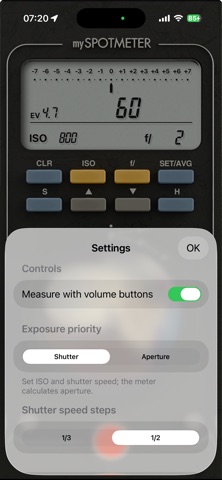
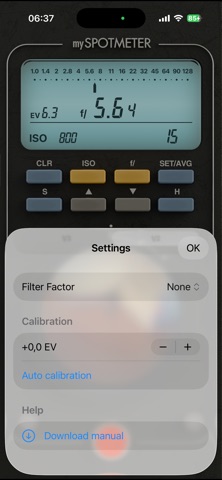
Designed by a photographer, for photographers. Built with one clear goal: precise spot metering for photographers who want full control over exposure. mySpotMeter turns your iPhone into a dedicated spot meter with selectable 1°, 2° and 4° measuring angles. Whether you shoot film or digital, you can isolate specific areas, evaluate contrast and place your exposure with confidence. Key Features • Selectable 1°, 2° and 4° spot metering angles • Dedicated readings for shadows, highlights and middle gray • Aperture or shutter speed priority • Average readings mode • Store and compare measurements directly on the exposure scale • Clear EV difference between your target and the current reading • Instant aperture calculation based on the selected ISO and shutter speed • Shutter speed range from 240 seconds to 1/8000s • Aperture range from f/1.0 to f/128 • ISO range from 3 to 409.6K • Exposure settings in 1/3 or 1/2-stop increments • Measure using the on-screen control or the iPhone volume buttons • Automatic calibration and precise manual EV adjustment • Filter factor correction up to FF1000 Built for Deliberate Exposure Instead of averaging the entire scene, mySpotMeter lets you measure only the area that matters. Compare shadows and highlights, understand the available contrast and decide exactly where to place your exposure before pressing the shutter. Download the User Manual You can view or download the complete user manual before purchasing or downloading the app. Scroll to the Information section of this App Store page and tap Developer Website. About This app is built and maintained by an independent photographer and developer. It is a focused photographic tool, continuously refined through real-world use. If you have suggestions or need help, feel free to contact me: davidquiles@me.com
What's new · 1.2.5
Updated for iOS 27. Minor improvements.
Details