

こんだて帳 週間献立と買い物リスト
AKIHIRO MATSUYAMA · Lifestyle
Independent analytics for this App Store listing. AppTracker is not affiliated with AKIHIRO MATSUYAMA.
Chart standing · US
What changed · US
Listing changes AppTracker has observed for this app in this storefront — new versions, price moves, rating shifts, and store copy.
- Your shopping list now shows a rough guide for the number of people. Change the count and ingredient amounts scale up or down (a guide only; the same ingredient is never added together) - Checking off the last item on your shopping list now brings a few petals and a gentle sound - Added a friendly hint for an empty shopping list - On iPad and other wide screens, this week's menu now sits on the left with the shopping list and other tabs on the right - Fixed labels such as Main dish breaking one letter per line in some languages, and sample dish names now read naturally in each language
In-app purchases · US
What this app sells inside itself, grouped by kind and priced for this storefront.
Screenshots


About
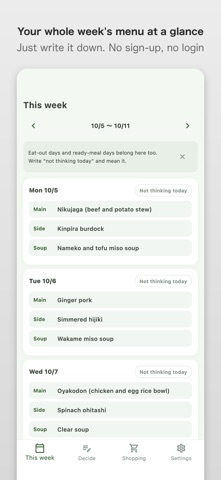
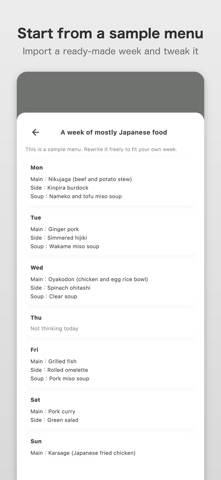
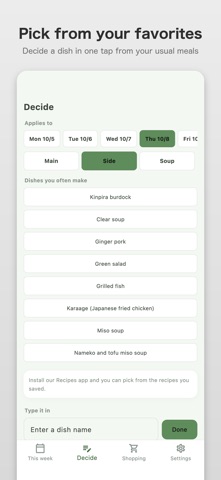
Decide a week of "what shall I cook today" in advance. Weekly Meal Plan lets you build a week of meals and turn it straight into a shopping list. There is nothing to set up: write a dish for each day and your weekly menu is ready. [Who it is for] - People who find thinking up dinner every day a little tiring - People who shop once at the weekend and want fewer extra trips - People who would rather plan the family's meals on a phone than on scraps of paper - People who want to know where their usual items were cheapest, without digging through receipts - People who do not want their records leaving the device: data stays on the device only [Build a week of meals] - Write a main, a side and a soup for each day, Monday to Sunday - It is just text, so you can jot down a dish the moment you think of it - Dishes you cook often appear as suggestions, so you can pick them instead of typing the same name again - Mark a "no-think day" for eating out or ready meals. It is fine for a menu to have those - If some days are still empty, nothing scolds you. Start with whatever you have decided - Copy last week's menu as a starting point for this week, handy if your weeks look much the same [Start from a sample menu] - The first time you open the app, you can look at a sample menu instead of facing a blank page - Import a sample you like into your own week and swap in your own dishes - Just viewing a sample saves nothing to your menu [Straight into a shopping list] - Create a shopping list from the menu you built - Save the ingredients for each dish and the list shows ingredients - Enter amounts for 2 servings and the app scales them to the number of people as a guide - The same ingredient is listed under each dish and never added up behind your back, so you can see which dish uses it - Tick things off as you buy them - The shopping list is always free to use [Know your lowest price from receipts] - Each item on the shopping list shows the lowest price you have paid so far and the store - Photograph a receipt and the app reads the items and prices so you can record them - For a long receipt, take the next part and join it into one - You can check what was read before recording it. Fix anything wrong; unticked lines are not recorded - If it cannot be read, you can type the prices in by hand - The photo is turned into text on the device only. It is never sent anywhere - Recording is free for up to 10 items. Viewing is free for any number of items [Connects with My Recipe Book] - Choose dishes you saved in the sister app My Recipe Book - It also works on its own when not connected - Only the name of the dish is shared. No text and no photos are exchanged - The connection with My Recipe Book is always free [What is free and what is paid] - Free: up to 2 weekly plans. Writing menus, the shopping list, copying last week, the My Recipe Book connection and backup stay free - From the 3rd week on, a one-time purchase makes weekly plans unlimited. It is not a recurring subscription - You can try everything in the free range first - Restore your purchase after changing devices with "Restore purchase" - Check the amount on your store's purchase screen [Safe to use] - Menus and shopping lists are kept on the device only (nothing is sent out) - No account needed - No ads - No nutrition scoring, and no lectures about how you should eat - Backup export and import are always free. Export before changing devices to be safe [One way to use it each week] 1. At the start of the week, jot down this week's dinners by day 2. Leave undecided days empty or mark them as no-think days 3. Open the shopping list and check the ingredients 4. At the store, tick off what you have bought 5. If you have time, photograph the receipt to record lowest prices 6. Next week, copy last week and change only what you want Decide a week ahead. That alone makes the kitchen a little lighter every day.
What's new · 1.4.1
- Your shopping list now shows a rough guide for the number of people. Change the count and ingredient amounts scale up or down (a guide only; the same ingredient is never added together) - Checking off the last item on your shopping list now brings a few petals and a gentle sound - Added a friendly hint for an empty shopping list - On iPad and other wide screens, this week's menu now sits on the left with the shopping list and other tabs on the right - Fixed labels such as Main dish breaking one letter per line in some languages, and sample dish names now read naturally in each language
Details