

Tagdawn: NFC Alarm & Habits
Ali Bakhshoude · Productivity
Independent analytics for this App Store listing. AppTracker is not affiliated with Ali Bakhshoude.
Chart standing · US
What changed · US
Listing changes AppTracker has observed for this app in this storefront — new versions, price moves, rating shifts, and store copy.
Bug fixes for Ring again.
Price & rating history · US
Reconstructed from the listing changes AppTracker has observed in this storefront. A field is charted once it has changed more than once, and each line starts at the value it moved from.
Average rating · ★ 4.67 now · 3 changes on record
Ratings breakdown · US
The star breakdown behind this app's rating in this storefront.
Screenshots




Keywords this app targets
Search terms AppTracker associates with this app — estimates, not search volume. ❝ = in the app's title; a highlighted number is its current position for that term.
Similar apps
Competitors and close alternatives, as estimated by AppTracker.
 SuperAlarm - Loud Alarm Clock
Jiseop Han
3 shared topics · 1 shared title word
SuperAlarm - Loud Alarm Clock
Jiseop Han
3 shared topics · 1 shared title word
 Arcana Alarm
Bernar Omarshayev
1 shared topic · 1 shared title word
Arcana Alarm
Bernar Omarshayev
1 shared topic · 1 shared title word
 Lina Alarm: Wake Up Guaranteed
CommonSource
1 shared topic · 1 shared title word
Lina Alarm: Wake Up Guaranteed
CommonSource
1 shared topic · 1 shared title word
 CalAlarm — Calendar Alarms
Mitsuhiro Ogata
1 shared topic
CalAlarm — Calendar Alarms
Mitsuhiro Ogata
1 shared topic
 Barcode Alarm Clock Pro
Jarig Duval
1 shared topic · 1 shared title word
Barcode Alarm Clock Pro
Jarig Duval
1 shared topic · 1 shared title word
 Smart Alarm Clock for Watch
Vimo Labs Inc.
1 shared topic · 1 shared title word
Smart Alarm Clock for Watch
Vimo Labs Inc.
1 shared topic · 1 shared title word
 Wakey: Alarm Clock (No Snooze)
Sanghoon Im
1 shared topic · 1 shared title word
Wakey: Alarm Clock (No Snooze)
Sanghoon Im
1 shared topic · 1 shared title word
 PushClock - Loud Alarm Clock
Kaizen Technologies LLC.
1 shared topic · 1 shared title word
PushClock - Loud Alarm Clock
Kaizen Technologies LLC.
1 shared topic · 1 shared title word
About
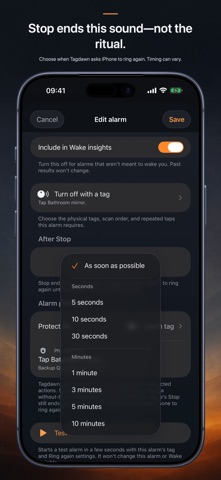
Meet the alarm you finish on your feet. Place a compatible NFC sticker across the room and scan it to complete your alarm in Tagdawn. Bring your own tag: common NFC stickers are inexpensive, and no Tagdawn-branded accessory is required. Tagdawn uses iPhone’s system alarm experience, including alerts through Silent mode and Focus. iPhone always provides Stop. Without a tag, Stop ends the alarm normally. With a tag setup, Stop ends the current alarm and Tagdawn asks iPhone for a fresh one after your chosen Ring again wait until the tag ritual is complete. Choose As soon as possible or clear seconds-and-minutes presets; exact timing can vary. Build your wake-up setup: • Choose one or more tags, their order, and the number of taps per tag. • Keep an optional private backup QR code for an eligible alarm. • Run an isolated test alarm with the same tag and Ring again setup. • Protect alarm changes with Face ID, Touch ID, a passcode, or the physical tag. • Choose a Tagdawn tone, the iPhone alarm sound, or a compatible imported sound. Keep the rest of your day together: • Track check-offs, counts, amounts, limits, and habits with no daily goal. • Add several planned times with a normal reminder or loud alarm. • Use deliberate tag shortcuts for habit entries while Tagdawn is open. • Log earlier entries with their real date and time. • Review separate Wake and Habit charts. • Use timers, a stopwatch, widgets, and eligible Lock Screen or Dynamic Island activities. Tag scans begin only while Tagdawn is open after you choose Scan. Tagdawn works alongside Clock; it does not replace it. Your alarm, tag, Wake, Habit, timer, and stopwatch records stay on your devices. No account, subscription, ads, or tracking.
What's new · 1.1.2
Bug fixes for Ring again.
Details