

MonAI – Finanze personali
Giovanni Caserta · Finance
Independent analytics for this App Store listing. AppTracker is not affiliated with Giovanni Caserta.
Chart standing · US
What changed · US
Listing changes AppTracker has observed for this app in this storefront — new versions, price moves, rating shifts, and store copy.
First of all: with iOS 27 the app works again. THE APP OPENED BUT WOULD NOT RESPOND TO TOUCH With iOS 27, two opening notices could overlap: one stayed invisible on top of the screen and took every touch, and the app looked frozen. Now the notices come one at a time. We apologise to everyone who got stuck. PHONE PAYMENTS: PAUSED With iOS 27 Apple rebuilt Shortcuts, and the automation that passed your Apple Pay payments to MaxIA can no longer be set up the old way. We are rebuilding it from scratch, along with the guide: it comes back in one of the next updates. Payments that already arrived stay, and can still be confirmed. THE CREDIT CARD CHARGES ITSELF On a Card account, pick the account the money comes from and the day of the month. On that day MaxIA moves the previous month's spending from the account to the card, like the bank does: on 15 October, September's. The account panel tells you when and how much ahead of time. Nothing counts twice. THE MONTH STARTS WHEN THE SALARY ARRIVES If you get paid on the 27th, your month does not run from the 1st to the 31st: it runs from the 27th to the 26th. Pick the day in Settings → Start of the month, and budget, Analysis, forecast, score and the assistant count from there. Account interest and recurring payments stay on the bank calendar. MAXIA NOW SPEAKS SPANISH The whole app and both assistants: the one connected to Gemini and the one running on your phone with no key at all, which understands questions and transactions written in Spanish. Plus the voice of the video guides. Choose it in Settings → Language; on first launch it follows the phone. And the Colombian peso is among the currencies, with Colombia among the countries for the score comparisons. IMPROVED • On a security's chart, with your finger, you see how many units you held that day and what they were worth • Two new guides in Settings → Guide: the credit card and the start of the month • Recurring payments, interest and cards are never half-written: if the system closed the app at the wrong moment, a payment could be entered twice FIXES • With the app in English or Spanish, two replies from the on-phone assistant still came back in Italian • In English the assistant did not understand "yesterday": the expense was dated today • With the app in English, the names of currencies, languages and countries in the settings were still in Italian • In the assistant's greeting, a transfer between accounts made today counted as two entries • A change in an asset's quantity recorded after midnight landed on the previous day
In-app purchases · US
No in-app purchases.
Screenshots




About
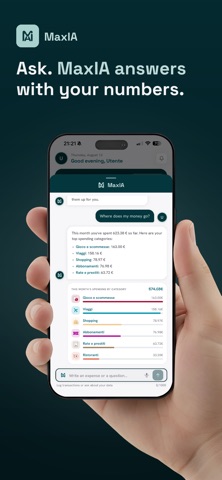
MaxIA is the personal finance manager with built-in artificial intelligence: log an expense in one tap (or just say it out loud), and the app does the rest. STAY IN CONTROL • Multiple accounts, transactions, custom categories and subcategories • Recurring payments with reminders • Monthly budget and savings goals SEE WHERE YOUR MONEY GOES • Spending map and analysis by category • A coach with tips calculated on your own numbers • End-of-month forecast: how much you'll spend and the balance you'll end with, on a chart that updates with every transaction and learns from its own errors • A financial score that captures your money health THE CREDIT CARD AND YOUR PAYDAY MONTH • The credit card charges itself: on the day you pick, last month's spending comes out of your account, like the bank does • Your month can start on the day your salary arrives: budget, analysis and forecast count from there • No bank connection: everything stays on your phone YOUR POCKET ADVISER • Ask "can I afford a €500 purchase?" and get an answer based on your real data • Have it build savings plans, create transactions, budgets and goals just by writing in plain language • It also runs on your phone, with no network and no key; with a free Google Gemini key it understands far more, and you set it up in a minute with the built-in guide AND ALSO • Assets section to track investments and holdings (stocks, ETFs, crypto, metals, real estate) with recurring contribution plans • PDF import and clean exports • 10 theme families, light and dark • Backup and restore YOUR PRIVACY FIRST Your data stays on your phone: no account, no sign-up, no data collected by our servers. MAXIA PLUS The advanced features (AI assistant, Assets section, financial score, PDF import and export, automatic backup, extra themes and customisations) are grouped under MaxIA Plus and in this version are included for free for everyone.
What's new · 2.2.0
First of all: with iOS 27 the app works again. THE APP OPENED BUT WOULD NOT RESPOND TO TOUCH With iOS 27, two opening notices could overlap: one stayed invisible on top of the screen and took every touch, and the app looked frozen. Now the notices come one at a time. We apologise to everyone who got stuck. PHONE PAYMENTS: PAUSED With iOS 27 Apple rebuilt Shortcuts, and the automation that passed your Apple Pay payments to MaxIA can no longer be set up the old way. We are rebuilding it from scratch, along with the guide: it comes back in one of the next updates. Payments that already arrived stay, and can still be confirmed. THE CREDIT CARD CHARGES ITSELF On a Card account, pick the account the money comes from and the day of the month. On that day MaxIA moves the previous month's spending from the account to the card, like the bank does: on 15 October, September's. The account panel tells you when and how much ahead of time. Nothing counts twice. THE MONTH STARTS WHEN THE SALARY ARRIVES If you get paid on the 27th, your month does not run from the 1st to the 31st: it runs from the 27th to the 26th. Pick the day in Settings → Start of the month, and budget, Analysis, forecast, score and the assistant count from there. Account interest and recurring payments stay on the bank calendar. MAXIA NOW SPEAKS SPANISH The whole app and both assistants: the one connected to Gemini and the one running on your phone with no key at all, which understands questions and transactions written in Spanish. Plus the voice of the video guides. Choose it in Settings → Language; on first launch it follows the phone. And the Colombian peso is among the currencies, with Colombia among the countries for the score comparisons. IMPROVED • On a security's chart, with your finger, you see how many units you held that day and what they were worth • Two new guides in Settings → Guide: the credit card and the start of the month • Recurring payments, interest and cards are never half-written: if the system closed the app at the wrong moment, a payment could be entered twice FIXES • With the app in English or Spanish, two replies from the on-phone assistant still came back in Italian • In English the assistant did not understand "yesterday": the expense was dated today • With the app in English, the names of currencies, languages and countries in the settings were still in Italian • In the assistant's greeting, a transfer between accounts made today counted as two entries • A change in an asset's quantity recorded after midnight landed on the previous day
Details