

Zoom Camera: DSLR Focus & Blur
Janki Panchani · Photo & Video
Independent analytics for this App Store listing. AppTracker is not affiliated with Janki Panchani.
Chart standing · US
What changed · US
Listing changes AppTracker has observed for this app in this storefront — new versions, price moves, rating shifts, and store copy.
Price & rating history · US
Reconstructed from the listing changes AppTracker has observed in this storefront. A field is charted once it has changed more than once, and each line starts at the value it moved from.
Average rating · ★ 4.67 now · 48 changes on record
Ratings breakdown · US
The star breakdown behind this app's rating in this storefront.
In-app purchases · US
What this app sells inside itself, grouped by kind and priced for this storefront.
Screenshots



Keywords this app targets
Search terms AppTracker associates with this app — estimates, not search volume. ❝ = in the app's title; a highlighted number is its current position for that term.
Similar apps
Competitors and close alternatives, as estimated by AppTracker.
 DSLR Camera
Fulvio Scichilone
3 shared topics · 2 shared title words
DSLR Camera
Fulvio Scichilone
3 shared topics · 2 shared title words
 xZoom Cam - PRO Camera
Slava Plisko
1 shared topic · 1 shared title word
xZoom Cam - PRO Camera
Slava Plisko
1 shared topic · 1 shared title word
 ProCamera. Professional Camera
Cocologics
2 shared topics · 1 shared title word
ProCamera. Professional Camera
Cocologics
2 shared topics · 1 shared title word
 Manual Camera 4
Kenneth Kao
3 shared topics · 1 shared title word
Manual Camera 4
Kenneth Kao
3 shared topics · 1 shared title word
 Camera Plus Pro
Global Delight Technologies Pvt. Ltd
3 shared topics · 1 shared title word
Camera Plus Pro
Global Delight Technologies Pvt. Ltd
3 shared topics · 1 shared title word
 Pro Camera-Omnipotent Camera
Xiamen Suijisenlin Technology Co., Ltd.
3 shared topics · 1 shared title word
Pro Camera-Omnipotent Camera
Xiamen Suijisenlin Technology Co., Ltd.
3 shared topics · 1 shared title word
 ProCam - Pro Camera
Tinkerworks Apps
2 shared topics · 1 shared title word
ProCam - Pro Camera
Tinkerworks Apps
2 shared topics · 1 shared title word
 Mega Zoom: Super Zoom Camera
Van Phap Tran
1 shared topic · 3 shared title words
Mega Zoom: Super Zoom Camera
Van Phap Tran
1 shared topic · 3 shared title words
About
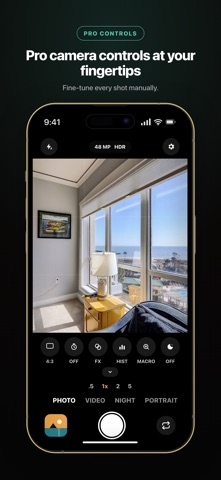
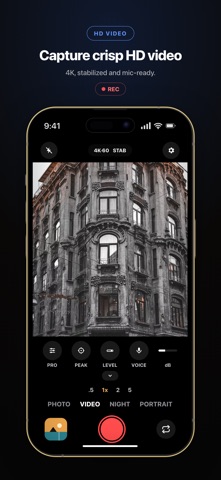
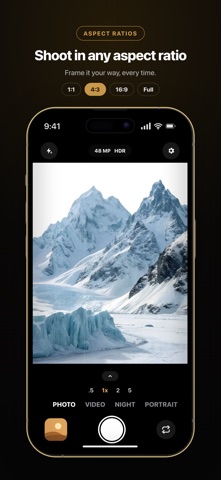
Capture photos and videos with precise zoom, manual camera controls, portrait effects, night photography tools, and built-in editing. Zoom Camera provides greater control over focus, exposure, photo resolution, video quality, and creative effects through a clean and easy-to-use camera interface. PHOTO CAPTURE • Capture high-resolution photos on supported devices • Use precise zoom controls for accurate framing • Night mode for brighter low-light photos • Smart HDR for balanced highlights and shadows • Portrait mode with adjustable background blur on compatible devices • RAW photo capture where supported • Burst capture for fast-moving subjects • Live filters, grid lines, level guide, timer, and histogram VIDEO RECORDING • Record video in supported resolutions up to 4K • Choose from available frame rates, including 24, 30, and 60 fps • Adjust zoom, focus, and exposure while recording • Pause and resume supported recordings • Monitor audio levels during recording • Use compatible external microphones supported by your device MANUAL CAMERA CONTROLS • Adjust ISO, shutter speed, focus, exposure, and white balance where supported • Tap to focus and drag to adjust exposure • Lock focus and exposure • Use focus peaking for manual focus • Switch between available camera lenses BUILT-IN EDITING • Review photos and videos after capture • Crop, rotate, and adjust photos • Trim and compress videos • Apply filters and adjust brightness, contrast, saturation, and warmth • Save or share your finished photos and videos DESIGNED FOR EVERYDAY USE • Light, Dark, and System appearance options • Smooth gestures and haptic feedback • Battery and storage warnings • VoiceOver, Dynamic Type, and Reduce Motion support • No account required Photos and videos are saved directly to your photo library. Some features depend on the device model, available camera hardware, selected lens, and capture format. Payment & Renewal Payment will be charged to your Apple ID account at confirmation of purchase. Subscriptions renew automatically unless cancelled at least 24 hours before the end of the current period. You can manage or cancel your subscription anytime in your Apple ID account settings. For more details on managing subscriptions, visit: https://support.apple.com/en-us/118428 Terms of Use (EULA): https://sites.google.com/view/jdtechnologiesterms-of-service/home Privacy Policy: https://sites.google.com/view/jd-technologies-privacy-policy/home Thank you for choosing us.
What's new · 1.1
Various bug fixes and performance improvements.
Details