

PowerPlay Interval Timer
Andrew Steinman · Music
Independent analytics for this App Store listing. AppTracker is not affiliated with Andrew Steinman.
Chart standing · US
What changed · US
Listing changes AppTracker has observed for this app in this storefront — new versions, price moves, rating shifts, and store copy.
Price & rating history · US
Reconstructed from the listing changes AppTracker has observed in this storefront. A field is charted once it has changed more than once, and each line starts at the value it moved from.
Average rating · ★ 5.00 now · 2 changes on record
In-app purchases · US
No in-app purchases.
Screenshots




Similar apps
Competitors and close alternatives, as estimated by AppTracker.





About
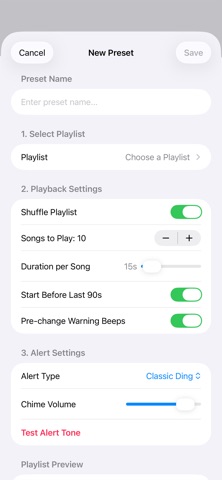
PowerPlay Interval Player is a sleek, native iOS application designed for workouts, Power Hours, and Bar Bingo, providing timed interval playback without manually editing tracks. Instead of listening to entire songs, PowerPlay lets you play custom segments of songs from your Apple Music library, seamless transitions, and custom alert chimes. Custom Interval Control - Flexible Playback Durations: Set song play durations anywhere from 5 seconds up to 5 minutes (300s) per track. - Song Limit Selection: Choose exactly how many songs to include in your workout session (from 1 to 100 tracks). - Randomized Start Points: Enable "Start Before Last 90s" to bypass long track intros and dive straight into the energy of the song. - Shuffle & Queue: Easily toggle playlist shuffling to keep every workout fresh and unpredictable. Preset System & Dedicated Editor - Unlimited Custom Presets: Save unique configurations for different routines (e.g., "HIIT Running", "Boxing Rounds", or "Tabata Dance"). - Dedicated Preset Editor: Edit playlist selections, interval lengths, and chime alerts inside a clean, dedicated editor sheet. - Live Playlist Preview: View the exact song order and track list directly within the editor before saving. - Visual Selection & Session Lock: Active presets are clearly highlighted with a custom selection checkmark. To prevent accidental taps during intense routines, preset switching is automatically locked while a session is running. - Persistent Memory: Automatically saves and restores your last active preset when you relaunch the app. Custom Transition Alerts & Pre-Warnings - Custom Synthesized Chimes: Choose from multiple built-in synthesized transition tones: - Classic Ding - Deep Sonar - Digital Pulse - Soft Marimba - Modern Alert - Library Song Alerts: Select any specific track from your Apple Music library to play as your transition alert, complete with custom start-time and duration sliders. - "No Alert" Mode: Prefer silent transitions? Select No Alert for a smooth 1-second visual gap between tracks. - Pre-Change Countdown Beeps: Option to enable subtle audio warning beeps during the final 4 seconds of a song interval so you can prepare for your next movement. - Volume Control & Instant Testing: Fine-tune chime volumes and test tone playback directly inside the settings before starting your session. Mini-Player & Visual Countdown - Persistent Now Playing Bar: Stay in control with a floating bottom player available across the app. - Circular Progress Timer: Features an animated visual ring timer that counts down remaining seconds in real time. - Session Tracker: Displays clear progress indicators (e.g., SONG 3 OF 10) alongside song title, artwork, and artist information. - Visual Mode Alerts: The mini-player visually updates and changes accent colors (Orange/Pink) to distinguish between standard music playback and active alert states.
Details