

EdgeSage
RICHARD ROYAL HOOPES · Reference
Independent analytics for this App Store listing. AppTracker is not affiliated with RICHARD ROYAL HOOPES.
Chart standing · US
What changed · US
Listing changes AppTracker has observed for this app in this storefront — new versions, price moves, rating shifts, and store copy.
What's new in EdgeSage • Saved chats (Pro): every answered EdgeSage AI conversation is kept on this iPhone. Search them, pick one back up where you left off, or share it as text or PDF. If Pro lapses, chats already saved stay readable and shareable. • Take Photo: add a progress photo of your edge straight from the camera at the end of a session, or choose one from your library as before. • Ready for larger screens: Steels, Sharpen, Knives, Log and EdgeSage AI chat now lay out in a comfortable reading width on wide displays, and the sharpening coach shows your live angle and session controls side by side. • Polish: cleaner Steels list, and scrolled content no longer sits under the clock or screen titles.
Screenshots



About
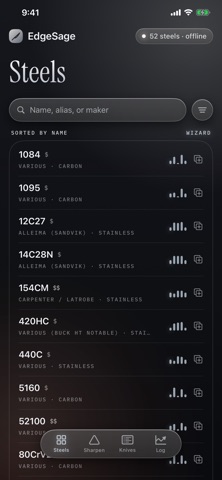
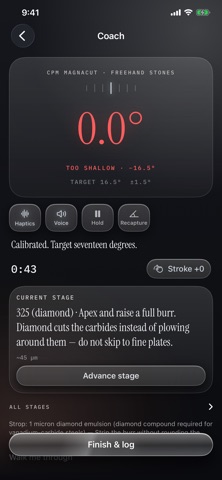
EdgeSage is a knife-steel reference and sharpening coach that works entirely offline. KNOW YOUR STEEL Search 52 knife steels by name, alias or maker. Open any steel for its composition, its heat-treat notes, and plain-language pros and cons. Put two steels side by side and compare them across five axes — edge retention, toughness, corrosion resistance, wear resistance and ease of sharpening — on radar and bar charts. NOT SURE WHICH STEEL? Answer four questions about how you actually use a knife and the Steel Wizard returns a ranked shortlist, each result one tap from its sharpening recipe. A RECIPE, NOT A GUESS Every steel resolves to a concrete plan: the target angle in degrees per side, a grit ladder with micron equivalents, what to look for before moving to the next stone, a strop step, and a realistic time estimate. Recipes account for the abrasive a steel actually needs — vanadium-carbide steels are flagged for diamond. HOLD YOUR ANGLE Rest your iPhone on the blade and the coach reads your bevel angle live from the device's motion sensors, in degrees per side. It taps when you drift and speaks a correction, holds an on-target streak while you stay in the band, and counts strokes and time. Calibrate against your stone first so the reading is relative to the surface you're working on. BUILT FOR YOUR SETUP Freehand stones, Wicked Edge, KME Precision, Lansky, Work Sharp Precision Adjust and strops. Wicked Edge, KME and Lansky include a setup calculator that estimates the real edge angle for your blade height, so you can pick the right mark or slot. YOUR KNIVES, YOUR HISTORY Keep your knives with their steel, a photo, an angle override and their full sharpening history, including a sharpness trend so you can see how an edge is actually holding up. NO ACCOUNT NEEDED The steel database, the Wizard, the recipes and the angle coach all work from first launch with no connection and no account, and your knives, sessions and photos are stored on your device. Sign in only if you want more: your library syncs across your devices, you can add anonymous field reports to the community Steel Leaderboard, and EdgeSage AI chat, photo steel ID and custom recipes unlock. EDGESAGE PRO The free app is complete: the full steel database, the Wizard, every recipe, the angle coach and session logging are all free and stay free. Pro lifts the limits in the free tier: • Unlimited knives (free keeps 3) • A third column in the comparator (free compares 2) • A higher daily limit on EdgeSage AI chat and photo steel ID • Saved chats — keep every answered EdgeSage AI conversation on this iPhone, search them, pick them back up, share as text or PDF Pro is $4.99/month or $39.99/year. Plans renew automatically until cancelled; manage or cancel any time in Settings › Apple Account › Subscriptions. Terms of Use: https://www.apple.com/legal/internet-services/itunes/dev/stdeula/ Privacy Policy: https://edgesage.us/privacy.html
What's new · 1.0.3
What's new in EdgeSage • Saved chats (Pro): every answered EdgeSage AI conversation is kept on this iPhone. Search them, pick one back up where you left off, or share it as text or PDF. If Pro lapses, chats already saved stay readable and shareable. • Take Photo: add a progress photo of your edge straight from the camera at the end of a session, or choose one from your library as before. • Ready for larger screens: Steels, Sharpen, Knives, Log and EdgeSage AI chat now lay out in a comfortable reading width on wide displays, and the sharpening coach shows your live angle and session controls side by side. • Polish: cleaner Steels list, and scrolled content no longer sits under the clock or screen titles.
Details