

Emojio: Emoji Music Maker
MADE WITH BEST PRACTICE LLC · Music
Independent analytics for this App Store listing. AppTracker is not affiliated with MADE WITH BEST PRACTICE LLC.
Chart standing · US
What changed · US
Listing changes AppTracker has observed for this app in this storefront — new versions, price moves, rating shifts, and store copy.
• Buying Premium now closes the Premium screen and takes you straight back to your song. • Clearer messages when a purchase is waiting for approval, when Restore finds nothing, and when the store can't be reached (with a Try Again button). • Terms of Use and Privacy Policy links on the Premium screen. • Enjoying Emojio? After you save your first song, the app may ask you for a rating. It helps other people find Emojio!
Screenshots



About
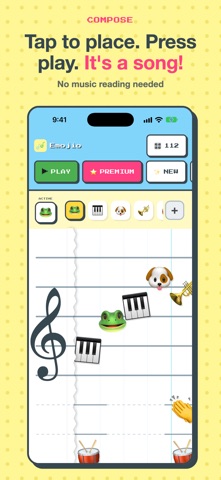
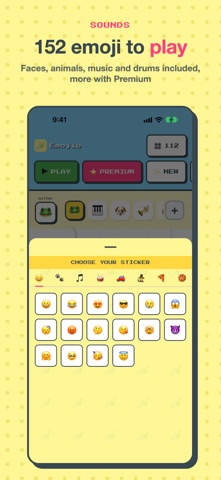
MAKE MUSIC OUT OF EMOJI — FREE. Emojio turns your iPad or iPhone into a playful music studio where every emoji is an instrument. Tap a frog, a dog, a drum, a bell — drop the stickers onto the staff and watch your little song come to life. No notes to read, no theory to learn. If you can pick an emoji, you can write a tune. PAINT A SONG • A big, friendly staff — tap to drop an emoji, tap it again to remove it. • Every emoji has its own voice. Faces, animals, music and a full drum kit are free; Premium adds vehicles, characters, food, sports, nature and more. • Set the pace with the turtle-and-hare tempo slider, hit Play, and hear it loop. • Apple Pencil pressure sets each note's volume, so you can play it soft or loud (Premium). SAVE AND SHARE • Save your songs right on your device — name them and reopen anytime. Free keeps 3; Premium keeps as many as you like. • Export your song as an audio file (WAV), or as a video (MP4) to post anywhere (Premium). • Share a link that opens your song right back up in Emojio. PLAY WITH REAL GEAR (PREMIUM) • Connect a MIDI keyboard — USB or Bluetooth — to play and record live. • Send notes and MIDI clock out to drive external gear, or follow an external clock to stay in sync. Studio-quality sound that plays even with the silent switch on. MADE TO BE PLAYED WITH Emojio is for families, beginners, and anyone who ever wanted to make music but felt locked out by staffs and sheet music. It's silly, it's colorful, and it sounds surprisingly good. FREE, WITH AN OPTIONAL PREMIUM Emojio is free to play, with no time limit. New players get Premium free for their first 3 days. After that, Premium is a single one-time purchase — no subscription, ever. Bought Emojio before it went free? You have Premium. PRIVATE BY DESIGN Emojio collects nothing. No ads, no tracking, no analytics, no accounts. Your songs live on your device and only leave when you share them yourself.
What's new · 1.1.2
• Buying Premium now closes the Premium screen and takes you straight back to your song. • Clearer messages when a purchase is waiting for approval, when Restore finds nothing, and when the store can't be reached (with a Try Again button). • Terms of Use and Privacy Policy links on the Premium screen. • Enjoying Emojio? After you save your first song, the app may ask you for a rating. It helps other people find Emojio!
Details