

Readr: AI Ebook Reader
Anusree Jayakrishnan · Books
Independent analytics for this App Store listing. AppTracker is not affiliated with Anusree Jayakrishnan.
Chart standing · US
What changed · US
Listing changes AppTracker has observed for this app in this storefront — new versions, price moves, rating shifts, and store copy.
Readr 3.3.1: Readr Voice is the only voice you hear. • The first time you listen, Readr waits for Readr Voice instead of reading in an Apple voice meanwhile — the Listen bar shows the one-time download's progress, and the book starts the moment the voice is ready • Readr Voice keeps reading with the screen locked. It reads ahead while the app is open (an hour, or the rest of the book while charging) and plays from that with the phone in your pocket; if it ever runs out, it pauses and asks you to unlock rather than switching voices • Speed changes no longer restart the sentence • The voice menu is Readr Voice, with Apple's voices a tap away under "Other voices" for anyone who prefers them; books in other languages keep Apple's voices as before • If the download can't finish, the bar says so with a Retry — no surprise voice
In-app purchases · US
No in-app purchases.
Screenshots



Keywords this app targets
Search terms AppTracker associates with this app — estimates, not search volume. ❝ = in the app's title; a highlighted number is its current position for that term.
Similar apps
Competitors and close alternatives, as estimated by AppTracker.
 PageEcho - AI Text Reader
harim kang
PageEcho - AI Text Reader
harim kang
 bREADER - 青空文庫
INFOCITY, Inc.
bREADER - 青空文庫
INFOCITY, Inc.
 Speed Reading - Speedy
Alican Efe
Speed Reading - Speedy
Alican Efe
 Vox libri
Jonathan Chacon Barbero
Vox libri
Jonathan Chacon Barbero
 Speed Reader: RSVP Reading
Mahanti Corporation LLC
Speed Reader: RSVP Reading
Mahanti Corporation LLC
 Quick Read - RSVP
Nicola Paparella
Quick Read - RSVP
Nicola Paparella
 Stasis: RSVP Speed Reader
Oleksandr Iatsenko
Stasis: RSVP Speed Reader
Oleksandr Iatsenko
 Wordrunner-Reader
Heiko Kiedrowicz
Wordrunner-Reader
Heiko Kiedrowicz
About
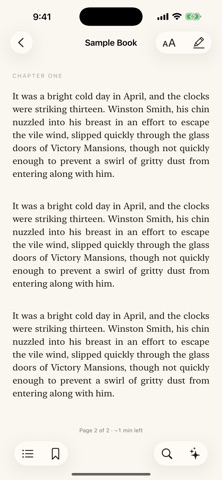
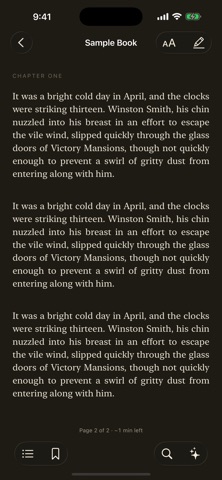
Read, listen, and ask questions as you go. Readr answers from what you've read so far and never spoils what's ahead — and clearly labels anything it adds from elsewhere. ASK THE BOOK Open an EPUB, PDF, plain-text or Markdown file you already own, select a sentence, and ask about it. Readr answers from the pages you've read, not the pages you haven't, so nothing ahead of your place can slip out. Choose "Whole book" to ask about all of it. And it isn't limited to the book: ask how the science has moved on, who directed the adaptation, or how an idea aged, and you get a useful answer that shows which part came from the book and which from outside it. Readr won't attribute an outside claim to the book you're reading. Back after a week away? Tap Recap on your Continue Reading card and Readr tells you the story so far, from only the pages you've read — it can't spoil what comes next. Ask needs an AI account of your own: connect an Anthropic, OpenAI or OpenRouter key, or sign in with OpenRouter. You pay that company directly for what you use, and you can change or disconnect at any time. On an Apple silicon Mac you can use a local Ollama model instead and stay offline. Without one, Readr is still a complete reader — Ask simply stays off. LISTEN Press Listen and Readr reads the book aloud, starting from the page you're on — not the top of the chapter. The page turns itself to follow the voice, and the place it saves is where the voice left off, so switching between reading and listening never costs you your spot. The narrator is Readr Voice, a neural voice that runs entirely on your device: no account, no subscription, and nothing about your book ever leaves the device to be read aloud. Its voice model downloads once, the first time you listen, and the Listen bar shows the wait. Readr Voice keeps reading with the screen locked: it reads ahead while the app is open and plays from that with the phone in your pocket. Prefer Apple's built-in voices? They're a tap away under "Other voices" in the voice menu, with nothing to download at all. Skip by sentence or by chapter, change the speed or the voice mid-sentence and it carries on from that word, and set a sleep timer that counts listening rather than clock time — pause for lunch and the countdown waits for you. It keeps playing with the screen locked, with lock-screen and headphone controls, and reads PDFs as well as EPUBs. HIGHLIGHTS BECOME A DRAFT Highlight as you read, then turn those highlights into a first draft. Readr orders them by reading position, keeps your quotes intact, and turns them into an editable draft you can export as Markdown. PRIVACY No usage tracking. No account. No subscription. Your books, highlights, notes and questions live on your device, and reading them aloud happens there too. When you use Ask, your question and the book text needed to answer it go straight to the company you connected — never through a Readr server, because there isn't one. Your keys are stored in the device Keychain. READING THAT FEELS LIKE READING • EPUB, PDF, plain-text and Markdown — DRM-free files you own • A book to start on: Alice's Adventures in Wonderland is in your library on first launch, so you can try everything before importing your own • Three layouts: continuous scroll, single page, or two facing pages • Paper, Sepia and Dark themes, with your choice of typeface and spacing • Table of contents, bookmarks, in-book search, footnote popups • Five highlight colors, notes, and a Notes panel that exports to Markdown • Continue Reading picks up exactly where you left off, reading or listening • On iPad: sidebar and reader side by side, two-page spreads, and hardware keyboard page turns FREE AND OPEN SOURCE Readr is free and MIT-licensed, developed in the open. Read the code, file an issue, or send a bug report from inside the app — there's a Report a bug button in Settings that attaches your app version and recent errors, and nothing about what you've been reading.
What's new · 3.3.1
Readr 3.3.1: Readr Voice is the only voice you hear. • The first time you listen, Readr waits for Readr Voice instead of reading in an Apple voice meanwhile — the Listen bar shows the one-time download's progress, and the book starts the moment the voice is ready • Readr Voice keeps reading with the screen locked. It reads ahead while the app is open (an hour, or the rest of the book while charging) and plays from that with the phone in your pocket; if it ever runs out, it pauses and asks you to unlock rather than switching voices • Speed changes no longer restart the sentence • The voice menu is Readr Voice, with Apple's voices a tap away under "Other voices" for anyone who prefers them; books in other languages keep Apple's voices as before • If the download can't finish, the bar says so with a Retry — no surprise voice
Details