
Chart standing · US
What changed · US
Listing changes AppTracker has observed for this app in this storefront — new versions, price moves, rating shifts, and store copy.
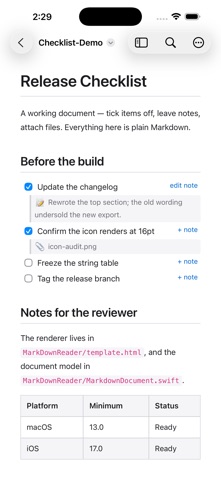
Checklists are now somewhere to work, not just something to read. • Notes: hover any checklist item and add a note. It saves into the file as a plain indented bullet, so every other Markdown tool still reads it. • Attachments (Mac): drag a file onto a checklist item to attach it. Click the chip to open that file again. • Clickable file references (Mac): a path written in a code span opens in your editor. • Path bar (Mac): copy the document's path, or reveal it in the Finder. • Live reload is steadier. iPhone and iPad also gain the interactive checkboxes and notes that the Mac version has had.
Screenshots


About
MarkDown Reader is a free, lightweight viewer for Markdown files. Double-click any .md file and read it beautifully rendered — no editor chrome, no distractions, just your document. It also turns a checklist into somewhere to work. Tick a task and the change is written straight back to the file, one character, instantly. Add a note to any item and it is saved as an ordinary indented bullet, so every other Markdown tool still reads it. On the Mac, drag a file onto an item to attach it, and click the chip to open it again later. Nothing is locked in a database. Everything this app writes is plain Markdown you can read in any editor. - Clean rendering of headings, tables, code blocks, and images - Interactive task lists: click a checkbox and the .md file updates instantly - Notes on any checklist item, saved as plain Markdown - Attach files to checklist items by dragging them in (macOS) - Clickable file references: a path in a code span opens in your editor (macOS) - Table of contents sidebar for long documents - Full-text search with match navigation - Live reload — edit the file elsewhere and the view keeps up - Zoom, print, and export to PDF - Copy the document's path or reveal it in the Finder (macOS) - Opens .md, .markdown, .mdown, .mkd, and .mkdn files - Sandboxed and private: no accounts, no analytics, no data collection
What's new · 1.4
Checklists are now somewhere to work, not just something to read. • Notes: hover any checklist item and add a note. It saves into the file as a plain indented bullet, so every other Markdown tool still reads it. • Attachments (Mac): drag a file onto a checklist item to attach it. Click the chip to open that file again. • Clickable file references (Mac): a path written in a code span opens in your editor. • Path bar (Mac): copy the document's path, or reveal it in the Finder. • Live reload is steadier. iPhone and iPad also gain the interactive checkboxes and notes that the Mac version has had.
Details