

Receipt Rabbit Expense Tracker
Pine River Labs LLC · Finance
Independent analytics for this App Store listing. AppTracker is not affiliated with Pine River Labs LLC.
Chart standing · US
What changed · US
Listing changes AppTracker has observed for this app in this storefront — new versions, price moves, rating shifts, and store copy.
- A new full-screen scanner that finds the receipt and captures it automatically - Your name, address, and card number are masked on receipt photos before they leave your phone, and you can see what was hidden - Forwarded email receipts are encrypted on arrival and readable only on your device - Two new categories: Sports & Outdoors, and Charity & Donations - Plus easier-to-read text, a receipt actions menu with notes, and fixes for missing images and rotated PDFs
Ratings breakdown · US
The star breakdown behind this app's rating in this storefront.
Screenshots




About
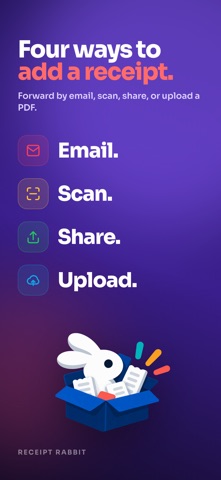
Receipt Rabbit is an iPhone receipt scanner for freelancers, the self-employed and small businesses. It categorizes every line item on a receipt separately, splits business from personal, and sends the itemized split, with the receipt image, to QuickBooks Online or Lunch Money. One store run can hold office supplies, groceries and pharmacy items. Receipt Rabbit gives each line its own category, so your books show what you actually bought. EVERY LINE ITEM, ITS OWN CATEGORY • 42 categories across 11 groups, including a group for business expenses. • The list is fixed, so the same item lands in the same place in January and in November. • Coupons, discounts, taxes and fees follow the receipt's main category, so your totals still add up. • Change any line's category by hand if you disagree. • Works with messy receipts: handwritten tips, member savings, statements, invoices and multi-page PDFs. BUSINESS AND PERSONAL, SPLIT LINE BY LINE • Mark a single line as business, or the whole receipt. Select several lines to mark them together. • Your Tax Profile maps business lines to Schedule C categories, so tax time is less work for you and your accountant. • Review each business line before you send, or let it send automatically. SPLIT RECEIPTS IN QUICKBOOKS ONLINE AND LUNCH MONEY (Pro) • QuickBooks Online: one receipt becomes one Expense split across your QuickBooks categories, business and personal kept apart, with the receipt image attached. • Lunch Money: finds the matching bank transaction, splits it by category, adds the receipt image and tags it, with every split matching down to the penny. • Receipts send on their own after each scan, or turn that off and send when you are ready. READY FOR TAX TIME (Pro) • Tax-year export for your accountant: one zip with a spreadsheet, one row per line item, and every receipt image. • Expense reports for the receipts you select. GET RECEIPTS IN ANY WAY YOU LIKE • Point the camera at a receipt. The full-screen scanner outlines it as you line it up, captures it on its own, then crops and straightens it. • Choose from Photos or Files, or share a receipt from any other app. • Bulk import: bring in dozens of receipt photos at a time. • Import PDFs up to 10 pages. • Forward an emailed receipt to your own Receipt Rabbit address and it arrives itemized like a scan (Pro). FIND ANY RECEIPT, OR ANY ITEM ON ONE • Search by store, item, category or date, in the app, in Spotlight or with Siri. PRIVATE BY DEFAULT • No account. No login. Ever. • Personal details on a receipt photo, like names, addresses, phone numbers and card numbers, are masked on your iPhone before the photo is sent for categorization. Open the receipt photo to see exactly what was hidden. • Add your own names, addresses, words and phrases to an Always Hide list. • Forwarded email receipts are encrypted the moment they arrive, and only your iPhone can open them. • Receipts sync across your devices through your own iCloud, kept in a tidy Receipt Rabbit folder in iCloud Drive. • Automatic categorization runs only after you turn it on, and you can turn it off anytime in Settings. WHO IT IS FOR • Freelancers, the self-employed and small businesses who buy business and personal items on the same receipt. • Anyone who budgets in Lunch Money or keeps books in QuickBooks Online. FREE AND PRO • Free: 30 receipts a month. • Pro: 300 receipts a month, QuickBooks Online and Lunch Money, email forwarding, expense reports, and tax-year exports. $7.99 a month or $59.99 a year, with a 7-day free trial on the annual plan. Pro is an auto-renewing subscription, billed through your Apple Account. Cancel anytime in Settings at least 24 hours before renewal. Terms of Use: https://receiptrabbit.io/eula Privacy Policy: https://receiptrabbit.io/privacy
What's new · 1.1
- A new full-screen scanner that finds the receipt and captures it automatically - Your name, address, and card number are masked on receipt photos before they leave your phone, and you can see what was hidden - Forwarded email receipts are encrypted on arrival and readable only on your device - Two new categories: Sports & Outdoors, and Charity & Donations - Plus easier-to-read text, a receipt actions menu with notes, and fixes for missing images and rotated PDFs
Details