

encho: Tape Calculator
Yuya Tanaka · Productivity
Independent analytics for this App Store listing. AppTracker is not affiliated with Yuya Tanaka.
Chart standing · US
What changed · US
Listing changes AppTracker has observed for this app in this storefront — new versions, price moves, rating shifts, and store copy.
The tape you're working on is now kept automatically. After you close or restart the app, it opens just as you left it. If you had a saved sheet open, it returns to that sheet. Before a working tape with rows is replaced by a new tape or another sheet, the app now asks first.
Screenshots



About
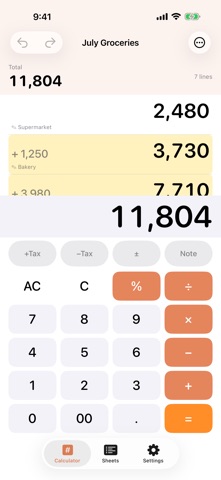
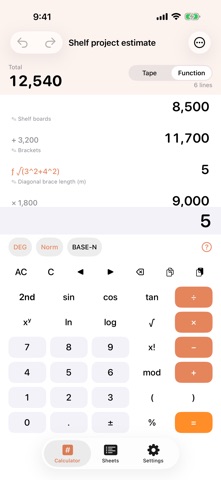
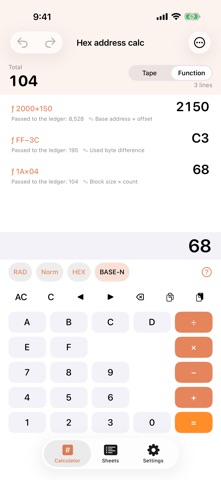
The tape calculator you can edit — fix any line and everything below recomputes. Save your tape as a named sheet, with the total always in view. Every tape (ledger) row runs in full-precision Decimal. — On a normal calculator, one wrong key means starting over. Dencho keeps every calculation on a tape you can edit: tap any line — the starting value, an operator, or an operand — and every line below recomputes. Changed lines briefly highlight. Inserting, reordering, and deleting lines recompute the same way, and a one-tap Undo rolls the whole last action back at once. Name a tape and it's saved as a sheet. The list is sorted by last edited and shows each sheet's total. A running total bar always shows the sum and line count, so you never re-add just to ask "where am I now?" Rounding mode (half-up, up, or down), decimal places (0–4), and the tax rate are saved per sheet — reopen an old sheet and its results reproduce exactly, with that sheet's own settings. Percentages follow business-calculator conventions: 1000 + 8% = 1080, 1000 − 8% = 920, 1000 × 8% = 80. Add-tax and remove-tax split values to the yen. Because each line is rounded to a real amount, a division like 1000 ÷ 3 = 333, then × 3 = 999 — the ledger-correct behavior. Function-mode math runs in double precision (IEEE 754); results are finalized under the sheet's rounding settings once a ledger row references them. Dencho also includes a full scientific calculator mode: trig and inverse trig (DEG/RAD/GRAD), logarithms (log, ln, any base), powers and roots, factorial, permutations and combinations, modulo, polar⇄rectangular conversion, integer math in binary/octal/decimal/hex, display formats (Normal/Fix/Sci/Eng), memories (A–F, M), and Ans. Function calculations land on the same tape — tap to correct any row and everything below recalculates. The entire function set is free. WHAT YOU GET • Every calculation stays on the tape; tap any line to edit and everything below recomputes • Save named sheets, sorted by last edited, each with its total; duplicate and search • Note-only lines you can insert — they don't affect the math but are included in sharing and search • Rounding mode × decimal places × tax rate, saved per sheet • Three text sizes, light/dark, and one-action-per-transaction Undo/Redo • Scientific calculator mode (trig, logs, roots, factorial, binary/octal/decimal/hex, and more) — function rows edit and recompute automatically too • Runs on iPad, with a two-column layout (list + calculator) in landscape BUILT DIFFERENTLY, ON PURPOSE • No ads, no tracking. All math stays on your device and the app makes no network calls (except Apple's StoreKit for purchases) • The whole tape calculator (editing, recompute, notes, rounding, tax, totals, Undo) is free; you can save up to 2 sheets • The one-time Dencho Pro makes sheets unlimited and adds widgets and sheet sharing (text export). There is no subscription (see the App Store listing for current pricing) • If Pro ever lapses, all your saved sheets remain readable — only editing and creating beyond the third sheet pauses — and repurchasing restores everything instantly Dencho Pro is a one-time purchase (see the App Store listing for current pricing). Restore Purchases is available anytime in Settings. Terms of Use and Privacy Policy are linked in-app and at the links below. Dencho is a calculation-notes tool. It does not guarantee compliance with statutory bookkeeping or Japan's Electronic Books Preservation Act. "Ledger" is used as an analogy for how the tape is kept. Always verify results yourself.
What's new · 1.1.3
The tape you're working on is now kept automatically. After you close or restart the app, it opens just as you left it. If you had a saved sheet open, it returns to that sheet. Before a working tape with rows is replaced by a new tape or another sheet, the app now asks first.
Details