

ZenFlow AI Markdown
发亮 刘 · Utilities
Independent analytics for this App Store listing. AppTracker is not affiliated with 发亮 刘.
Chart standing · US
What changed · US
Listing changes AppTracker has observed for this app in this storefront — new versions, price moves, rating shifts, and store copy.
ZenFlow v1.0.5: What's New in This Version 1. New Voice to Markdown: record audio or import an audio file and turn speech into text. 2. Choose between two transcription engines, Apple Speech and OpenAI, depending on your needs. 3. AI cleanup turns raw transcripts into tidy Markdown, removing filler words and adding a short summary. 4. Improved OpenAI API connection and audio transcription, fixing occasional 421 errors and failed requests. 5. Full localization across 15 languages, covering the main interface, voice transcription, and related features. 6. Refined the Markdown editor's top toolbar and improved the typing experience. 7. Better soft keyboard handling: tap any blank area to dismiss the keyboard quickly. 8. Clearer voice permissions, temporary audio file management, and updated privacy notes. 9. Fixed known issues and further improved overall stability. Thank you for using ZenFlow. We will keep improving writing, Markdown, and AI-assisted experiences.
Screenshots



About
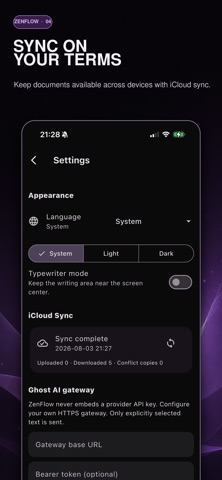
ZenFlow AI is a minimalist Markdown editor with an invisible AI editor built in. Write without distraction, keep your files local, and call Ghost AI only when you want a careful second look at your sentences. NEW: VOICE TO MARKDOWN Tap record or import an audio file, and ZenFlow turns speech into text. Choose Apple Speech for on-device transcription or OpenAI for higher accuracy, then let Ghost AI remove filler words, shape the transcript into tidy Markdown, and add a short summary. Ideal for interviews, lectures, meeting notes, and first drafts you would rather speak than type. WRITE WITHOUT DISTRACTION A quiet, borderless editor built around plain text and Markdown. Focus mode fades everything except the sentence you are writing, and typewriter scrolling keeps your eyes where your words are. No ribbons, no formatting panic. GHOST AI, ONLY WHEN YOU ASK Select a sentence and ask Ghost AI to polish, rewrite, expand, check grammar, or adjust tone. Suggestions appear as a clear before-and-after diff, so you compare, accept, or reject. Your voice stays yours. THREE WRITING STARTERS A blank page now offers Journal, Inspiration, and Daily Plan starters, so you can begin writing with a single tap. You can also create a document from scratch or import an existing Markdown file. FIND THINGS FASTER Recently edited documents are one tap away on the home screen, and when a search returns nothing, one tap clears every filter. YOUR FILES STAY YOURS Documents are stored locally as Markdown, so you can write offline and keep full ownership of your work. iCloud sync keeps your library consistent across your Apple devices, with recent changes making syncing faster and more reliable. ORGANIZE WITHOUT THE OVERHEAD Folders, smart tags, and lightweight links keep long drafts, quick notes, research, and daily journal entries together, without turning writing into database maintenance. BRING YOUR OWN AI KEY Use your own token with Ghost AI. Add your key in Settings and your writing assistant runs on your own account, your own limits, and your own data terms. EXPORT ANYWHERE Export plain Markdown and text for free, or unlock polished PDF and DOCX export with typographic themes through ZenPro. ZENPRO ZenPro is a one-time purchase, not a subscription. A single payment unlocks Ghost AI and advanced export. PERFECT FOR Writers, bloggers, students, researchers, journalists, novelists, and anyone who journals daily and wants fewer distractions and better editing. Contact: support@100ideas.net Apple Standard End User License Agreement (EULA): https://www.apple.com/legal/internet-services/itunes/dev/stdeula/
What's new · 1.0.5
ZenFlow v1.0.5: What's New in This Version 1. New Voice to Markdown: record audio or import an audio file and turn speech into text. 2. Choose between two transcription engines, Apple Speech and OpenAI, depending on your needs. 3. AI cleanup turns raw transcripts into tidy Markdown, removing filler words and adding a short summary. 4. Improved OpenAI API connection and audio transcription, fixing occasional 421 errors and failed requests. 5. Full localization across 15 languages, covering the main interface, voice transcription, and related features. 6. Refined the Markdown editor's top toolbar and improved the typing experience. 7. Better soft keyboard handling: tap any blank area to dismiss the keyboard quickly. 8. Clearer voice permissions, temporary audio file management, and updated privacy notes. 9. Fixed known issues and further improved overall stability. Thank you for using ZenFlow. We will keep improving writing, Markdown, and AI-assisted experiences.
Details