

BitMeter: Data Usage Widget
Michael Burgoon · Utilities
Independent analytics for this App Store listing. AppTracker is not affiliated with Michael Burgoon.
Chart standing · US
What changed · US
Listing changes AppTracker has observed for this app in this storefront — new versions, price moves, rating shifts, and store copy.
NEW: Alerts, reworked. Choose exactly when BitMeter warns you as you use your data. Premium adds several usage milestones and a pace warning that flags a likely overage before it happens. NEW: More ways to make it yours. Three new Premium themes (Gruvbox, Neon, and Solar) and a font option for your dashboard and widget. NEW: Siri & Shortcuts. Ask how much data you have left, or add it to your own shortcuts. Free for everyone. Also in this update: browse previous cycles in Daily Usage (free), a cleaner Settings layout, a new app icon to choose from, and improved data-tracking accuracy. Thanks for all the feedback since launch. Keep it coming at support@goonbits.com.
Ratings breakdown · US
The star breakdown behind this app's rating in this storefront.
Screenshots


About
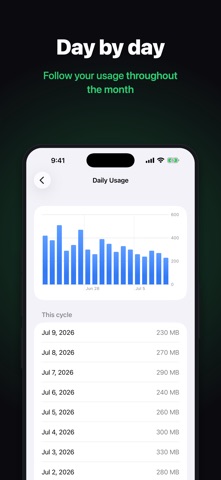
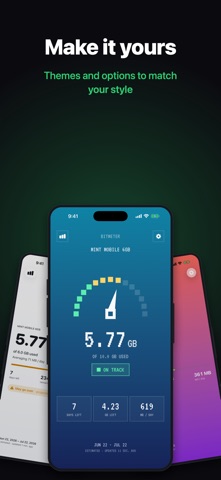
BitMeter is a clean, honest mobile data monitor. See how much of your plan you've used, how much is left, and whether you're on track for the month. All at a glance, without opening the app. WHAT YOU GET • A clear dashboard - data used in big, readable numbers, plus days left, data remaining, and a daily budget so you know if you'll make it to your reset date. • Home & lock screen widgets - glance at your remaining data anytime, without opening the app. • On-track projection - BitMeter watches your recent pace and colors the screen green, amber, or red so an overage never sneaks up on you. • Daily history - see your day-by-day usage, and step back through previous cycles. • Usage alerts - get a heads up as you approach your limit. • Ask Siri - "How much data do I have left?" works through Siri and Shortcuts. • Set up in seconds - enter your plan's allowance and reset date and you're done. Installing mid-cycle? Enter what you've already used so your totals start accurate. PRIVATE BY DESIGN No accounts. No sign-ups. No analytics or tracking. Everything stays on your device and is never sent anywhere. Your data is yours. AN HONEST ESTIMATE iOS doesn't let apps read your carrier's official usage, so BitMeter measures your cellular data on your device while it runs. Keep it installed and the numbers stay accurate. No app can read your carrier's exact numbers, and we're upfront about that instead of pretending otherwise. PREMIUM (one-time purchase) Unlock a few extras with a single purchase — no subscription: • Rollover - model AT&T, Verizon, or T-Mobile style rollover and see your banked data. • Multiple plans - track more than one SIM or data plan and switch between them. • Smart alerts - set several usage milestones and a pace warning that flags a likely overage before it happens. • Color themes - style the dashboard and widget with palettes like OLED, Dracula, Gruvbox, Neon, and Solar. • Fonts - pick the typeface for your dashboard and widget. • Bit Mode - a retro pixel look with a speedometer gauge and CRT styling for the dashboard and home screen widgets. Everything else stays free, forever. (an app by goonbits)
What's new · 1.2
NEW: Alerts, reworked. Choose exactly when BitMeter warns you as you use your data. Premium adds several usage milestones and a pace warning that flags a likely overage before it happens. NEW: More ways to make it yours. Three new Premium themes (Gruvbox, Neon, and Solar) and a font option for your dashboard and widget. NEW: Siri & Shortcuts. Ask how much data you have left, or add it to your own shortcuts. Free for everyone. Also in this update: browse previous cycles in Daily Usage (free), a cleaner Settings layout, a new app icon to choose from, and improved data-tracking accuracy. Thanks for all the feedback since launch. Keep it coming at support@goonbits.com.
Details