

TV Remote Universal Remote App
APPHAZE LIMITED · Utilities
Independent analytics for this App Store listing. AppTracker is not affiliated with APPHAZE LIMITED.
Chart standing · US
In-app purchases · US
What this app sells inside itself, grouped by kind and priced for this storefront.
Screenshots



About
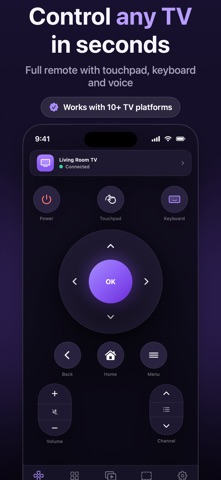
Every TV in your home, controlled from your iPhone. TV Remote App turns your iPhone into a full remote for the TVs and streaming devices you already own. It finds them automatically on your Wi-Fi network, so there is nothing to plug in and no extra hardware to buy. WORKS WITH YOUR TV The app speaks the connection protocols already built into today's smart TVs, streaming sticks and streaming boxes, and supports more than ten TV platforms, including Apple TV via AirPlay. If your TV connects to Wi-Fi, chances are it is supported: the app finds every compatible device on your network and picks the right control layout for it automatically. WHAT YOU CAN DO - Full remote: D-pad, volume, playback, power and channel controls, laid out to match each platform - Touchpad: swipe to navigate on TVs that support pointer control - Launch apps on your TV straight from your phone - Cast your own photos, videos and music to the big screen - Screen mirroring: put your whole iPhone display on the TV - Keyboard: type on the TV with your iPhone keyboard instead of hunting letter by letter - Voice search: speak instead of typing - Automatic discovery: your TVs appear as soon as you open the app BUILT TO RESPECT YOU No ads. No analytics. No trackers. No account to create. The app runs on your device and talks to your TVs directly over your own Wi-Fi. We have no servers and no way to see what you watch. FREE AND PREMIUM The core remote is free and has no ads. Premium unlocks screen mirroring, keyboard and voice input, and channel switching. Premium is available as a subscription or as a one-time lifetime purchase, and the price is shown in the app before you buy. GOOD TO KNOW Your iPhone and your TV need to be on the same Wi-Fi network. This app controls TVs over the network rather than by infrared, so it works with smart TVs and streaming devices rather than older sets that are not network connected. Some TVs ask you to approve the connection or enter a PIN the first time you pair. SUBSCRIPTION DETAILS Payment is charged to your Apple Account at confirmation of purchase. Subscriptions renew automatically unless auto-renew is turned off at least 24 hours before the end of the current period. Your account is charged for renewal within 24 hours before the end of the current period. You can manage your subscription and turn off auto-renewal in your Apple Account settings after purchase. Privacy Policy: https://apphaze.com/tvremote/privacy/ Terms of Use: https://apphaze.com/tvremote/terms/ Support: https://apphaze.com/tvremote/support/
Details