

CrewTally: Crew Timesheets
9547-8715 QUEBEC INC. · Business
Independent analytics for this App Store listing. AppTracker is not affiliated with 9547-8715 QUEBEC INC.
Chart standing · US
What changed · US
Listing changes AppTracker has observed for this app in this storefront — new versions, price moves, rating shifts, and store copy.
Your requests shape CrewTally. This update adds optional shared crews so colleagues can manage their book together. Thank you for helping us improve. Keep your private book or choose an optional shared crew. Create or join explicitly with invited iCloud accounts. Each collaborator needs verified active Pro or a valid Lifetime purchase, including eligible Apple Family Sharing access. Co-managers can work on workers, jobs, hours and payroll together. Owners manage invitations and removal; members can leave. These privacy controls do not require Pro. Review conflicting workdays and payroll rules before syncing. Original reports and pending work are retained. Apple must confirm membership changes; downloaded or exported copies cannot be recalled. Clearer purchase actions, contextual help and better recovery. Existing private records, purchases, pay agreements, week-start choices and saved payroll files are preserved. New optional platform survey: one automatic invitation, never repeated. Decline without sending data or remove your vote in Settings.
In-app purchases · US
What this app sells inside itself, grouped by kind and priced for this storefront.
Screenshots




About
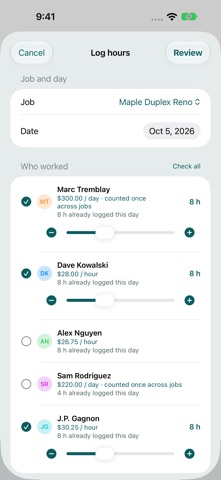
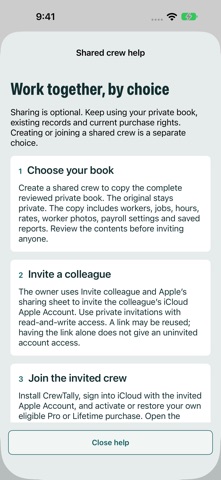
One agreed day amount. Clear job costs. Keep your crew book private or choose to share it. CrewTally helps foremen and small contractors turn field hours into reviewed timesheets for construction, landscaping and other field work. HOURLY AND DAILY PAY Mix hourly and day-rate workers. Count the agreed day amount once per worker and workday, even across several jobs. Actual minutes allocate that cost between jobs. Choose a full day, half day, quarter day or another explicit fraction. Record additional pay with a reason. Hours alone never choose a paid-day fraction. Log several workers together, reuse a job's crew or repeat selected entries. Add optional worker photos and notes. Recorded rates and day agreements stay intact when defaults change. Search workers and jobs and archive finished jobs. OPTIONAL SHARED CREWS Keep your existing private book, or explicitly create a separate shared copy. Invite the intended iCloud Apple Accounts through Apple's private sharing interface. Colleagues review and accept the invitation to join. Members are co-managers of the entire book: workers, photos, jobs, hours, pay rates, payroll rules and saved reports. There are no employee-only or per-worker access restrictions. Each collaborating person needs their own verified active CrewTally Pro subscription or valid Lifetime purchase, including eligible Apple Family Sharing access. Worker roster records do not each need a purchase. Buying Pro does not grant access to someone else's book. A link alone does not authorize an uninvited account. Owners can remove invitees or stop sharing; members can leave. These controls do not require Pro. Changes remain pending until Apple confirms them. Returning to a private book does not end membership. Removal cannot recall downloaded or exported files. REVIEW BEFORE FINALIZING Save reviewed weekly PDF and CSV payroll packets. Preview a combined two-week PDF with worker totals, job costs and daily timesheets; weekly overtime is calculated separately. Compare corrections and retain original reports. Conflicting shared edits wait for review instead of silently overwriting wages. Resolving sync does not finalize payroll. YOUR PAYROLL RULES Choose currency, workday time zone and any week start, including Saturday. Set weekly and optional daily overtime thresholds. Hourly overtime uses a 1.5 multiplier; day pay follows the saved agreement. Verify applicable rules. CrewTally does not calculate tax or deductions, transfer wages or certify legal compliance. FREE AND PRO Free includes 1 active job, 1 worker, hourly or daily logging and current-week review. Pro adds unlimited jobs and workers, full history, job reports, PDF/CSV exports, private-book reminders and optional collaboration. Existing private records, purchase rights and previously enabled reminders stay available. Future Pro feature updates are included while your access is active. Choose monthly or yearly Pro, or Lifetime. Apple shows localized prices and eligible offers before purchase. Subscriptions renew automatically unless canceled in your Apple Account settings. PRIVATE FIRST Private records work offline and can sync through your own iCloud account. Shared edits saved in a verified open book can wait for a connection. After restart, opening it requires fresh Apple access checks; pending work is retained. The owner's iCloud storage and Apple service limits apply. No CrewTally account is required. Support sends your submitted message, provided contact details and disclosed app/device diagnostics. You choose where to export reports. Optional Settings feedback helps us count platform demand. Votes contain no payroll records. Privacy: https://innovalabworks.com/a/crewtally/privacy Support: https://innovalabworks.com/a/crewtally/support Apple Standard EULA: https://www.apple.com/legal/internet-services/itunes/dev/stdeula/
What's new · 2.1.0
Your requests shape CrewTally. This update adds optional shared crews so colleagues can manage their book together. Thank you for helping us improve. Keep your private book or choose an optional shared crew. Create or join explicitly with invited iCloud accounts. Each collaborator needs verified active Pro or a valid Lifetime purchase, including eligible Apple Family Sharing access. Co-managers can work on workers, jobs, hours and payroll together. Owners manage invitations and removal; members can leave. These privacy controls do not require Pro. Review conflicting workdays and payroll rules before syncing. Original reports and pending work are retained. Apple must confirm membership changes; downloaded or exported copies cannot be recalled. Clearer purchase actions, contextual help and better recovery. Existing private records, purchases, pay agreements, week-start choices and saved payroll files are preserved. New optional platform survey: one automatic invitation, never repeated. Decline without sending data or remove your vote in Settings.
Details