

Cocotte: Recipes & Cookbook
HUGO ANATOLE PAUL MORICEAU · Food & Drink
Independent analytics for this App Store listing. AppTracker is not affiliated with HUGO ANATOLE PAUL MORICEAU.
Chart standing · US
What changed · US
Listing changes AppTracker has observed for this app in this storefront — new versions, price moves, rating shifts, and store copy.
• If a purchase fails, you now see why instead of a screen that simply does nothing. • On iPad, the plans and the Continue button now sit together instead of being stranded apart.
Screenshots


About
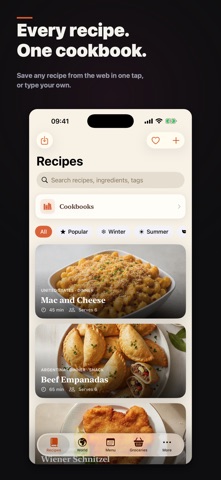
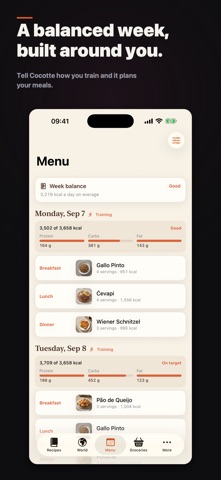
Cocotte is the recipe keeper that stays out of your way. Save any recipe from the web in one tap, cook hands-free with a full-screen step-by-step mode, and turn your ingredients into a smart grocery list. Everything lives on your device — no account, no cloud, no tracking. SAVE RECIPES FROM ANYWHERE • Import from virtually any recipe website in a single tap • Paste plain text — Cocotte automatically detects ingredients and steps • Add your own photos, servings and personal notes • Finally build that family cookbook, from weeknight chili to Thanksgiving classics COOK MODE • Full-screen, step-by-step instructions built for messy hands • The screen stays awake while you cook • Start a timer straight from any step TIMERS THAT KEEP UP • Run several named timers at once — pasta, sauce, roast • Get notified even when the app is in the background SMART GROCERY LIST • Generate a shopping list from any recipe's ingredients • Adjust servings and quantities update automatically • Check items off as you shop PRIVATE BY DESIGN • 100% offline — your recipes never leave your device • No account, no ads, no tracking COCOTTE PREMIUM Your first 15 recipes are free, forever. Premium unlocks unlimited recipes, serving adjustment, beautiful themes and export. Pick a monthly or yearly subscription — or make it yours for good with a one-time Lifetime purchase. Terms of Use (EULA): https://www.apple.com/legal/internet-services/itunes/dev/stdeula/
What's new · 1.5.1
• If a purchase fails, you now see why instead of a screen that simply does nothing. • On iPad, the plans and the Continue button now sit together instead of being stranded apart.
Details