

VenueSpy — Gig Tracker
Hal Waldram · Music
Independent analytics for this App Store listing. AppTracker is not affiliated with Hal Waldram.
Chart standing · US
What changed · US
Listing changes AppTracker has observed for this app in this storefront — new versions, price moves, rating shifts, and store copy.
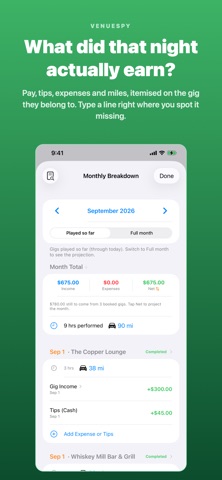
Receipts you can actually read, bandmates you can settle up with, and a monthly breakdown that tells you whether a gig paid. • Tap a bandmate's name on the gig sheet to see every gig they had a cut on and what was paid. • Cut any gig by percent, band or not — type 20 in the % box and the dollars follow the pay. • "Your take after cuts" on the gig sheet: pay plus tips, minus what the bandmates get. • In the Monthly Breakdown, tap any line to open the entry or the gig behind it, and each gig now shows whether the night made money or cost you. • Tap a receipt photo on an expense to open it full screen, and pinch to zoom in on the fine print. Settings › Backup › Receipt Photos can keep scans at full resolution if you'd rather trade a little storage for detail. • A song saved without an artist just shows nothing there. Nothing is labeled "Original" any more. • The "added to setlist" notice now sits just above the dock, so it never covers the drop zone and Undo is right where your thumb is.
Screenshots




About
VenueSpy is a gig-tracking CRM made for performers. Whether you play music, do stand-up comedy, DJ, or perform anything else, it works the same way. Track the venues you play, the ones you want to play, and everything in between: who you talked to, when you last reached out, what they pay, and when you're booked. VENUES & OUTREACH • Keep every venue in one place with status tracking — potential, contacted, booked, completed • See all your venues on a map, color-coded by status • Save venue contacts with one-tap call, text, or email • Log when you last reached out so no lead goes cold BOOKINGS • Book multiple dates per venue with times, pay, and arrival reminders • Calendar view with gig dots so your month is readable at a glance • Day-of-gig reminders and a "Time to Leave" alert based on live drive time • Weather at showtime for outdoor gigs, so you know before you load in • Send a gig to any calendar on your iPhone — including a Google or Outlook one you share with the band — and choose exactly what travels with it, so your fee stays yours • Look 15 days ahead, or a month, or everything you have booked, and see at a glance which nights are solo and which are with the band MONEY • Track income, expenses, tips, and mileage per gig or on their own • See what you actually took home after bandmate splits • Manager and agent commission worked out automatically — set your rate once, override it on any single booking, and it lands in your books as a deductible expense instead of quietly shrinking your income • Track what you owe bandmates and what you've paid them — sorted by year for tax time • Save your regular lineups as bands, with splits that fill themselves in • Generate PDF invoices for venues that pay against an invoice — with reminders so you never forget to send one (Business Pack) • Export your books as CSV or a formatted PDF report FIND ANYTHING • One search box across venues, gigs, people, money and songs • Money & Taxes gathers invoices, the monthly audit, 1099 summaries and exports in one place SETLISTS • Build setlists from your song library with total set duration • Filter songs by artist, key, genre, and length MADE FOR PERFORMERS • Color-coded design that keeps dates, money, and people scannable • Quick action buttons you can customize on every screen • 25 app icon styles • Automatic iCloud backup of your venue data • No account required. No ads. No tracking. Your data stays on your device and your private iCloud. FREE, PREMIUM & BUSINESS The free version includes 5 venues, 5 income/expense entries, and 10 mileage logs — enough to get a real feel for the app. Premium unlocks unlimited venues and income tracking, setlists, bandmate pay tracking, financial exports, outreach reminders, iCloud backup, and every future premium feature — less than a single drink at the bar you're playing. The Business Pack adds professional PDF invoicing with send reminders and bandmate 1099 tax summaries — for performers who invoice venues and pay a band. No subscription.
What's new · 1.8.1
Receipts you can actually read, bandmates you can settle up with, and a monthly breakdown that tells you whether a gig paid. • Tap a bandmate's name on the gig sheet to see every gig they had a cut on and what was paid. • Cut any gig by percent, band or not — type 20 in the % box and the dollars follow the pay. • "Your take after cuts" on the gig sheet: pay plus tips, minus what the bandmates get. • In the Monthly Breakdown, tap any line to open the entry or the gig behind it, and each gig now shows whether the night made money or cost you. • Tap a receipt photo on an expense to open it full screen, and pinch to zoom in on the fine print. Settings › Backup › Receipt Photos can keep scans at full resolution if you'd rather trade a little storage for detail. • A song saved without an artist just shows nothing there. Nothing is labeled "Original" any more. • The "added to setlist" notice now sits just above the dock, so it never covers the drop zone and Undo is right where your thumb is.
Details