

SmartList Flashcards
Takaaki Onishi · Education
Independent analytics for this App Store listing. AppTracker is not affiliated with Takaaki Onishi.
Chart standing · US
What changed · US
Listing changes AppTracker has observed for this app in this storefront — new versions, price moves, rating shifts, and store copy.
- Find duplicate cards and merge them into one, keeping their study history - Create a book by pasting Markdown. The first heading becomes the book name, and the headings below it become chapters - Added a format reference for pasting, with a sample you can insert straight into the field - Deleting a card now asks for confirmation - The card detail during a session now shows its book and chapter - Other small display improvements
In-app purchases · US
What this app sells inside itself, grouped by kind and priced for this storefront.
Screenshots



About
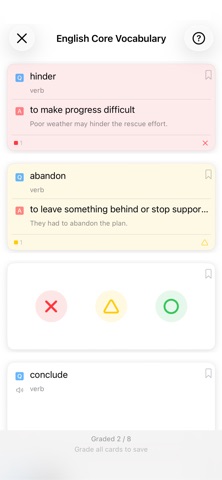
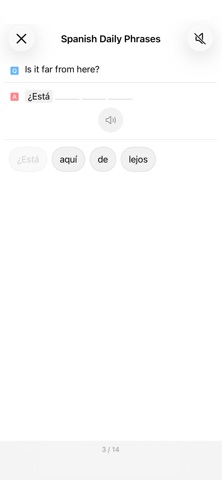
I originally created it because I wanted a flashcard app that was easy for me to use. The “SmartList” in the app’s name is a feature for saving study conditions. - Customize which cards are selected for each study session - Study the same flashcard data in several different ways The following study modes are available: - Flashcard: Look at the front, reveal the back, and grade yourself—the standard flashcard experience - Arrange: Reassemble a sentence from words presented separately - Typing: Study while practicing typing; requires an external keyboard - Initial Typing: Type only the first letter of each word to develop a feel for the sentence’s flow and rhythm
What's new · 1.0.003
- Find duplicate cards and merge them into one, keeping their study history - Create a book by pasting Markdown. The first heading becomes the book name, and the headings below it become chapters - Added a format reference for pasting, with a sample you can insert straight into the field - Deleting a card now asks for confirmation - The card detail during a session now shows its book and chapter - Other small display improvements
Details